3281 E. Guasti Rd, STE 700, Ontario, CA 91761
1712 9th Ave SW, Watertown, SD 57201

Business Disaster Recovery Services Southern California: A Complete Guide
Imagine losing $1.9 million every single day your production line sits idle. For modern manufacturers, that isn't a dark fantasy. It's the documented price of operational silence. You likely feel the weight of every ticking second when a system hangs, knowing that hourly downtime costs are eating your margins alive. It's a terrifying reality for any executive responsible for client trust and bottom-line stability. Securing reliable business disaster recovery services Southern California isn't just a technical task. It's a defensive wall against regional threats like wildfires and seismic shifts that can vaporize local hardware in an instant.
You'll learn how to build a strategy that restores your operations in under an hour. We'll show you how to keep data safe far beyond the reach of local power grids. This guide clarifies the confusion between simple cloud backups and true continuity. You need confidence that files stay accessible even if your office doesn't. We break down the true costs of downtime, the 2026 CCPA audit requirements, and why your current local storage might be your biggest liability. Ready to secure your future? Contact our team at contact us
• Identify specific California hazards like PSPS events and seismic activity that threaten local hardware.
• Master the math behind RPO and RTO to determine exactly how much data loss your bottom line can survive.
• Deploy the 3-2-1 backup rule to balance local recovery speed with the safety of business disaster recovery services Southern California.
• Audit your digital assets and assign priority levels to keep critical server functions alive during a crisis.
• Build a custom continuity framework. Back it with a sub-20-minute response time to keep your operations moving.
By Lance Reichenberger, Ph.D.
Data recovery involves the methodical restoration of corrupted or lost digital assets. It is the heartbeat of operational survival. In Southern California, this process faces unique environmental hurdles. Public Safety Power Shutoffs (PSPS) by Southern California Edison frequently paralyze local commerce. These intentional blackouts protect the grid during high-risk weather, yet they leave unprepared IT stacks in the dark. Securing business disaster recovery services Southern California is the only way to bypass these regional bottlenecks. Seismic activity across the Inland Empire poses a different threat. A minor tremor can rattle server racks, causing mechanical drive failure or physical disconnects. Physical restoration, such as fixing a roof or replacing carpet, does nothing for your digital workflow. If your servers are fried, the building is just an empty shell. Ensuring your facility's electrical systems are professional-grade is a crucial preventative step; for instance, Triumph Electrical Contracting Inc. serves as an example of a licensed contractor that helps businesses in major hubs like New York harden their physical infrastructure against power-related failures.
Keeping backups in your office closet is a recipe for total loss. If a wildfire reaches your street, your primary and secondary data perish together. This geographic overlap is a fatal flaw in many outdated plans. Consider the environmental factors that dominate our region:
These gusts create massive grid instability and power surges that cook sensitive hardware.
Aging infrastructure leads to brownouts that can corrupt database files during write cycles.
Smoke and heat can destroy on-premise hardware even if flames never touch the server room.
If your recovery strategy relies on a drive sitting three feet away from your server, you don't have a plan. You have a gamble. Effective it-management requires geographic diversity. Moving data outside the immediate strike zone ensures that a regional crisis doesn't become a terminal event for your company.
Modern survival has changed. Fixing a wall is simple. Recovering ten years of legal records or manufacturing schematics is not. For law firms and factories, data is the most valuable asset on the balance sheet. Digital survival requires immediate server failover, not just a repair crew. Business continuity planning focuses on keeping the pulse of the company beating while the physical world is in chaos. Business disaster recovery services Southern California must prioritize digital uptime over bricks and mortar. We move beyond reactive fixes. We build frameworks that keep your staff working from anywhere, regardless of what happens to the local office.
Protect your operations from the next regional disruption. Contact Trinity Networx today to build your custom recovery framework: contact us
Vague promises of "getting back to work fast" don't pay the bills. You need hard numbers to justify your investment in business disaster recovery services Southern California. Recovery Point Objective (RPO) measures the volume of data you can afford to lose before the damage is permanent. Recovery Time Objective (RTO) dictates how long your staff can sit staring at black screens before the company folds. To find your cost per hour, add your gross hourly revenue to your total hourly payroll. Then, include the cost of restorative labor. If you produce $10,000 in goods per hour and pay $2,000 in wages, a single hour of downtime costs you $12,000 plus the price of the fix. That number grows when you consider the long-term loss of customers who flee to competitors during your outage.
Supply chain and logistics companies live on thin margins and tight schedules. For them, a low RTO is vital. A delay at a distribution center in Ontario ripples across the entire West Coast. If the warehouse management system stays offline for two hours, trucks miss their windows. Drivers time out. Customers cancel orders. You aren't just losing data; you're losing momentum. Clear metrics turn a technical wish list into a defensive business strategy.
Your RPO determines your backup frequency. A law firm might survive losing a morning's worth of emails, but a high-volume manufacturing plant cannot. For those factories, RPO represents the maximum window of data loss they can survive before production schedules collapse. Losing eight hours of production data could mean thousands of units vanish from the inventory system. Five minutes of loss is a hiccup; eight hours is a catastrophe. Real-time replication is the standard for those who can't afford to repeat a single shift's worth of work. You can tune your data flow to ensure these windows stay as tight as possible.
RTO is a race against the clock. According to SBA emergency preparedness resources, many small firms never reopen after a prolonged outage. A two-day blackout for a retail site might be survivable. For a legal services firm, every twenty minutes of downtime erodes client trust and billable hours. If your digital portals stay dark, clients assume the worst. They think their sensitive data is gone. They look for a partner who stays online. Business disaster recovery services Southern California focus on slashing that RTO. You want to move from "down for the weekend" to "up in under an hour."
Stop guessing about your survival window. If you aren't sure where your RTO stands, talk to our consultants to find your actual downtime math.
Contact Lance Reichenberger, Ph.D. and the Trinity Networx team via contact us to secure your operations.
Share this guide: [Social Media Share Buttons]
By Lance Reichenberger, Ph.D.
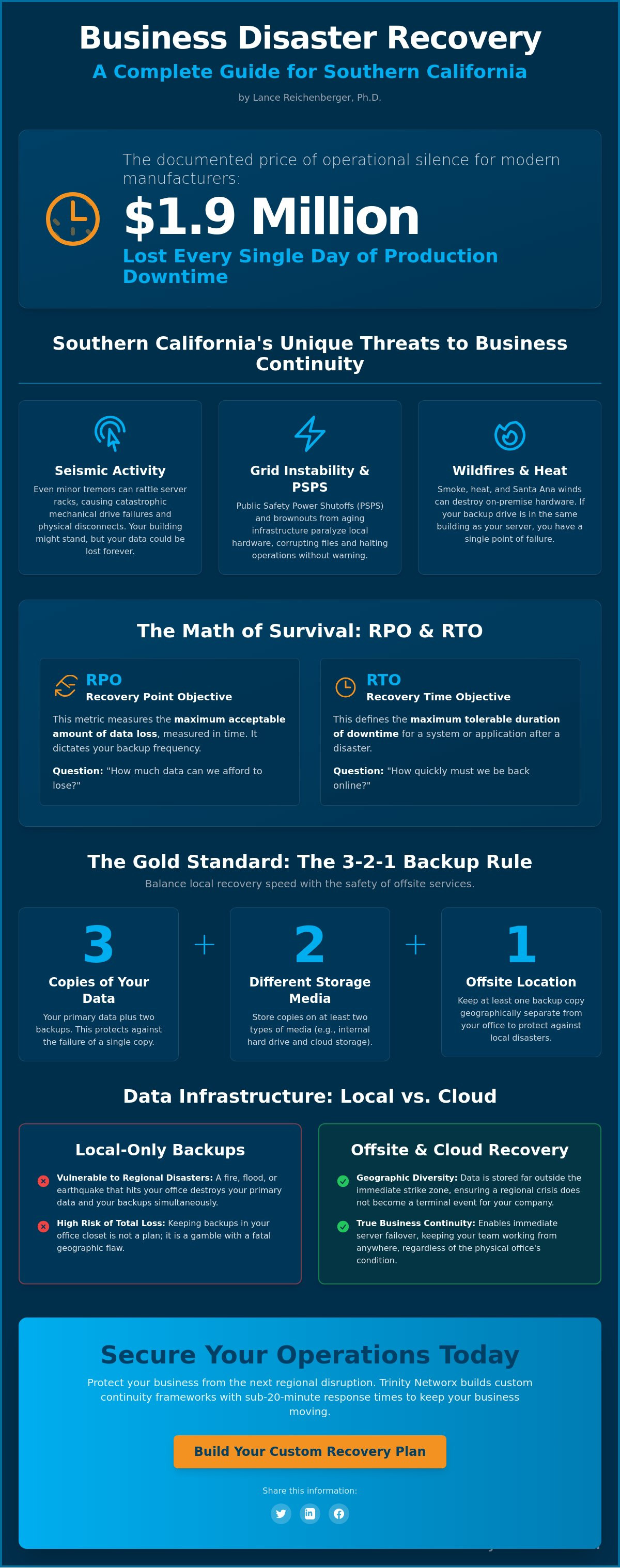
Choosing where to house your data isn't a binary coin flip. It's a strategic calculation. Local hardware offers unmatched speed, but it's vulnerable to the same physical shocks that hit your office. Cloud storage provides a safety net thousands of miles away. To survive, you must follow the 3-2-1 rule. Keep three copies of your data. Use two different media types. Ensure one copy stays offsite. This isn't just a suggestion; it's the foundation of any professional IT Disaster Recovery Plan. For firms seeking business disaster recovery services Southern California, the goal is a hybrid setup that balances immediate access with total security. Relying on a single point of failure is a gamble you'll eventually lose.
Cloud replication is your shield against regional catastrophes. When an earthquake disrupts the local power grid or damages physical structures, your data remains untouched in a distant data center. This distance is vital. It guarantees that a single event can't wipe out your entire operation. Security matters just as much as location. For firms handling medical records or defense contracts, encryption isn't optional. Your storage must meet HIPAA or CMMC standards to avoid massive fines. Modern data centers now offer high-speed retrieval, allowing you to pull critical files back into production faster than ever before. It's about maintaining momentum when the local ground stops being stable. We ensure your data is encrypted both at rest and in transit, keeping prying eyes out of your business.
Cloud is safe, but local is fast. Downloading a five-terabyte database over a standard office connection can take days. In industries like construction, where teams handle massive CAD files and high-resolution site scans, every minute counts. Using a local NAS device allows for near-instant file recovery. You don't wait for the internet; you pull from the rack next door. This speed saves hours of frustrating downtime. The best approach combines this local agility with cloud endurance. You get the best of both worlds. Local hardware handles the daily hiccups. Cloud storage handles the disasters. If you need help with your it-infrastructure, we can map out a setup that fits your specific file sizes and recovery needs. This dual-layered defense is the only way to ensure your business disaster recovery services Southern California strategy actually works when you need it most.
Don't leave your data to chance. Contact the team at Trinity Networx to build a resilient infrastructure today: contact us
Share this guide: [Social Media Share Buttons]
By Lance Reichenberger, Ph.D.
A protocol is a set of hard orders. It isn't a suggestion. It dictates exactly how your team acts when a server goes dark. Most Southern California businesses fail here because they treat their plan as a static document. They write it once and let it gather dust. You must treat business disaster recovery services Southern California as an active playbook. It starts with a total map of your digital assets. You need to know where every byte lives. If you don't know it exists, you can't save it.
Assigning priority is the next step. Not all data carries the same weight. Your customer database is vital. Your internal blog is not. Rank your applications from "essential for survival" to "secondary." This ensures your IT team recovers the most important systems first. It prevents wasted time on low-value files while your main production line sits idle. Every minute you spend on the wrong data is money out of your pocket. If everything is a priority, nothing is.
Look beyond your main server room. Remote work has created data silos on individual laptops. If an employee saves a client contract to their desktop instead of the cloud, that data is at risk. Your audit must include these outliers. List every software tool, database, and communication platform. Verify that every backup uses strong encryption. Password protection must be active and the keys must be documented. Your audit should cover:
• Essential databases and CRM software.
• Communication tools like VoIP and email servers.
• Local files stored on remote employee laptops.
• Encryption keys and administrative passwords.
You can improve system performance by removing "ghost" data that no longer serves your mission. Clean data recovers faster. It reduces the load on your backup pipes and cuts down on storage costs.
A plan without proof is a fantasy. You need quarterly fire drills. Don't just check if the backup ran. Try to restore a specific set of files to a new machine. If the data is unreadable, you need to know now. Don't wait for a wildfire evacuation to find a corrupted file. Update your protocol every time you add a new cloud service or swap out a firewall. Ensure your recovery key holders are always available. If the only person with the admin password is on vacation during a crash, your recovery stops dead. Document these steps clearly so any staff member can follow them when the primary site fails.
Stop hoping your backups work. Contact Trinity Networx to build a protocol that actually stands up to a real-world test.
Contact Lance Reichenberger, Ph.D. and the Trinity Networx team via contact us to secure your operations.
Share this guide: [Social Media Share Buttons]
By Lance Reichenberger, Ph.D.
Trinity Networx doesn't just watch your servers. We protect your pulse. When a system fails, every second bleeds capital. That's why we stand by a sub-20-minute response time guarantee. While others wait to respond, we're already fixing the breach. Lance James and our technical staff develop custom continuity frameworks. They don't use generic templates. A law firm in Riverside has different data needs than a distribution center in San Bernardino. We bridge that gap. By handling the technical heavy lifting, we turn your IT stack into a growth driver. You stop worrying about crashes. You start focusing on expansion. We prioritize the health of your business by ensuring your technology supports your long-term goals. Our focus on manufacturing, legal, and supply chain industries allows us to address the specific regulatory and operational pressures you face every day.
We know the Inland Empire. We understand the local grid risks and the pressure of the regional market. This isn't distant, faceless support. It's a partnership rooted in your backyard. Our helpdesk stays available around the clock for immediate crisis management. If your office loses power during a Santa Ana wind event, we're the first call that matters. We provide the stability you need to keep moving when the local infrastructure fails. For a deeper look at specific tools, read our sibling article on Disaster Recovery as a Service (DRaaS): The SMB Guide to Zero Downtime. Professional business disaster recovery services Southern California require a team that knows the terrain and the stakes.
Resilience starts with a cold look at your current setup. Most firms have hidden vulnerabilities. A professional IT audit finds these gaps before a disaster does. You can't fix what you can't see. We identify the weak points in your backup chain and provide a clear path to fix them. Check out our pillar resource, Beyond the Safety Net: The Executive Guide to Business Data Backup in 2026, to stay ahead of upcoming shifts in data security. Don't wait for a seismic event to test your limits. We build personalized strategies that keep your data safe and your staff productive. It's time to move beyond reactive fixes and embrace a more certain future.
Ready to secure your future? Contact Lance Reichenberger, Ph.D. and the Trinity Networx team via contact us. Let's build a plan that works.
Share this guide: [Social Media Share Buttons]
By Lance Reichenberger, Ph.D.
You now possess the math to calculate your downtime risks and the logic to choose between local and cloud storage. Maintaining business disaster recovery services Southern California means staying ahead of PSPS events and seismic shifts that threaten your physical site. A functional protocol is your only defense against permanent data loss. Trinity Networx has served as a steady strategic partner in this region since 2001. We combine deep expertise in CMMC and HIPAA compliance with a relentless focus on your operational uptime. Our sub-20-minute response time guarantee means we act while others are still checking their email. Your data is the engine of your growth. Protect it. Don't wait for a crisis to test your limits.
Ready to protect your business? Contact Trinity Networx today for a proactive strategy. You've worked hard to build your reputation. We'll work harder to make sure you never lose it.
By Lance Reichenberger, Ph.D.
Backup is a static copy of your files. Disaster recovery is the active strategy that restores your entire operation after a crash. Think of backup as a spare tire and recovery as the roadside assistance team that actually gets you back on the highway. You need both to survive a total system failure and maintain your client trust.
Run a full digital fire drill at least once every quarter. Southern California businesses face shifting regional threats like wildfires and power grid instability. Testing four times a year ensures your staff knows exactly what to do when the primary site goes dark. Static plans fail. Active testing works to protect your bottom line.
Cloud storage alone is insufficient during a regional blackout. While your data stays safe in a distant data center, your local staff still needs a way to access it without office power or internet. A complete business disaster recovery services Southern California strategy includes secondary connectivity and remote work protocols to bypass local grid failures and keep your team productive.
Costs for professional recovery vary based on your data volume and required recovery speed. While some industry data exists for various company sizes, your specific price depends on the complexity of your IT environment. Investing in a proactive framework is always more affordable than paying the high price of unrecovered downtime and lost client trust during a crisis.
The 3-2-1 rule remains the standard for data safety in 2026. Keep three copies of your data on two different types of media with one copy stored offsite. This strategy protects you against hardware failure and regional disasters alike. It's a simple, effective way to ensure your most valuable assets survive any single point of failure without interruption.
Professional business disaster recovery services Southern California are your primary defense against ransomware. We use immutable backups that hackers cannot encrypt or delete. If an attack hits, we wipe the infected systems and restore your clean data in minutes. This bypasses the need to pay a ransom and keeps your operations moving while protecting your brand reputation.
Choose based on your need for speed versus your need for geographic safety. Local on-premise solutions offer the fastest recovery for large files. Cloud-based solutions protect you if your physical building is destroyed or inaccessible. Most Inland Empire firms find that a hybrid model provides the most reliable protection for their specific operational needs and growth goals.
Inland Empire businesses face high risks from Public Safety Power Shutoffs (PSPS) and seismic activity. High summer temperatures also strain cooling systems in server rooms, leading to premature hardware failure. You must account for these environmental factors when building your local IT infrastructure to avoid unexpected outages and protect your expensive hardware from heat damage.
Contact Lance Reichenberger, Ph.D. and the Trinity Networx team via contact us to secure your operations.
Share this guide: [Social Media Share Buttons]

Article by
Lance Reichenberger, Ph.D.
Dr. Lance Reichenberger is the founder of Trinity Networx, a Southern California technology firm specializing in managed IT services, cybersecurity, network infrastructure, and business technology strategy. With nearly four decades of experience in the IT industry, he works with businesses to improve operational efficiency, strengthen security, and align technology with long-term growth objectives.
Lance focuses on proactive IT management, enterprise wireless infrastructure, cybersecurity integration, and scalable technology solutions for growing organizations throughout Southern California.
The content published on this website is provided for general informational and educational purposes only. Articles may be created, edited, or enhanced with the assistance of artificial intelligence and automation tools under the direction and review of Trinity Networx. While every effort is made to ensure accuracy and relevance, the information provided should not be considered professional, legal, financial, cybersecurity, or technical advice specific to your organization. Businesses should consult directly with a qualified professional regarding their unique environment, compliance requirements, and operational needs. Trinity Networx makes no warranties regarding completeness, reliability, or applicability of the information contained within these articles.
Schedule a brief conversation with Trinity Networx to discuss your business technology needs.
Get a practical roadmap built around your business, your users, your systems, and the technology issues that need attention first.
Put the right technology, support, security, and infrastructure in place so your business can grow, adapt, and move forward with confidence.