3281 E. Guasti Rd, STE 700, Ontario, CA 91761
1712 9th Ave SW, Watertown, SD 57201

While 87% of organizations now run a multi-cloud strategy, most leaders still feel chained to their server rooms by the high costs of aging hardware. You know the frustration of watching your IT budget vanish into maintenance while your team struggles with spotty remote access. It's a trap. Your data feels safer when you can touch the box it lives on, but that physical proximity often masks a lack of real protection. Finding the right cloud computing services for business isn't about following a trend. It's about ending the cycle of reactive repairs and constant hardware refreshes.
I’ll show you how to migrate your operations with surgical precision and ironclad security. This guide breaks down how to trade unpredictable repair bills for steady monthly costs and better protection than any local server can offer. We'll look at the 2026 pricing landscape where providers like Azure and GCP offer 60% discounts for three year commitments. You'll learn to select an architecture that supports your growth without compromising your control over sensitive data. Stop managing machines. Start driving your business forward.
Ready to secure your digital future? Contact the experts at Trinity Networx at contact us to start your transition. Share this guide with your leadership team using the social links below.
• Learn how cloud computing services for business replace expensive server closets with agile, internet-based access to your core data.
• Match your specific security needs to the right infrastructure by choosing between public, private, or hybrid environments.
• Turn your technology budget into a predictable monthly expense while walking away from the constant cycle of hardware failures.
• Protect your move with a rigorous data audit that identifies what to keep and what to delete before you migrate.
• Gain the speed of a 20 minute response time from a local partner focused on Southern California companies.
By Lance Reichenberger, Ph.D.
Stop thinking about IT as a physical asset you own. Modern it-infrastructure has shifted from the back room to the data center. Cloud computing services for business offer on-demand access to servers, storage, and databases over the internet. You pay for what you use. No more buying hardware that sits idle 80% of the time. This shift allows your team to connect from a home office in Ontario or a coffee shop in Rancho Cucamonga without missing a beat. For those seeking a detailed overview of cloud computing, it's the delivery of computing power as a utility, much like electricity or water. The global market for these services hit $917.9 billion in 2026. It's not just a trend; it's the standard for professional operations.
Traditional servers are liabilities. They demand constant power. They need expensive cooling systems to prevent meltdowns. Most office setups lack the redundancy needed to survive a single power surge or hardware failure. When a local drive dies, your work stops. Moving to the cloud puts your data in professional facilities with multiple power grids and backup generators. You stop paying for electricity to keep a closet cold. You start paying for performance. Professional management ensures your systems stay active without your constant intervention. It moves the burden of maintenance from your shoulders to a dedicated partner. This isn't just about convenience. It's about stability. Physical machines age. They fail. They require physical space that costs money. By removing the server closet, you reclaim office square footage and eliminate the noise of humming fans. It's a cleaner, more focused way to run a company.
Downtime is a silent profit killer. Reports suggest that for many Southern California firms, an hour of lost connectivity can cost thousands in unbilled time and missed opportunities. Reliability is the new gold standard. Cloud systems hit uptime marks that local hardware can't touch. Your remote staff needs fast, stable access to stay productive. If the office internet goes down, a cloud-based team keeps working from elsewhere. This stability drives business health. AI-related cloud spending now makes up 19% of total cloud costs in 2026. This means your competitors are using the cloud to run advanced tools you can't host locally. Staying on-site isn't just slower; it's a strategic disadvantage. Cloud computing services for business provide the stability needed to compete in a fast-paced market. You gain the agility to adjust resources as your project load changes.
Ready to move your business operations to the cloud with precision and security? Contact Trinity Networx today at contact us to discuss your strategic growth.
Share this guide: LinkedIn | X (Twitter) | Facebook
By Lance Reichenberger, Ph.D.
Selecting the right architecture isn't about picking the most popular brand name. It's about matching your operational load to the correct delivery method. The NIST definition of cloud computing categorizes these into deployment models that dictate who owns the hardware and who accesses it. Public clouds like Microsoft Azure offer high flexibility for general business tasks. You share the underlying physical environment with other organizations, which drives down your entry price. For many firms, cloud computing services for business start here because it allows for rapid growth. You can add ten new employees today and have their workstations ready by lunch. It's fast. It's cost-effective. It works for the majority of standard office needs.
Small teams often find the public model most efficient. It handles email, standard document storage, and basic collaboration without requiring a massive upfront investment. You aren't buying a server; you're renting a slice of a global network. This setup is ideal for companies that need to move fast. If your data volume is standard and your security needs don't involve federal oversight, this path offers the cleanest route to efficiency. You don't need to worry about hardware lifecycles or unexpected drive failures. The provider handles the heavy lifting while you focus on your customers.
Southern California is a hub for defense and healthcare. These sectors don't have the luxury of casual data management. If your contracts require CMMC or HIPAA compliance, a generic public setup might leave you exposed. Private clouds provide dedicated resources. Nobody else shares your hardware. You gain total control over where your files live and who can touch them. Hybrid models bridge the gap. They let you keep sensitive client files on a private server while using the public cloud for less sensitive tasks like internal chat. This mix creates a powerful engine for complex workflows. Data volume plays a major role here. If you move terabytes of data daily, the networking fees in a pure public cloud can surprise you. Choosing cloud computing services for business that incorporate a hybrid model can save money on egress fees while maintaining the speed you need for daily production. You can consult with our team to see which model matches your specific risk profile. Building the right it infrastructure services requires a clear-eyed look at your industry's legal demands. It's about finding the balance between accessibility and absolute protection.
Ready to move your business operations to the cloud with precision and security? Contact Trinity Networx today at contact us to discuss your strategic growth.
Share this guide: LinkedIn | X (Twitter) | Facebook
By Lance Reichenberger, Ph.D.
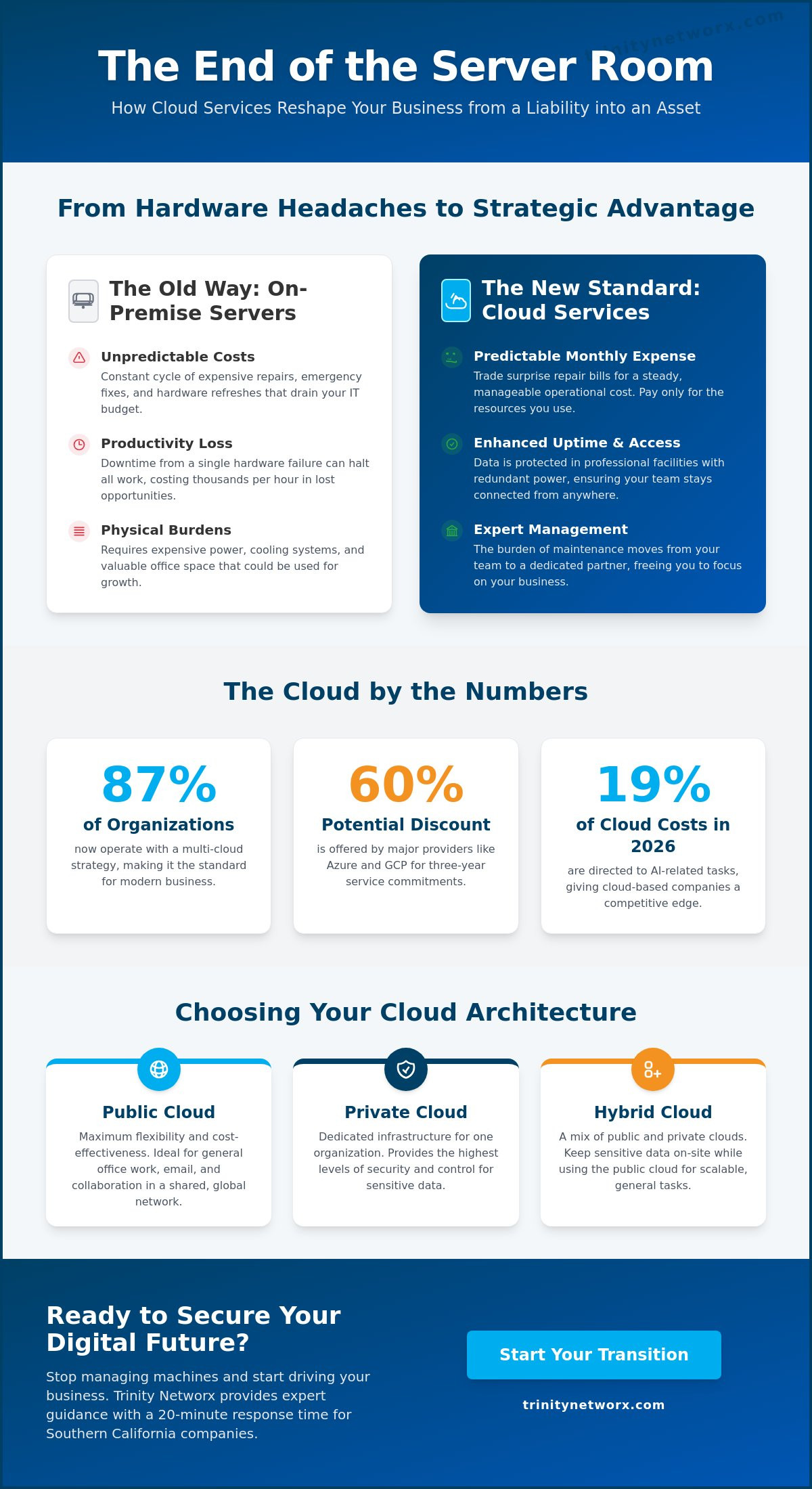
Buying hardware is a gamble on future needs. You pay for the maximum capacity you might need on your busiest day, even if that day only happens once a year. This is the weight of capital expenditure. By choosing cloud computing services for business, you shift that weight. You move from owning depreciating metal to purchasing a service that grows with you. It's a fundamental change in how you fund your progress. You stop paying for the potential to work and start paying for the work itself. This shift turns your technology into a utility that matches the rhythm of your revenue.
A new physical server often costs ten thousand dollars or more before you even turn it on. That's a massive hit to your cash flow. Then comes the maintenance. Most businesses face this cycle every five years as hardware hits its limit or breaks down. Service models remove this barrier. You trade that large upfront check for predictable monthly fees. This makes your IT budget stable. You can forecast your costs with precision because the price is tied to your usage. There are no surprise repair bills. Consider the costs you leave behind:
No more high electricity bills for cooling and running server racks.
Reclaim the square footage used for noisy hardware closets.
End the five year rush to replace failing equipment before it crashes.
You simply pay for the access your team needs to stay productive. It turns a fixed cost into a flexible one.
Moving to the cloud is only half the battle. The real gain comes from how you manage it. Internal IT teams often get bogged down in the mud of basic patches and security updates. This is a waste of their talent. When you use it management services alongside your cloud computing services for business, those routine tasks happen in the background. Professional monitoring catches small glitches before they turn into office-wide outages. You aren't just buying space on a server; you're buying the labor required to keep it safe. This proactive approach ensures your security stays current without you having to track every new threat. It allows your staff to focus on projects that actually grow the company. Stop worrying about the "how" of technology and focus on the "what" of your business goals.
Ready to move your business operations to the cloud with precision and security? Contact Trinity Networx today at contact us to discuss your strategic growth.
Share this guide: LinkedIn | X (Twitter) | Facebook
By Lance Reichenberger, Ph.D.
Migration is not a simple copy and paste job. It is a surgical procedure for your company's heart. If you move junk data, you pay for junk storage. This is why a full audit is your first step toward success. Look at your current inventory of applications and files. Determine which legacy programs actually need to move and which are better left behind. Many firms treat the cloud like a digital attic. It is not. It is an engine for growth. By cleaning up old files and logs before the move, you save on monthly storage fees. This is a core part of it-optimization that keeps your cloud computing services for business lean and efficient from the start.
Speed is often the enemy of security. Moving too fast leads to lost files and frustrated employees who cannot find their work. You need a clear path. Our cloud migration strategy guide offers a step by step plan to avoid these common traps. Once your data is clean, test your connections. High latency can kill productivity. Ensure your bandwidth can handle the new traffic before you move the entire operation. This testing phase allows you to fix bottlenecks before they impact your customers. It is better to find a problem on a Sunday than on a busy Monday morning. Small tests prevent large failures.
Security must be active from the first minute of your transition. This ensures your cloud computing services for business remain protected against modern threats. Encryption is vital while your data is in transit between your office and the data center. It protects your trade secrets from interception. Identity management ensures only authorized staff can access specific folders. This prevents internal leaks during the chaos of the move. Most importantly, verify your backups are functional. Never shut down your old local servers until you have confirmed every database is live and accurate in the cloud. A single corrupted file can ruin a week of production. Use this time to train your staff on new security protocols. Teach them how to use multi-factor authentication and how to report suspicious activity. This human wall is just as important as your digital one. If your team understands the new system, they won't accidentally leave a door open for attackers. Start your secure migration today by speaking with a strategist who understands your specific industry needs.
Ready to move your business operations to the cloud with precision and security? Contact Trinity Networx today at contact us to discuss your strategic growth.
Share this guide: LinkedIn | X (Twitter) | Facebook
By Lance Reichenberger, Ph.D.
Proximity matters when your operations are on the line. We provide direct, local support for businesses throughout Ontario and Rancho Cucamonga. You don't have to wait for a technician to fly in from another state. You won't deal with a call center halfway across the globe. Our 20 minute response guarantee keeps your cloud computing services for business moving forward. If a problem arises, we're already on it. This speed is a strategic driver of your success. We don't just fix tools. We act as a protective force for your growth. Lance James and our team of experts work as your strategic partner. We ensure your technology supports the overall health of your company.
Defense contractors and manufacturers face strict rules. We specialize in compliance for these specific sectors. Whether you're dealing with CMMC or HIPAA, we build the guardrails you need to stay legal and secure. We understand the specific pressures of the Southern California industrial landscape. Our approach ensures your data stays exactly where it should. We help you navigate the it-infrastructure choices that protect your contracts and your reputation. You gain the assurance of a partner who knows the local regulatory environment as well as you do.
Waiting for things to break is a failed business plan. It's expensive. It's stressful. Reactive IT keeps you in a state of constant emergency. We reject that status quo. Our team monitors your cloud environment around the clock to stop threats before they hit your desk. This proactive stance is part of our it management services philosophy. We handle the technical details. We manage the security patches. We run the background updates. You lead your company. We keep the engine running. This creates a steady momentum that ensures efficiency and responsiveness in everything you do.
Old hardware shouldn't slow you down. If your team is fighting with lag or inconsistent access, it's time for a change. We help you move past the headaches of local server maintenance. Contact our experts to build your custom cloud roadmap. We'll show you how to trade unpredictable repairs for a stable, professional environment. Contact us today at contact us to start the conversation. Your future doesn't belong in a server closet. It belongs in the cloud.
Ready to move your business operations to the cloud with precision and security? Contact Trinity Networx today at contact us to discuss your strategic growth.
Share this guide: LinkedIn | X (Twitter) | Facebook
By Lance Reichenberger, Ph.D.
Moving your operations away from local hardware isn't just a technical upgrade. It's a financial reset. You've seen how the right cloud computing services for business turn heavy capital costs into predictable monthly fees while protecting your data better than any office closet. By selecting between private, public, or hybrid models, you align your infrastructure with your actual industry demands. You stop reacting to failures and start building for growth.
Success in this space requires a partner who knows the local landscape. We bring over 20 years of Southern California IT experience to your project. Our team focuses on the hard requirements of CMMC and HIPAA compliance so you don't have to guess at security. We back our work with a 20 minute response time guarantee. You won't wait for answers. We act as a protective force for your company's health.
Lance Reichenberger, Ph.D. and the Trinity Networx team are ready to secure your future. Contact us for a no-nonsense IT assessment. Your business deserves a platform that moves as fast as you do.
Share this guide: LinkedIn | X (Twitter) | Facebook
By Lance Reichenberger, Ph.D.
You are ready for a move when your on-site hardware starts failing or your cooling costs spike. If your team struggles to access files from home, you've outgrown the local server closet. This transition ends the cycle of buying machines that lose value the moment you plug them in. Most companies make the switch when they need better reliability than a single office server can provide.
Professional data centers offer layers of protection that a standard office cannot match. These facilities use biometric access and advanced fire suppression alongside constant digital monitoring. Your office server is vulnerable to physical theft, spills, or local power surges. Moving your data to a managed environment puts it behind enterprise-grade firewalls that most small firms cannot afford on their own.
Your data stays active and safe even if your office loses its connection. Because your files live in a secure data center, your staff can switch to mobile hotspots or work from a different location immediately. The cloud removes the single point of failure that a local server creates. Your business continues to run while you wait for your local provider to fix the line.
You still need expert guidance to manage your environment and security protocols. While you won't need someone to swap out physical hard drives, you do need a partner to monitor for threats and manage user access. This shift allows your technical support to focus on business health rather than reactive repairs. Expert management ensures your cloud computing services for business stay current and protected.
A standard migration often spans four to eight weeks. We spend the first half of that time auditing your data and testing connections. The actual move happens quickly, but the preparation ensures your team doesn't lose a single hour of productivity. We build a roadmap that accounts for every file and application before the first byte moves.
Most modern applications run perfectly in a cloud environment through virtualization or direct web versions. We check your specific software licenses during the audit phase to ensure everything moves without a hitch. Some older legacy tools might need a private cloud setup to maintain performance. We find the right home for every tool you use to lead your company.
Manufacturers in the Inland Empire often face strict CMMC or ITAR regulations. These rules require your data to stay within specific geographic borders or on hardware managed by US citizens. We build cloud computing services for business that satisfy these legal demands without slowing down your production line. Staying compliant protects your government contracts and your reputation.
Cloud storage acts like a digital filing cabinet where you simply keep your documents. Cloud computing provides the actual processing power to run your software and databases. One holds the data, while the other does the work. You need both to run a modern office that doesn't rely on physical hardware in a back room.
Lance Reichenberger, Ph.D. and the Trinity Networx team are ready to secure your future. Contact us for a no-nonsense IT assessment. Share this guide with your team: LinkedIn | X (Twitter) | Facebook

Article by
Lance Reichenberger, Ph.D.
Dr. Lance Reichenberger is the founder of Trinity Networx, a Southern California technology firm specializing in managed IT services, cybersecurity, network infrastructure, and business technology strategy. With nearly four decades of experience in the IT industry, he works with businesses to improve operational efficiency, strengthen security, and align technology with long-term growth objectives.
Lance focuses on proactive IT management, enterprise wireless infrastructure, cybersecurity integration, and scalable technology solutions for growing organizations throughout Southern California.
The content published on this website is provided for general informational and educational purposes only. Articles may be created, edited, or enhanced with the assistance of artificial intelligence and automation tools under the direction and review of Trinity Networx. While every effort is made to ensure accuracy and relevance, the information provided should not be considered professional, legal, financial, cybersecurity, or technical advice specific to your organization. Businesses should consult directly with a qualified professional regarding their unique environment, compliance requirements, and operational needs. Trinity Networx makes no warranties regarding completeness, reliability, or applicability of the information contained within these articles.
Schedule a brief conversation with Trinity Networx to discuss your business technology needs.
Get a practical roadmap built around your business, your users, your systems, and the technology issues that need attention first.
Put the right technology, support, security, and infrastructure in place so your business can grow, adapt, and move forward with confidence.