

3281 E. Guasti Rd, STE 700, Ontario, CA 91761
1712 9th Ave SW, Watertown, SD 57201
By Lance Reichenberger, Ph.D.
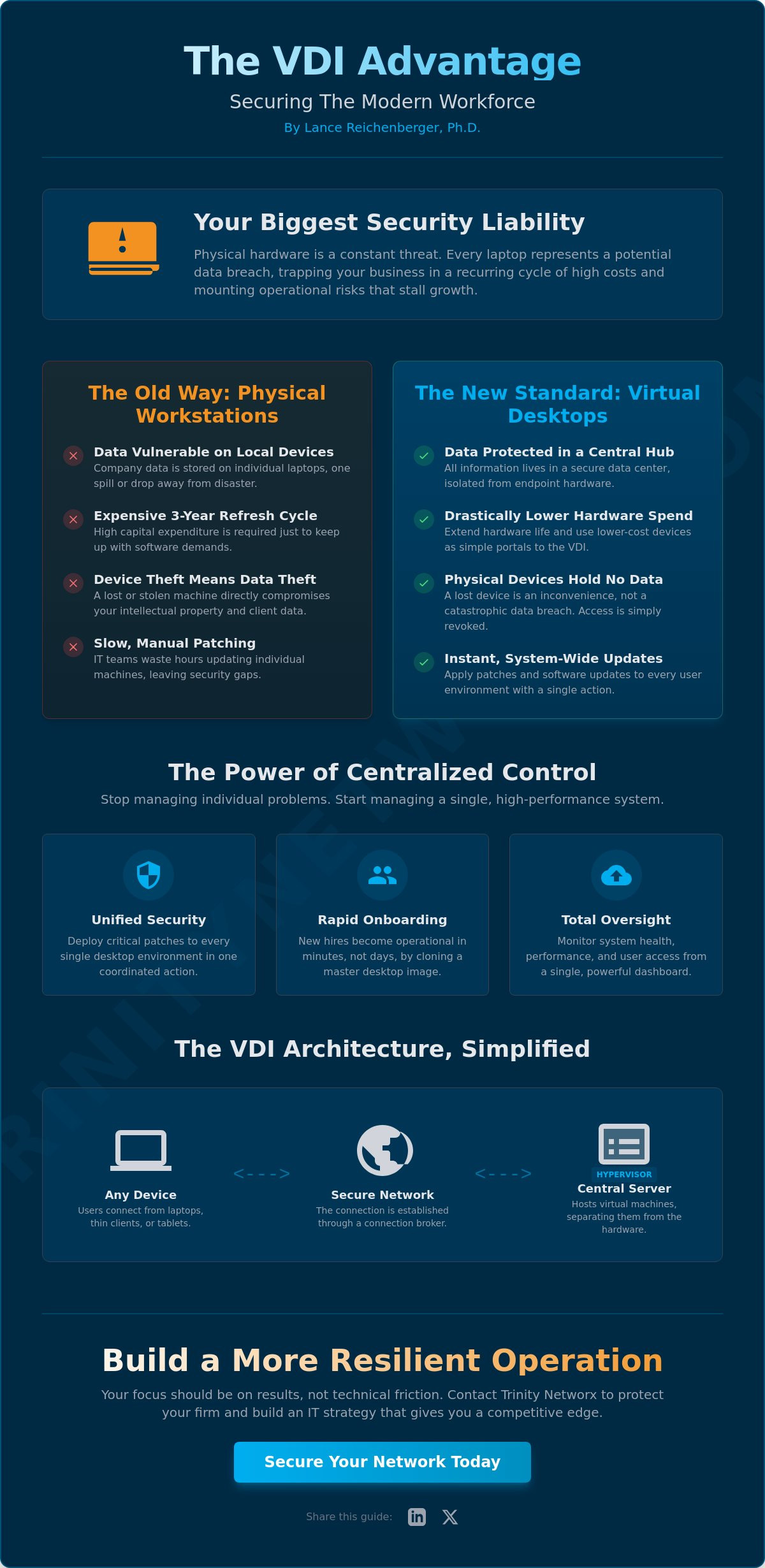
Your physical hardware is now your biggest security liability. Every laptop in the field represents a potential data breach waiting to happen if it falls into the wrong hands. You know the headache of refreshing expensive workstations every three years just to keep up with software demands. It's a cycle of high costs and even higher risks that stalls your growth. Using a virtual desktop infrastructure solves these issues by moving your data off the edge and into a controlled environment. Managing a distributed team shouldn't feel like a losing battle against technical friction.
We agree that your focus should be on results, not on whether a remote worker's device is patched. This guide shows you how virtual desktop infrastructure separates your work environment from physical hardware to increase security and mobility for your business. You will learn how to gain centralized control over every desktop while slashing your hardware spend. We look at the 2026 environment, including the shift toward Zero Trust models and the latest 2603 updates from Citrix and Omnissa, to help you build a more resilient operation. Check out our Managed IT Services and Cybersecurity Solutions to see how we protect your firm. Contact us at https://www.trinitynetworx.com/contact-us to secure your network today. Share this guide on LinkedIn or Twitter to help your peers stay ahead.
• Learn how virtual desktop infrastructure secures company data by hosting environments on central servers rather than risky physical laptops.
• Master the mechanics of hypervisors and connection brokers to ensure your remote team accesses the right resources without delay.
• Compare persistent and non-persistent configurations to find the right balance between user personalization and system cleanliness.
• Pinpoint the network latency and speed benchmarks required to maintain a high-performance experience for your distributed workforce.
• Shift your technical management to expert partners who handle the heavy lifting while you focus on driving business growth.
By Lance Reichenberger, Ph.D.
Every time a staff member logs into a machine, they open a door to your company's heart. Traditional setups rely on the strength of a single piece of hardware. That's a mistake. Virtual desktop infrastructure moves the entire workspace, including the operating system and every application, to a central server. Your team accesses their desktops through any device with an internet connection. This shift means the actual processing happens elsewhere. Your hardware becomes a portal, not a storage locker. This tech is a specific application of Desktop virtualization, which decouples the user experience from the physical box. It provides a level of agility that old-school IT simply cannot match.
Physical hardware is a ticking clock. Components wear out. Laptops get dropped. When your data is tied to a local drive, you're one spill away from a disaster. Virtual desktops keep your assets in a secure data center. This setup ensures that your business stays online even when hardware fails. You no longer have to worry about the high costs of refreshing physical hardware every three years. If a remote worker's laptop dies, they don't need a technician to drive to their house. They just need a web browser. By moving to this model, you protect your intellectual property from physical theft and environmental damage. It's about building a resilient it-infrastructure that doesn't blink when things go wrong.
IT teams often waste hundreds of hours every year on repetitive tasks. They manually update individual machines or troubleshoot software conflicts across different hardware brands. Centralization kills that inefficiency. You gain total visibility into who is accessing what, and when. It puts the power back in your hands. You stop managing individual problems and start managing a single, high-performance system.
• Apply critical security patches to every desktop with one action.
• Onboard new hires in seconds by cloning a master image.
• Monitor system health without needing physical access to devices.
When you use virtual desktop infrastructure, you simplify your tech stack. This leads to lower operational costs and a much faster response to threats. Our approach to it-management focuses on this kind of proactive control.
Ready to harden your remote workflow? Contact Trinity Networx at https://www.trinitynetworx.com/contact-us to discuss our Managed IT Services and Cybersecurity Solutions. Share this guide on LinkedIn or Twitter to help your peers secure their operations.
By Lance Reichenberger, Ph.D.
Understanding the engine makes the car go faster. You don't need to be a coder to grasp how Virtual desktop infrastructure (VDI) functions. It's a stack of specific technologies working in concert to mimic a physical computer. At the base, you have high-end servers. These servers don't just run one program. They host dozens of individual workloads. This happens through a layer of software that manages the hardware resources. It's about separating the user experience from the physical box sitting in an office. Your data stays put. The only thing moving over the wire is a stream of pixels.
The hypervisor is the foundation. It's the software that splits a physical server into multiple virtual machines. Each machine gets its own slice of memory, processing power, and storage. To the user, it feels like a private PC. To your business, it's an efficient use of hardware. You can support an entire department on a single rack. This is a core part of building modern IT infrastructure that actually performs. If one virtual machine crashes, the others keep running. The hypervisor isolates each environment to ensure stability. This prevents a single user from hogging all the resources and crashing the system for everyone else. It's about uptime.
If the hypervisor is the engine, the connection broker is the traffic cop. It sits between the user and the server pool. When an employee logs in, the broker checks their credentials. It then finds an available desktop and connects them. This happens in milliseconds. In the latest version released April 16, 2026, tools like the Unified Access Gateway now support up to 4,000 concurrent sessions. That's massive capacity. Once connected, display protocols take over. These protocols handle the heavy lifting of sending screen updates across the internet. They compress data so that even over a coffee shop wifi, the mouse doesn't lag. You get the speed of a local machine with the security of a locked data center.
Consistency wins every time. VDI allows you to use master images. You create one perfect desktop setup with all the apps and security settings your team needs. When a new hire starts, you just deploy a clone of that image. There is no manual configuration. No missing plugins. Every user gets exactly what they need to be productive on day one. This level of control is why smart leaders talk to our experts about modernizing their remote systems. It stops the endless cycle of manual tech support and keeps your team focused on their actual jobs.
Stop fighting with outdated hardware. Contact Trinity Networx at https://www.trinitynetworx.com/contact-us to discuss our Managed IT Services and Cybersecurity Solutions. Share this guide on LinkedIn or Twitter to help your peers secure their operations.
By Lance Reichenberger, Ph.D.
Business owners face a fork in the road when deploying virtual desktop infrastructure. You can't just pick a one-size-fits-all model and expect high performance. The choice between persistent and non-persistent setups dictates your storage costs, security posture, and employee satisfaction. Think of it as a balance between total personalization and operational speed. You need to align this tech with the specific roles within your company to get the best return on your investment. A clear grasp of What is Virtual Desktop Infrastructure (VDI)? helps you navigate these options with confidence. It's about matching the tool to the task.
Power users demand more. Executives, engineers, and creative pros often need to install specific plugins or save complex configurations. Persistent VDI gives them a dedicated virtual space. Their desktop looks exactly the same every morning. It's their digital office. While this boosts productivity for high-level roles, it requires more storage. Every user gets their own disk space. This increases your hardware footprint but ensures your most valuable talent isn't fighting their tools. It's a key part of smart it-management for specialized teams.
Task-based workers have different needs. Call center staff or data entry teams don't need custom wallpapers or unique software installs. They just need a fast, reliable portal to their apps. Non-persistent VDI is the winner here. The system resets to a clean state every time they log out. This makes it much harder for malware to stick around. It also simplifies updates. You update one master image, and everyone gets the newest version instantly. It's fast. It's secure. It keeps your overhead low.
Don't let the technical details cloud your judgment. Look at your payroll. If your team is mostly performing repeatable tasks, non-persistent is your best bet for security and cost control. If you have a lean team of experts who need specialized environments, go persistent. Most modern businesses use a hybrid approach. They give power users persistent desktops and move the rest of the staff to non-persistent pools. This strategy keeps your it-infrastructure lean and your data safe. Choosing the right virtual desktop infrastructure mix is an executive decision that directly impacts your bottom line.
Stop guessing about your tech stack. Contact Trinity Networx at https://www.trinitynetworx.com/contact-us to discuss our Managed IT Services and Cybersecurity Solutions. Share this guide on LinkedIn or Twitter to help your peers secure their operations.
By Lance Reichenberger, Ph.D.
A brilliant strategy fails without a strong foundation. Your network is the lifeblood of a successful virtual desktop infrastructure. If your bandwidth is choked, your team will face frozen screens and dropped connections. This isn't just a minor annoyance. It's a direct hit to your billable hours. You need to verify your IT efficiency and tuning before you commit to a full rollout. High latency kills productivity. When an employee clicks a button, the response must be instant. Anything over 150 milliseconds of round-trip time starts to feel like wading through mud. You want a snap-to-action feel that keeps your team in the zone.
Test your speeds now. Don't wait until your team is frustrated. Most businesses focus on download speeds, but VDI requires strong upload performance. Each active user needs a stable slice of that pipe. For our clients in Southern California, we suggest a hard look at your local ISP options. One fiber line isn't enough. You need redundant internet lines to keep your office in Ontario or Rancho Cucamonga running if a local construction crew hits a cable. This level of preparation is a core part of a winning cloud migration strategy. It ensures that your office bandwidth can handle the constant stream of data between your local users and the cloud server.
VDI changes the math on your hardware budget. You no longer need to buy top-of-the-line laptops for every staff member. Because the heavy processing happens in the data center, your local devices act as simple viewing ports. You can keep your older laptops in service for another two or three years. Some firms even switch to thin clients. These are small, inexpensive devices with no moving parts. They cost less to buy and almost nothing to maintain. This approach keeps your capital expenses low while giving your team a high-end experience. It's a smart way to get more life out of your current investments.
Success depends on the details of your setup. We see too many firms rush into the cloud without checking their local wiring or ISP contracts. It leads to lag, user pushback, and wasted money. Get your network right first. Contact our team today to audit your current network capacity and see if you're ready for the shift.
Stop letting slow networks stall your growth. Contact Trinity Networx at https://www.trinitynetworx.com/contact-us to discuss our Managed IT Services and Cybersecurity Solutions. Share this guide on LinkedIn or Twitter to help your peers secure their operations.
By Lance Reichenberger, Ph.D.
Trinity Networx operates as a high performance partner for companies that refuse to settle for reactive IT. We don't just fix things when they break. We prevent the break from happening. For businesses in Ontario and Rancho Cucamonga, this means local experts who understand the Inland Empire business climate. You shouldn't have to worry about the technical plumbing of your virtual desktop infrastructure. We handle the heavy technical lifting so you can focus on your core mission: growth. Check out our managed IT services in Ontario CA to see how we drive local progress. We act as a protective force for your digital assets.
We watch your systems around the clock. If a server starts to lag at 3:00 AM, we are already on it. Our 20 minute response guarantee ensures your virtual team stays online without interruptions. You get direct access to a real person in Southern California. No scripts. No call centers on the other side of the planet. We manage all security patches and software updates behind the scenes. This keeps your team productive while we maintain the engine. We keep your operation steady and fast. Our team handles the complexity so your staff can
By Lance Reichenberger, Ph.D.
Modern business demands mobility without the risk of data loss. You've already seen how moving your desktops to the cloud protects your firm from physical theft and aging hardware. It’s about control. Security matters. Performance matters. By separating your work environment from the laptop, you ensure your team stays productive regardless of where they sit. virtual desktop infrastructure is no longer a luxury for big corporations; it's a standard for any secure operation in 2026. You need a partner who doesn't just watch the clock. We provide the Southern California local support and deep expertise led by Lance Reichenberger, Ph.D., to keep your network hardened. Our 20 minute response time guarantee means we are there when you need us most. Stop fighting with broken laptops and manual updates. Stop managing hardware and start growing your business. Contact Lance and the Trinity Networx team today. Your growth is the only metric that matters. Share this guide on LinkedIn or Twitter to help your peers stay ahead.
By Lance Reichenberger, Ph.D.
No, they aren't the same. A VPN builds a secure path to your office network from a home device. By contrast, a virtual desktop infrastructure hosts the entire operating system and all your apps on a central server. You aren't just connecting to the office; you are working inside a computer that lives safely in the data center. It offers a much higher level of control over your data.
You need a server with enough processing power and memory to support your user base. The server carries the workload, so your employees only need basic devices with internet access. We suggest looking at your current server capacity to see if it can handle the simultaneous demands of your team. High speed storage is also a factor for keeping the experience snappy. This setup lets you get more value out of your existing tech budget.
Security improves because your data never leaves the data center. Traditional laptops store sensitive files on local drives that are easily stolen or lost. With a virtual desktop infrastructure, the physical device holds no data at all. If a worker loses their tablet, your company secrets remain locked behind your server firewall. It stops data leaks before they happen and protects your intellectual property from physical threats.
Modern systems handle graphic intensive work with ease. You must equip your server with dedicated GPU resources to manage video editing or CAD software. When the server does the heavy lifting, the user sees the results on their screen without the need for a $4,000 workstation at home. It makes professional grade tools accessible from any location. Your creative team stays productive without expensive hardware at every desk.
VDI saves money by extending the life of your hardware. You don't have to replace every laptop in your office every three years because the local device doesn't need much power. It also cuts down on the hours your staff spends on manual tech support. While the upfront server cost exists, the long term savings on hardware refreshes and labor make it a smart financial move for growing firms. It keeps your overhead predictable.
You cannot access a virtual desktop without an active internet connection. This is a hard reality of the tech. We always advise our clients in Ontario and Rancho Cucamonga to install redundant internet lines. Having a backup provider ensures that a single cut cable doesn't bring your entire workforce to a standstill. Reliability is the foundation of remote productivity and business continuity. Plan for backup connectivity to stay online.
Contact us at https://www.trinitynetworx.com/contact-us to secure your network today. Share this guide on LinkedIn or Twitter to help your peers stay ahead.

Article by
Lance Reichenberger, Ph.D.
Dr. Lance Reichenberger is the founder of Trinity Networx, a Southern California technology firm specializing in managed IT services, cybersecurity, network infrastructure, and business technology strategy. With nearly four decades of experience in the IT industry, he works with businesses to improve operational efficiency, strengthen security, and align technology with long-term growth objectives.
Lance focuses on proactive IT management, enterprise wireless infrastructure, cybersecurity integration, and scalable technology solutions for growing organizations throughout Southern California.
The content published on this website is provided for general informational and educational purposes only. Articles may be created, edited, or enhanced with the assistance of artificial intelligence and automation tools under the direction and review of Trinity Networx. While every effort is made to ensure accuracy and relevance, the information provided should not be considered professional, legal, financial, cybersecurity, or technical advice specific to your organization. Businesses should consult directly with a qualified professional regarding their unique environment, compliance requirements, and operational needs. Trinity Networx makes no warranties regarding completeness, reliability, or applicability of the information contained within these articles.
Schedule a brief conversation with Trinity Networx to discuss your business technology needs.
Get a practical roadmap built around your business, your users, your systems, and the technology issues that need attention first.
Put the right technology, support, security, and infrastructure in place so your business can grow, adapt, and move forward with confidence.

