

3281 E. Guasti Rd, STE 700, Ontario, CA 91761
1712 9th Ave SW, Watertown, SD 57201

By Lance Reichenberger, Ph.D.
Your office internet is lying to you. Most providers promise flawless calls, yet you're still fighting dropped connections during the most vital client meetings of your career. It's frustrating to watch a deal slip away because of a choppy signal. You're tired of the hidden fees and the mess of hardware that big telecom forces on your desk. Choosing the right VoIP for small business isn't just about picking an app. It's about fixing your local network health. You need every word to land with precision.
I'll show you how to master this selection to drive growth and keep your data safe. We'll look at the 2026 FCC mandates, real costs for 10-person teams, and the mobile tools your remote staff need to stay productive. This guide cuts through the noise. It gives you a clear path toward predictable monthly bills and professional voice quality. Stop settling for status quo static. Contact us at https://www.trinitynetworx.com/contact-us to start your upgrade.
Share this guide: [Facebook] [Twitter] [LinkedIn]
• Move beyond the limits of old telecom and treat your communication as a strategic driver for progress.
• Identify the unified messaging features that keep your team connected and prevent missed client calls.
• Master the technical side of VoIP for small business by prioritizing network health and data encryption.
• Audit your cabling and router capacity to ensure your office can handle high-speed digital traffic.
• Learn why local managed support in Southern California beats the slow response times of national vendors.
By Lance Reichenberger, Ph.D.
Stop thinking of your office phone as just another monthly bill like water or electricity. It's a mistake. Most owners see a dial tone as a basic necessity, but elite leaders view it as a growth engine. Modern communication systems do more than connect calls. They capture data. They project authority. They ensure your team stays mobile without losing a single beat. Your phone is your first handshake with a prospect. Don't let it be a weak one.
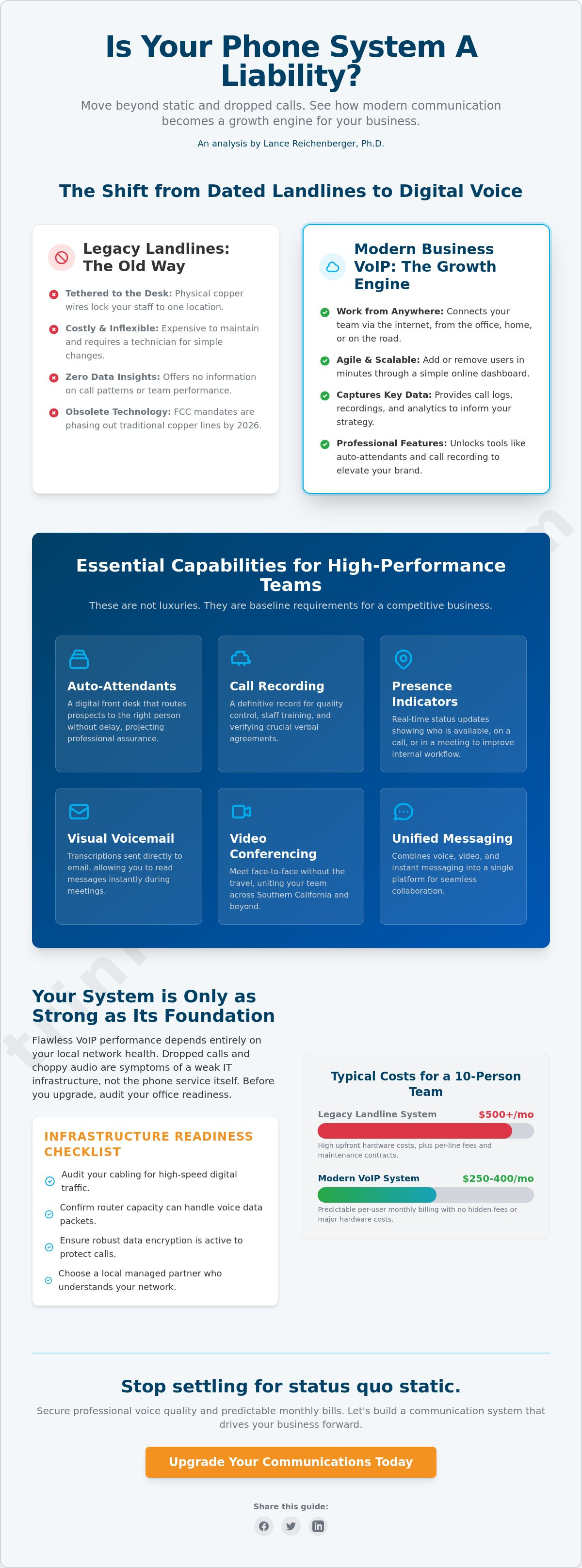
On a technical level, Voice over Internet Protocol (VoIP) works by converting your voice into digital data packets. These packets travel across the internet rather than traditional phone lines. This shift is why VoIP for small business has moved from a luxury to a baseline requirement. It offers tools like auto-attendants that route callers instantly and mobile twinning that rings your desk and cell simultaneously. You never miss a lead. You never sound like a hobbyist. By sending voice over your existing network, you remove the need for separate, aging phone wiring. This makes your overall business health much easier to manage.
Copper wires are fossils. They're expensive to keep alive. They lock your staff to a physical desk. In a world where talent works from Ontario to Orange County, you can't be tethered to a wall. Legacy hardware fails to grow as your headcount increases. Adding a new line used to mean waiting weeks for a technician to show up at your door. Now, it's a few clicks in a dashboard. Digital systems provide the agility your IT infrastructure needs to stay competitive. When you rely on old PSTN lines, you're paying for a dying technology that offers zero data insights. You're essentially subsidizing the past while your competitors invest in the future.
Don't run your legal or medical practice on free apps. They lack the privacy controls required for strict compliance. Professional systems provide 99.999 percent uptime. That's the gold standard for reliability. Consumer tools drop calls. They lag. They make your brand look small and unprepared. A dedicated business line signals stability. It shows clients you've invested in a stable foundation for their needs. This level of dependability is part of a smart IT management strategy that values your time. You need a partner that treats your voice quality as a priority, not an afterthought. High-performance teams require high-performance tools. Anything less is a liability to your bottom line.
Ready to move beyond basic dial tones? Contact us at https://www.trinitynetworx.com/contact-us to secure your communication future.
Share this article: [Facebook] [Twitter] [LinkedIn]
By Lance Reichenberger, Ph.D.
High performance is a choice. It requires tools that move as fast as your market. You cannot win with a fragmented phone system that forces your team to jump between screens or hunt for buried messages. A professional VoIP for small business setup acts as the backbone of your operations. It unites your staff. It protects your time. When your technology works, your team can focus on closing deals rather than troubleshooting connections.
To stay ahead, your system must include these baseline features:
A digital front desk that routes every prospect to the right person without delay.
A definitive record for quality control, training, and verifying verbal agreements.
Real-time status updates that show who is available or busy.
Transcriptions sent to your email so you can read messages during meetings.
Auto-attendants are not just a convenience. They are a statement of professional assurance. When a caller hears a clear, logical menu, they know they are dealing with an established firm. Call recording adds another layer of value. It removes the guesswork from your growth strategy by allowing you to review sales calls and find exactly what works. The FCC guide to VoIP notes that these services depend on your broadband quality. This is why your local network must stay in peak condition.
Stop wasting hours on the 10 or the 210 freeway. Video conferencing allows your team to meet face to face without leaving their desks. It cuts down on travel across Southern California. Unified platforms combine voice, video, and instant messaging into one window. You don't have to hunt for a buried email when a quick chat will suffice. This level of IT infrastructure keeps your staff aligned and productive. It stops the constant interruptions that kill deep work.
Business happens everywhere. Your Ontario office needs to be reachable whether you are in the field or at a lunch meeting. Softphones enable your laptops and mobile devices to act as full office extensions. You keep your personal cell number private. When you call a client, they see your business ID, not your personal line. You can even move an active call from your desk phone to your mobile device without a hiccup. The transition is fluid. It ensures you stay responsive without being tied to a physical location. If your current setup feels like an anchor, reach out to a professional partner to see what a modern system can do for your bottom line.
Master your communication strategy today. Contact Trinity Networx at https://www.trinitynetworx.com/contact-us.
Share this article: [Facebook] [Twitter] [LinkedIn]
By Lance Reichenberger, Ph.D.
Many leaders fear that switching to VoIP for small business means accepting robotic voices or dropped connections. This is a myth born from poor setup. When your audio stutters, it is rarely the provider's fault. It is usually your local network choking on data. You must treat a phone call as a sensitive data transmission that requires priority. Understanding how VoIP technology works is the first step in securing your voice quality. Quality is a choice. It requires a network that knows how to handle high-speed traffic without tripping over its own feet.
Audio quality is a result of network discipline. It isn't magic. If your calls sound like they're coming from underwater, your hardware is failing you. Most off the shelf routers can't distinguish between a vital sales call and a background software update. This lack of priority creates jitter. It destroys your professional image. We fix this by enforcing strict rules on your equipment. These rules ensure your voice packets always move first. No exceptions. No delays.
Jitter and latency happen when your router treats a Netflix stream with the same urgency as a CEO's conference call. This is unacceptable. Quality of Service (QoS) settings fix this by putting voice traffic at the front of the line. You need proper bandwidth allocation to prevent lag during heavy file uploads. A steady connection relies on multiple carrier paths. This redundancy keeps your lines open even if one path gets congested. Reliable systems use these multiple paths to dodge traffic jams on the digital highway. Your voice stays clear because the data has a clear path to run.
Protecting your conversations is a mandate. Your phone lines are now a gateway to your network. Hackers know this. They look for weak spots to hijack your lines or listen to private negotiations. End to end encryption is not optional. It is a requirement for any firm handling sensitive client data. You must also integrate your voice system into your business data backup strategy. Secure SIP trunking acts as a shield. It prevents unauthorized access and keeps your billing predictable. If a local outage hits, your system should automatically failover to a secondary data center. This keeps your team talking while the local grid recovers.
Don't let poor security or bad audio kill your momentum. Contact Trinity Networx at https://www.trinitynetworx.com/contact-us to lock down your communications.
Share this article: [Facebook] [Twitter] [LinkedIn]
By Lance Reichenberger, Ph.D.
Your network is the silent partner in every conversation. If the foundation is weak, your voice quality will crumble. Many owners rush to sign a contract without checking their local hardware first. This is a recipe for failure. Before you commit to VoIP for small business, you must audit your physical environment. It's about more than just software. It's about the wires in your walls and the power in your racks. Success depends on these technical pillars:
Verify support for Power over Ethernet (PoE) to eliminate messy power bricks at every desk.
Confirm the hardware handles high packet loads without creating audio latency.
Balance your upload speeds against expected call volume to prevent choppiness.
Map Wi-Fi strength in your Rancho Cucamonga facility to avoid dead zones during mobile calls.
Physical layout matters. If your office relies on wireless signals for softphones, you must map your coverage. Concrete walls and metal shelving kill signals. This leads to dropped calls as employees walk between rooms. Map your dead zones now. Fix them before you go live. A few well placed access points can save you from months of employee complaints and lost productivity. You need a setup that supports movement without sacrificing clarity.
Choose the right tools for the job. Physical desk phones offer a familiar feel for traditional teams. They are reliable and always ready. However, headsets paired with computer applications offer more mobility for active staff. Your existing IT infrastructure dictates which hardware options are viable for your VoIP for small business deployment. If your desks aren't wired for Ethernet, you might favor a software based approach. If your team spends all day on the phone, a dedicated handset is usually the better path for long term comfort.
Bandwidth is the fuel for your system. Most people look at download speeds, but upload speeds are what carry your voice to the client. If your upload is weak, you will sound like a robot to the person on the other end. Dedicated fiber is the gold standard for stability. It provides symmetrical speeds that keep large teams talking without lag. Always have a backup internet source. A simple 5G failover can prevent a total communication blackout if a local construction crew accidentally cuts your main line. You can't afford to be silent. Get a network assessment to ensure your office is truly ready for the transition.
Don't guess about your network readiness. Contact Trinity Networx at https://www.trinitynetworx.com/contact-us to secure your infrastructure.
Share this guide: [Facebook] [Twitter] [LinkedIn]
By Lance Reichenberger, Ph.D.
Self-service portals are a trap for busy owners. National vendors often sell you a license and then dump the technical burden on your desk. This leaves you stranded when a configuration error silences your phones or a software update breaks your call routing. A local, managed approach changes the dynamic. It moves your communication from a reactive headache to a proactive business asset. Choosing the right VoIP for small business means finding a partner that handles the technical heavy lifting so you can focus on your bottom line.
Managing your own phone system is a drain on your time. We take that weight off your shoulders. Our team handles the setup, the security patches, and the ongoing maintenance. We use proactive monitoring to catch quality dips before you or your clients ever notice them. This level of steady competence ensures your voice quality remains professional every single day. Integrating your phones with managed IT services in Ontario CA ensures your entire technology stack works as a single, high-performance unit.
Communication is the lifeblood of your brand. You cannot wait for an overseas queue to clear while your clients get a busy signal. Our 20-minute response time is a standard, not a suggestion. Local support means a technician can be at your Ontario CA office quickly if a physical hardware issue arises. We don't use generic scripts. We use local expertise to solve problems fast. This speed is vital for Southern California industries like manufacturing where every minute of downtime costs real money. You get direct access to experts who know your network and your facility.
A unified approach to IT management removes the frustration of vendor finger-pointing. When your phones and your data network are managed by the same team, there is nowhere for the blame to hide. We own the results. This consolidation also clarifies your technology budget for better forecasting. You get one invoice and one point of contact for your entire digital environment. This creates a secure, stable foundation for your data and your voice traffic. Contact us at trinitynetworx.com/contact-us to review your current setup and find the gaps in your strategy.
Secure your communication future with a partner who values your growth. Contact Trinity Networx at https://www.trinitynetworx.com/contact-us today.
Share this guide: [Facebook] [Twitter] [LinkedIn]
By Lance Reichenberger, Ph.D.
Your business cannot grow if your phone system acts as an anchor. We've seen how VoIP for small business depends on local network health and disciplined security. Stop settling for dropped calls and hidden fees. You need a partner that treats your voice quality as a strategic priority. High performance teams in Southern California deserve technical support that moves as fast as their market. Success starts with a network that stays upright and protected.
Trinity Networx provides the assertive reliability your firm needs to stay ahead. With a guaranteed response time under 20 minutes and 24/7 helpdesk support, we ensure your lines never go dark. Our expertise in the SoCal manufacturing and legal sectors means we know the specific pressures you face. It's time to demand more from your technology. Contact Lance and the Trinity team to fix your phones today. Your brand is too valuable to leave to chance. Let's build a foundation that actually drives your progress.
Share this guide: [Facebook] [Twitter] [LinkedIn]
By Lance Reichenberger, Ph.D.
VoIP is exceptionally reliable when backed by a managed network and a professional support team. Most quality issues in Southern California arise from unmanaged internet paths that cause jitter or lag. By using a dedicated connection or proactive monitoring, you ensure your dial tone is always there when you need it. We treat your voice traffic with the highest priority to maintain professional assurance and stability.
A single high-definition voice call requires about 100 Kbps of symmetrical bandwidth. This means your upload speed is just as vital as your download speed for maintaining clarity. If your team makes ten simultaneous calls, you need at least 1 Mbps of dedicated capacity. We verify your current internet speeds to ensure your network can handle the total expected packet load without stuttering or dropping calls.
You can absolutely keep your current local phone numbers through a process called porting. This transition allows you to move your identity to a more modern platform without confusing your clients or changing your marketing materials. We manage the paperwork and the coordination with your old carrier to ensure a smooth handoff. It is a standard procedure that keeps your brand stable while your technology moves forward.
You do not have to purchase new physical hardware if you prefer to use softphones on your existing computers or mobile devices. Many teams find that high-quality headsets provide more mobility and save desk space. If you want to keep your current analog phones, an Analog Telephone Adapter (ATA) can bridge the gap. We help you choose the hardware that fits your specific office layout and daily workflow.
Your calls will automatically route to mobile apps or secondary office locations if your primary internet connection fails. This failover capability ensures that your clients never hear a busy signal or a dead line. It's a proactive way to maintain operational continuity during local outages. You stay reachable on your cell phone or laptop as if you were still sitting at your desk in Ontario.
Business-grade systems are fully secure for sensitive sectors like law and medicine when they use end to end encryption. We secure your SIP trunking to prevent unauthorized access and protect your private client conversations from eavesdropping. This setup meets the high standards required for HIPAA or legal confidentiality. It is a protective force that keeps your data safe while you focus on your practice.
Managed VoIP for small business provides local technical support and proactive monitoring that DIY apps simply cannot offer. With a DIY app, you are the technician when things go wrong. A managed service takes that burden off your desk. We handle the configuration and the security patches so your communication system stays stable without any effort from your internal team.
A new system is usually ready for use within a few business days once your hardware arrives and your network is verified. The timeline often depends on how quickly your previous carrier releases your phone numbers. We coordinate the entire process to minimize any interruptions to your daily operations. You get a fast, methodical transition that respects your time and your growth goals.
Stop struggling with dropped calls and outdated hardware. Contact Lance and the Trinity team at https://www.trinitynetworx.com/contact-us to secure your business communications today.
Share this guide: [Facebook] [Twitter] [LinkedIn]

Article by
Lance Reichenberger, Ph.D.
Dr. Lance Reichenberger is the founder of Trinity Networx, a Southern California technology firm specializing in managed IT services, cybersecurity, network infrastructure, and business technology strategy. With nearly four decades of experience in the IT industry, he works with businesses to improve operational efficiency, strengthen security, and align technology with long-term growth objectives.
Lance focuses on proactive IT management, enterprise wireless infrastructure, cybersecurity integration, and scalable technology solutions for growing organizations throughout Southern California.
The content published on this website is provided for general informational and educational purposes only. Articles may be created, edited, or enhanced with the assistance of artificial intelligence and automation tools under the direction and review of Trinity Networx. While every effort is made to ensure accuracy and relevance, the information provided should not be considered professional, legal, financial, cybersecurity, or technical advice specific to your organization. Businesses should consult directly with a qualified professional regarding their unique environment, compliance requirements, and operational needs. Trinity Networx makes no warranties regarding completeness, reliability, or applicability of the information contained within these articles.
Schedule a brief conversation with Trinity Networx to discuss your business technology needs.
Get a practical roadmap built around your business, your users, your systems, and the technology issues that need attention first.
Put the right technology, support, security, and infrastructure in place so your business can grow, adapt, and move forward with confidence.

