3281 E. Guasti Rd, STE 700, Ontario, CA 91761
1712 9th Ave SW, Watertown, SD 57201

By Lance Reichenberger, Ph.D.
Stop paying for digital clutter that slows your team down. Why does your business still juggle four different apps just to close a single ticket? Most executives realize too late that their communication stack is a mess of redundant subscriptions and missed notifications. You likely wonder, what is unified communications, and why does it matter for your bottom line? It isn't just a technical upgrade. It's the end of the app-switching tax that kills productivity. Your current setup probably forces employees to jump between separate windows to answer a simple client inquiry. This fragmentation leads to lost data and frustrated staff.
Managing separate platforms for voice, chat, and video is an expensive headache that creates more work for your IT staff. We agree that your technology should drive profit, not maintenance hours. This article shows how to consolidate your tools into one interface to lower your monthly bills and stop the chaos of fragmented messaging. We will explore the shift toward cloud-based systems and how local SoCal expertise from Trinity Networx, LLC keeps your business connected without the usual technical friction. Expect a clear path to better reliability and a leaner budget.
• Learn what is unified communications and how merging phone systems with chat tools eliminates the inefficiency of toggling between apps.
• Identify the hidden costs of software redundancy and how to cut monthly expenses by removing overlapping communication subscriptions.
• Use real-time presence information to see team availability instantly; this stops the cycle of missed messages and delayed decisions.
• Audit your current technology stack to find gaps where data disappears and response times lag behind your competitors.
• Partner with a local Southern California expert to manage your technical setup so your leadership team can focus on driving business growth.
Business speed requires tools that talk to each other. You likely have one app for calling, another for internal chat, and a third for video meetings, creating a friction that drains your team’s energy and kills your hourly profit. To understand what is unified communications, you must view it as a bridge for all digital interactions. It unifies your phone system and collaboration tools into a single interface. This isn't just about convenience. It’s about removing the mental load of managing a dozen logins and notification settings.
Stop toggling between five different windows just to get through your morning tasks. A unified platform brings everything to your desktop or mobile phone. Your staff can answer a client call on their laptop and then switch to a chat window to ask a colleague for a quick answer without ever hanging up. It’s about movement and stability. Presence information takes the guesswork out of collaboration. You see instantly who is available, away, or in a meeting. This transparency kills the cycle of phone tag that plagues most modern offices. When you know a technician is on a job, you don't waste time calling them. You wait for their status to turn green.
Traditional phone systems are islands. They handle voice calls and basic voicemail, but they don't talk to your other software. If you want to share a file or start a video call, you have to open a separate program. Modern platforms change the rules. If you've been searching for what is unified communications, you'll find it's more than just a software bundle; it's a strategy for growth. These systems include video conferencing and file sharing as standard features right out of the box. This connection means your data stays in one place. You don't lose track of files in various chat threads or email chains because the system keeps the conversation grouped together. It turns your communication from a series of tasks into a strategic driver of progress.
Old desk phones and on-site servers are liabilities. They require physical maintenance and expensive on-site visits from technicians when things break. Modern businesses favor IT infrastructure that lives in the cloud. Cloud-based systems offer better reliability and faster speeds than aging copper wires. Software updates happen automatically in the background. Your staff won't face downtime for a patch or a version jump. Transitioning to a modern setup ensures your business stays agile and ready for the next growth phase without the weight of clunky, physical hardware holding you back. It's a no-nonsense approach to staying connected in a fast-paced market.
A high performing business requires more than just a list of features. It needs a stack that works as a single unit. Business VoIP acts as the foundation here. It replaces old copper lines with high speed digital calling. This shift ensures your team stays reachable anywhere. When people ask for TechTarget's definition of UC, they often focus on how these parts fit together. It isn't just about the tools. It's about the flow of information. To truly understand what is unified communications, you have to see how these individual pieces stop acting like silos and start acting like a unified engine.
Instant messaging cuts through the noise. Stop sending five word emails that clog up a busy executive's inbox. Quick questions deserve quick answers. Messaging allows for real time feedback without the formal overhead of a traditional message thread. When evaluating what is unified communications for your specific workflow, look at how video conferencing supports remote meetings with screen sharing features. This layer of visual clarity allows your team to walk through a contract or a blueprint together in real time. It reduces errors. It keeps everyone on the same page without requiring a physical office presence.
Unified messaging cleans up the digital mess. Instead of checking a separate voicemail box or walking to a fax machine, everything lands in your email. You get a digital file of your messages. You can read a transcript or listen to the audio directly from your inbox. This centralizes your workflow. It ensures no lead or client request falls through the cracks because it was stuck on an office machine. It's a direct way to ensure operational continuity.
Mobility is the standard. You can start a high stakes call on your desk phone and move it to your mobile device as you walk to your car. The connection stays stable. High definition audio ensures your clients hear a professional, clear voice rather than a jittery cell signal. You can launch a full video meeting with one click from a chat window. No meeting codes. No waiting rooms. Just instant connection.
Stop guessing. Presence indicators tell you if a colleague is in a meeting, on a call, or away from their desk. This simple status update saves hours of wasted effort. During project discussions, your team can share documents in real time. Everyone edits the same file. You keep all project notes in a single shared thread. This prevents version control issues and keeps your IT management strategy on track. If your current tools feel disconnected, it might be time to talk to an expert about a better setup.
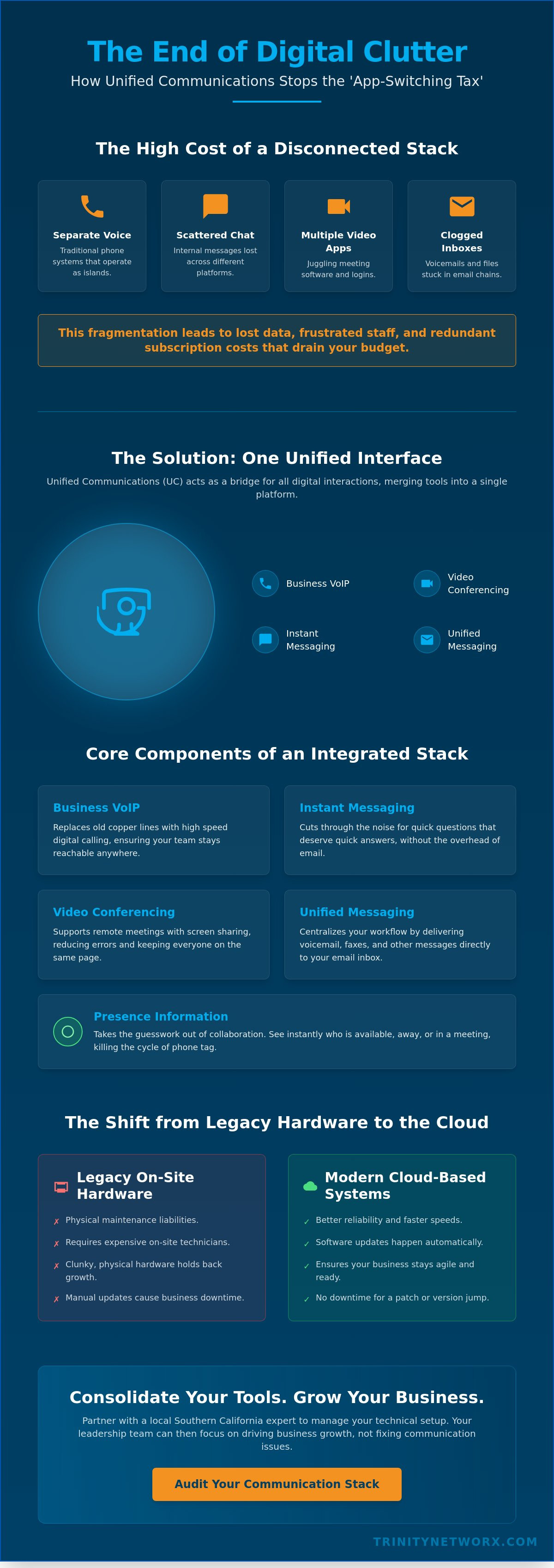
Your balance sheet likely hides a silent profit killer: app sprawl. Paying for separate monthly subscriptions for chat, video conferencing, and phone services creates massive financial waste. When leadership asks what is unified communications, they are usually looking for a way to stop this bleeding. Fragmented tools don't just cost more in monthly fees. They lead to lost data. When a client request gets buried in a chat thread that isn't linked to your phone logs, you lose money. Slower response times are a direct result of this digital friction. Consolidating these services into one platform often results in a lower monthly bill because you stop paying for overlapping features and redundant licenses.
Managing a dozen different vendors increases the workload for your administrative staff. Every new hire requires a complex setup process across multiple platforms. This fragmentation creates a high maintenance burden for your technology team. They spend their time resetting passwords and troubleshooting sync issues instead of focusing on higher value tasks. A single point of contact for all communication needs simplifies your operations. It turns a chaotic list of vendors into a predictable, manageable line item. This stability allows you to forecast your tech spending with precision rather than guessing which subscription will hike its prices next month.
Specialized support contracts for every tool you own add up fast. You can eliminate these by moving to a single, integrated provider. This reduces the time your managers spend on employee onboarding. New staff members get one login for everything. If you want to see how this affects your bottom line, check our VoIP for small business guide for pricing details. Reducing the number of systems you maintain directly lowers your overhead. It protects your profit margins while ensuring your IT management stays lean and responsive.
Stop the constant app switching that breaks your team's focus. Research suggests it takes several minutes to regain deep focus after a distraction. Switching windows to find a message is a distraction. A unified tool ensures every employee has the same resources regardless of location. Whether they are in the office or working from home in Southern California, the interface remains identical. Faster communication leads to faster project completion. Your clients notice when your team is responsive and coordinated. It builds trust. If you are tired of the status quo, it is time to talk to a strategic partner who values your time. High performance communication drives repeat business and keeps your growth on track.
Audit your tech stack before you spend another dime on software. Most leaders find they pay for three different chat tools and two video apps without realizing the overlap. This waste stops now. When you ask what is unified communications, you're asking for a cleaner way to work. Pick a platform that matches your industry rules. A law firm needs different security than a retail chain. Training your team is the next step. High adoption rates only happen when people understand the core features. Don't leave them to figure it out alone. Partner with a local expert to migrate your existing phone numbers. Losing your primary business line during a move is an avoidable disaster. Monitor your usage metrics monthly. See where you can cut more clutter and improve performance.
Audit your current tools to see which ones fail your team. You might find that your staff uses personal chat apps because the company tool is too slow. This creates a security risk. A single interface solves this. It brings everyone into a secure, company owned space. When you define what is unified communications for your firm, focus on the specific industry requirements you face daily. Compliance matters. HIPAA or CMMC needs shouldn't be an afterthought. They should drive your platform choice. Constant adjustment keeps your costs low and your system fast. It’s about operational health and momentum.
Transferring your data shouldn't stop your business. We set up your new system in parallel with the old one. This strategy ensures zero downtime. Your staff keeps working while we move the backend. Verify every call route and check emergency services before you pull the plug on the legacy gear. Precision in the setup phase prevents lost leads later. It’s about steady competence rather than reactive fixes.
Gather feedback from your staff. They use the interface every day and know where the friction points are. Update your security protocols to match your new cloud environment. Security isn't a one time event; it's a constant state of readiness. Learn more about it-management to keep your communication systems running at peak performance. You need a partner who understands it-infrastructure and how to lock it down. If you're ready to stop the headache of managing multiple apps, connect with Trinity Networx today for a professional migration plan.
Proactive support is the difference between a system that works and one that fails when you need it most. Trinity Networx, LLC doesn't just sell software. We provide a protective force for your business operations. Our team handles every piece of the technical setup. This allows your leadership to focus on growth and strategy. We ensure your system stays shielded against modern threats. Local Southern California businesses deserve better than a faceless vendor. We deliver a response in under twenty minutes. This speed keeps your momentum high and your staff productive.
Recognizing what is unified communications as a strategic driver changes how you view your office. It isn't just a utility. It's the pulse of your daily workflow. We manage the complexity so you don't have to. Most small businesses struggle with the app-switching tax mentioned earlier. We remove that friction. By centralizing your voice and data, we create a stable environment for your team. This steady competence instills a sense of security. You can move fast because your tools are reliable.
Stop the stress of troubleshooting technical glitches on your own. A DIY setup often leads to configuration errors that leave your data exposed. Get expert advice on it-infrastructure as your business scales. We act as your partner to ensure your tech drives profit. Our experts monitor your systems to catch problems before they disrupt your staff. It’s a no-nonsense approach to maintaining operational health.
Experience the peace of mind that comes with reliable systems. Join other SoCal leaders who have simplified their tech stack and lowered their monthly bills. Technology should empower your movement, not hold you back. Contact Lance Reichenberger, Ph.D. to discuss your specific business goals and see how we can harden your communications. We value your time and your growth above all else.
Stop wasting your team's energy on digital friction. You now understand what is unified communications and how it acts as a strategic driver for your business health. Fragmented tools are a liability that drains your budget and slows your response times. Consolidating your voice, chat, and video into a single interface removes the headache of managing multiple vendors. It turns your technology into a tool for momentum rather than a constant maintenance burden. Your staff deserves a workspace where information flows without barriers.
Trinity Networx has served the Southern California business community since 2001. We don't just fix problems; we prevent them. You get a guaranteed response in under twenty minutes and the steady competence of expert support from Lance Reichenberger, Ph.D. Experience the peace of mind that comes from professional assurance and reliable support. We act as a protective force for your firm so you can focus on what matters most. Contact Trinity Networx to Simplify Your Business Communication and take the first step toward a leaner, faster organization.
It cuts costs by eliminating the need for multiple, overlapping software subscriptions. You stop paying for separate chat, video, and phone bills. This consolidation reduces the administrative burden on your finance team. It also lowers the hours your IT staff spends on managing different vendor portals. One predictable monthly fee replaces a dozen variable invoices. It's a direct path to a leaner budget.
VoIP is the underlying technology that handles voice calls over the internet, while unified communications is the broader strategy that includes chat, video, and file sharing. Think of VoIP as the engine and UC as the entire vehicle. To understand what is unified communications, you must see it as the integration of all digital channels into one interface. VoIP provides the calling, but UC provides the collaboration.
Most modern SIP compliant desk phones will work with a new system after a simple reconfiguration. If your hardware is older, you can use inexpensive adapters to bridge the gap. However, many leaders find that moving to softphones on laptops and mobiles removes the need for physical hardware entirely. This shift reduces your desk clutter and hardware maintenance costs. It's a clean way to modernize your office.
Your calls automatically failover to your mobile device or another office location. Modern cloud systems detect a connection loss and reroute traffic instantly to ensure your clients never hear a busy signal. This redundancy is a core benefit of moving away from legacy landlines. Your team stays reachable via their cell phone apps even if the office power cuts out. It's a no-nonsense way to stay connected.
Number porting is a standard process that we manage for you to ensure zero downtime. You keep your existing local and toll free numbers without any interruption to your service. We handle the paperwork and coordination with your old carrier. This prevents the loss of established business lines that your long term clients already have saved. It's a methodical process designed for stability.
It provides a consistent interface for your team regardless of their physical location. An employee at home in Irvine has the exact same tools as someone in the Ontario office. Presence indicators show who is available in real time, which stops the frustration of calling someone who is away from their desk. This transparency builds trust and maintains momentum in distributed teams. This is a practical example of what is unified communications in action.
We use enterprise grade encryption for all voice traffic and instant messages. Multi-factor authentication ensures that only authorized staff can access your company data. These systems often meet strict compliance standards like HIPAA or CMMC. Protecting your intellectual property is a proactive part of our managed service. It isn't an afterthought. We maintain a secure environment to protect your business health and operational continuity.
You don't need an in house specialist when you partner with a managed service provider. We act as your technical department, handling the updates, security patches, and user setup. This allows your leadership to focus on high level business goals instead of troubleshooting phone glitches. We provide the steady competence required to keep your systems running at peak performance. It's a results-oriented approach to your technology.

Article by
Lance Reichenberger, Ph.D.
Dr. Lance Reichenberger is the founder of Trinity Networx, a Southern California technology firm specializing in managed IT services, cybersecurity, network infrastructure, and business technology strategy. With nearly four decades of experience in the IT industry, he works with businesses to improve operational efficiency, strengthen security, and align technology with long-term growth objectives.
Lance focuses on proactive IT management, enterprise wireless infrastructure, cybersecurity integration, and scalable technology solutions for growing organizations throughout Southern California.
The content published on this website is provided for general informational and educational purposes only. Articles may be created, edited, or enhanced with the assistance of artificial intelligence and automation tools under the direction and review of Trinity Networx. While every effort is made to ensure accuracy and relevance, the information provided should not be considered professional, legal, financial, cybersecurity, or technical advice specific to your organization. Businesses should consult directly with a qualified professional regarding their unique environment, compliance requirements, and operational needs. Trinity Networx makes no warranties regarding completeness, reliability, or applicability of the information contained within these articles.
Schedule a brief conversation with Trinity Networx to discuss your business technology needs.
Get a practical roadmap built around your business, your users, your systems, and the technology issues that need attention first.
Put the right technology, support, security, and infrastructure in place so your business can grow, adapt, and move forward with confidence.