

3281 E. Guasti Rd, STE 700, Ontario, CA 91761
1712 9th Ave SW, Watertown, SD 57201

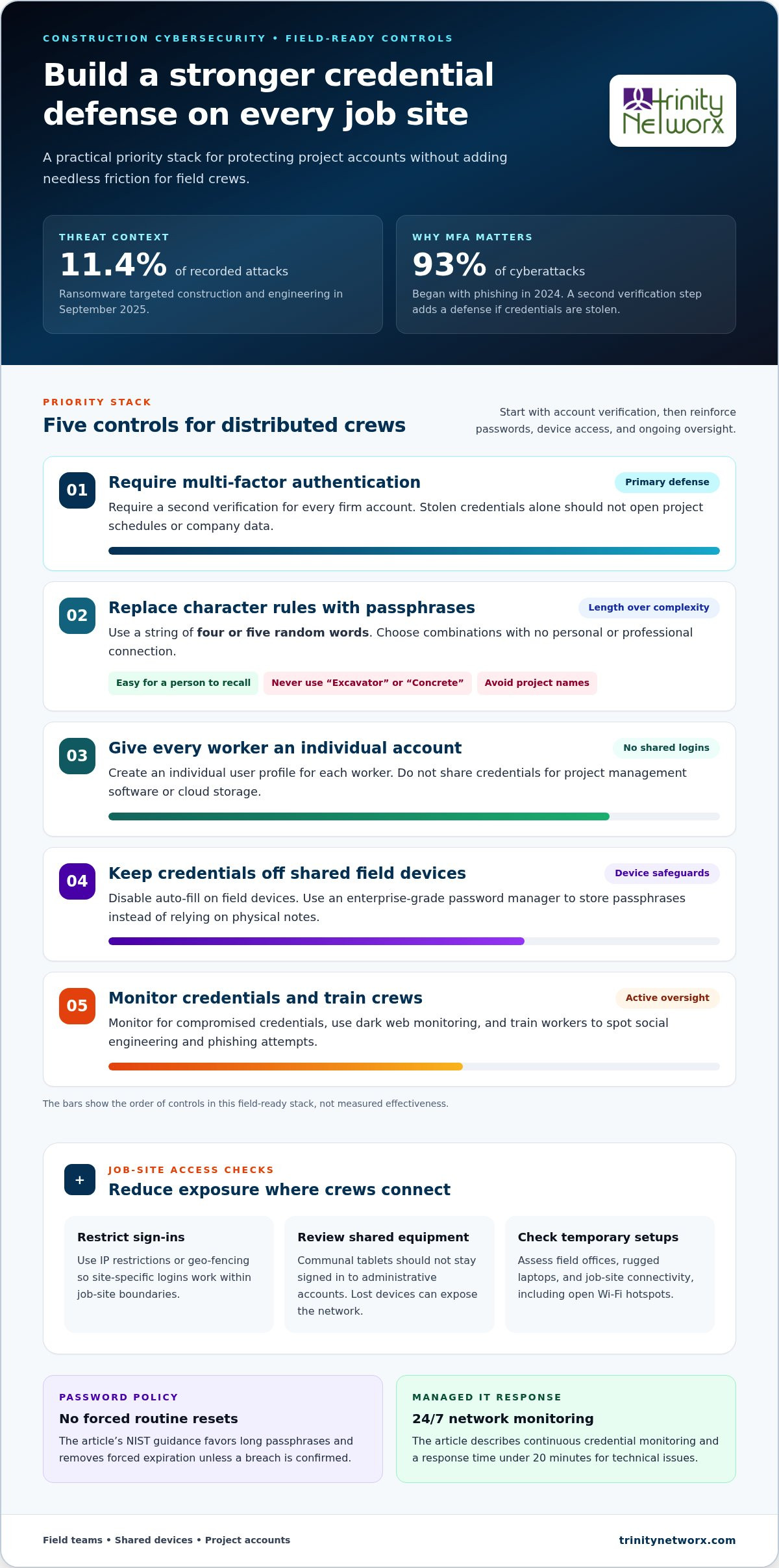
In September 2025, the construction and engineering sector became the primary target for ransomware, accounting for 11.4 percent of all recorded attacks. You know the drill on the job site. Field crews reuse easy codes or scribble passwords on the back of clipboards because complex requirements slow them down. Managing security across multiple projects feels like an impossible task when you just need to keep the cranes moving.
We provide field-tested best practices for employee password security that actually work for crews in the dirt. These protocols stop project delays and prevent data theft without making daily logins a nightmare. This guide shows you how to replace frustrating character rules with long, memorable passphrases and proactive credential monitoring to keep your firm secure and your projects on schedule.
• Identify job site vulnerabilities like shared tablets and rugged laptops that expose project data to unauthorized access.
• Implement best practices for employee password security by adopting NIST guidelines that favor long passphrases over complex, frequently changed codes.
• Use proactive monitoring and managed IT support to detect breached credentials before they lead to ransomware or project downtime.
• Simplify security protocols so field crews actually follow them, ensuring operational continuity across every distributed job site.
Construction job sites are high-speed hubs where field offices often lack physical security and crews prioritize production over IT protocols. This reality makes them prime targets for credential theft. When a superintendent leaves a rugged laptop in an unlocked trailer, or a subcontractor uses an open Wi-Fi hotspot at a new build, your project data is exposed. Following fundamental password security principles is difficult when the environment is working against you.
Shared devices represent a massive vulnerability. Communal tablets used for plan viewing or daily logs often stay logged into administrative accounts for convenience. If a single device is lost or accessed by an unauthorized party, your entire network becomes an open door. Applying best practices for employee password security requires moving away from shared credentials. You need individual accountability, even in the dirt.
Securing a distributed workforce starts with controlling how and where they log in. Use these tactical steps to protect your data:
• Require individual user profiles for every worker. Never allow shared logins for project management software or cloud storage.
• Disable auto-fill features on all field devices. Saving credentials on a tablet that stays in a vehicle is an invitation for disaster.
• Implement IP restrictions or geo-fencing. This ensures site-specific logins only function within the physical boundaries of the job site.
Proactive IT services for commercial construction ensure these best practices for employee password security are enforced without slowing down your crew. Trinity Networx, LLC helps you lock down the field so you can focus on the build. Contact our team at contact us to secure your job sites today.
Traditional IT security often relied on complex character requirements and mandatory 90-day resets. These outdated methods actually hurt security. Field workers simply write their passwords on the inside of their hard hats or on job site clipboards when rules are too rigid. Modern best practices for employee password security follow the latest NIST guidelines. These standards prioritize length over complexity and eliminate forced expiration unless a breach is confirmed.
Enforcing Multi-Factor Authentication (MFA) is your primary defense. Since 93 percent of cyberattacks began with phishing in 2024, MFA acts as a critical fail-safe. Even if credentials are stolen, attackers can't access project schedules without that second verification. It's a non-negotiable standard for every account in your firm. This simple step stops unauthorized access.
Shift your team toward long passphrases. A string of four or five random words is easy for a human to recall but impossible for hackers to guess. This reduces frustration for field crews while increasing your defensive posture.
• Encourage random word combinations that have no personal or professional connection.
• Strictly prohibit construction terms like 'Excavator', 'Concrete', or specific project names in any credential.
• Deploy enterprise-grade password managers to store these phrases. This ensures your team can access data quickly without relying on physical notes.
Implementing these standards requires a proactive security strategy that respects the pace of your job sites. We help firms deploy these protocols to stop data theft and maintain momentum. Our team ensures your security doesn't become a project bottleneck.
Policies on paper don't stop hackers. You need active oversight to ensure best practices for employee password security are actually followed across every job site. A managed IT partner acts as your primary defense, shifting your operations from reactive fixes to proactive protection. We monitor your network 24/7 to identify compromised credentials before they result in project downtime. This constant vigilance turns your security from a simple checklist into a strategic business driver.
Training is the second half of this defensive strategy. Your field crews are often the target of sophisticated social engineering. Regular security awareness training converts every worker into a human firewall. They learn to spot AI-enabled phishing attempts that bypass standard filters. When employees understand the stakes, they stop using weak passwords and start protecting the firm's progress. It's about building a culture of security that reaches the dirt.
We look beyond the office walls. Regular security assessments uncover vulnerabilities in temporary field office setups and communal device usage. Dark web monitoring allows us to identify stolen employee data before a breach occurs on your network. Effective cybersecurity and antivirus solutions ensure your operations remain continuous by blocking threats at the point of entry.
Don't leave your project data to chance. Our Southern California team provides the specialized expertise needed to secure complex construction environments. We guarantee a response time under 20 minutes for all technical issues. Reach out to the experts at Trinity Networx, LLC at contact us to lock down your firm today.
Maintaining a competitive edge in construction requires more than just heavy machinery; it demands an ironclad digital perimeter. You now have the blueprint to transition from vulnerable, shared logins to a resilient passphrase culture. Implementing best practices for employee password security ensures that your field data remains private and your schedules stay on track. Trinity Networx, LLC delivers the technical oversight needed to manage these protocols across every job site. Our 100 percent local US based help desk and 20 minute response guarantee provide the professional assurance your superintendents need to stay focused on the build. Take the next step toward a secure, high-performance operation. Secure your construction firm today and eliminate the IT nightmares that cause project delays. Confidence in your technology starts with a partner that understands the dirt.
The most effective policy follows NIST standards by prioritizing length over complexity. Require passphrases of at least 15 characters that use random words. This approach is easier for field crews to remember than strings of special characters. Implementing these best practices for employee password security reduces the likelihood of workers writing passwords on site equipment.
Staff should only change passwords when there is evidence of a compromise rather than on a set schedule. Mandatory 90 day rotations often result in employees choosing predictable patterns or weak variations. Modern security relies on proactive monitoring to detect breaches. This keeps your team productive and ensures that best practices for employee password security don't become a hurdle.
Multi-Factor Authentication is a non-negotiable requirement for every field office and remote worker. Since 93 percent of cyberattacks start with phishing, MFA serves as the final barrier against unauthorized access. It prevents attackers from using stolen credentials to access project data or financial records. We implement these solutions to ensure your firm remains secure regardless of location.
Secure communal devices by mandating individual user profiles and disabling all auto-fill features. You should also implement geo-fencing to restrict logins to the physical job site. Shared tablets are high-risk targets that require managed IT oversight to prevent data leaks. Contact our team at https://www.trinitynetworx.com/contact-us to lock down your field technology and eliminate project downtime.

Article by
Lance Reichenberger, Ph.D.., J.D. (Candidate)
Dr. Lance Reichenberger is the founder of Trinity Networx, a Southern California technology firm specializing in managed IT services, cybersecurity, network infrastructure, and business technology strategy. With nearly four decades of experience in the IT industry, he works with businesses to improve operational efficiency, strengthen security, and align technology with long-term growth objectives.
Lance focuses on proactive IT management, enterprise wireless infrastructure, cybersecurity integration, and scalable technology solutions for growing organizations throughout Southern California.
The content published on this website is provided for general informational and educational purposes only. Articles may be created, edited, or enhanced with the assistance of artificial intelligence and automation tools under the direction and review of Trinity Networx. While every effort is made to ensure accuracy and relevance, the information provided should not be considered professional, legal, financial, cybersecurity, or technical advice specific to your organization. Businesses should consult directly with a qualified professional regarding their unique environment, compliance requirements, and operational needs. Trinity Networx makes no warranties regarding completeness, reliability, or applicability of the information contained within these articles.
Schedule a brief conversation with Trinity Networx to discuss your business technology needs.
Get a practical roadmap built around your business, your users, your systems, and the technology issues that need attention first.
Put the right technology, support, security, and infrastructure in place so your business can grow, adapt, and move forward with confidence.

