

3281 E. Guasti Rd, STE 700, Ontario, CA 91761
1712 9th Ave SW, Watertown, SD 57201

A lost ruggedized tablet on a dusty jobsite represents more than a simple hardware replacement cost. It's a security hole. Research suggests the average cost of a lost corporate laptop can reach $49,246 when you factor in the high price of data breaches. You already feel the sting of paying for software licenses for employees who left the company months ago. It is a persistent drain on your bottom line. Rigorous IT inventory and asset management turns these reactive headaches into a strategic advantage for your firm. This article provides a field-to-office checklist to help you regain full visibility of every device and application in your fleet. You will learn how to stop losing profit to missing tech while building a predictable budget for future hardware refreshes. We are moving past the status quo. This ensures your data remains secure and your projects stay on schedule.
• Identify and eliminate ghost assets to stop budget leaks and close security gaps across all active jobsites.
• Establish a rigorous IT inventory and asset management system that tracks hardware from the field trailer to the corporate boardroom.
• Shift to proactive lifecycle management to ensure your field technology remains operational during critical inspections and pours.
• Stop losing profit to unused software licenses and missing ruggedized gear.
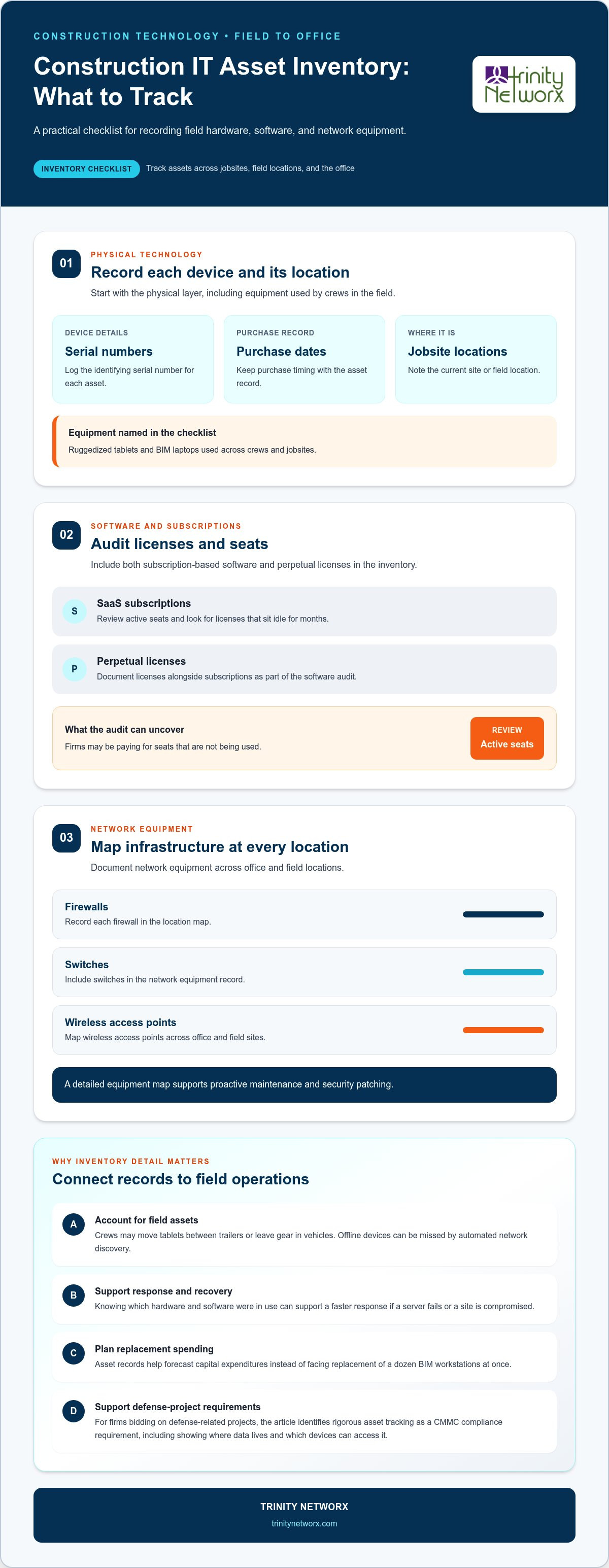
Static spreadsheets can't keep up with the movement of a live jobsite. Field crews move fast. They swap tablets between trailers or leave expensive ruggedized gear in unlocked vehicles. These habits create massive security holes that automated network discovery tools often miss because offline devices don't ping a server. Effective IT inventory and asset management requires a proactive bridge between your office records and actual field reality. Manual tracking in Excel leads to version control errors and outdated data. This results in a disconnected system where the office thinks a device is in San Diego while it's actually sitting in a foreman's truck in Ontario. Relying on luck is not a strategy.
Ghost assets are hardware items that stay on your balance sheet but have physically vanished. They drain your capital in silence. You might be paying for monthly cellular data plans or expensive Software Asset Management licenses for devices that sit at the bottom of a trench or in a former employee’s garage. These unused software licenses can drain thousands from your project budget every month without anyone noticing. When hardware goes missing, project managers often make emergency retail purchases to avoid delays. This kills your profit margins and bypasses your standard procurement controls. Beyond the money, every lost device increases your attack surface for ransomware because it remains a trusted entry point into your network until it is properly decommissioned. A rigorous approach to IT inventory and asset management ensures your field tech does not fail in the middle of a critical pour or inspection.
A complete inventory is the foundation of any professional IT management plan. Managing by guesswork is a recipe for downtime. This checklist ensures your team accounts for every piece of technology from the field trailer to the corporate boardroom. It's not just about counting boxes. It's about operational readiness. Properly documented assets allow for rapid virtualization and recovery during a disaster. If a server fails or a site is compromised, knowing exactly what hardware and software were in use allows for a high-speed response rather than a multi-day investigation. Use this framework as a benchmark to evaluate your current provider or internal team performance.
Start with the physical layer. Log serial numbers, purchase dates, and current jobsite locations for all ruggedized tablets and BIM laptops. This prevents the ghost asset problem and ensures accountability across your crews. For guidance on professional procurement and local support, review our IT hardware Ontario CA page. Next, audit all SaaS subscriptions and perpetual licenses. Many firms overpay for seats that sit idle for months. Finally, document every firewall, switch, and wireless access point across your office and field locations. This detailed map is vital for proactive maintenance and security patching. A professional IT inventory and asset management strategy turns these details into business momentum. If your current records are incomplete, you are vulnerable. You can consult with our experts to establish a secure baseline for your firm today.
Asset management is not just about tracking what you have. It is about planning what you need next. When you maintain a rigorous system for IT inventory and asset management, you gain the data required to predict capital expenditures. This prevents the sticker shock of replacing a dozen BIM workstations at once. Your virtual CIO uses this data to build a technology roadmap that aligns with your specific growth goals. We move you away from reactive fire fighting. Proactive maintenance ensures your field tech does not fail during a critical concrete pour or a high stakes inspection. Reliability is built on visibility.
For many Southern California subcontractors, this level of detail is no longer optional. If you bid on defense related projects, rigorous asset tracking is a hard requirement for CMMC compliance. You must prove where your data lives and which devices can access it. Generic risk profiles often fail to connect these dots to long term capital planning. We bridge that gap by linking technical health to your business health. This ensures your operations remain compliant and your overhead stays predictable. Similarly, protecting your physical assets is just as critical; you can discover NanoTech Exteriors to see how specialized roof rejuvenation and refurbishment can safeguard your facilities and help your construction firm avoid massive capital expenses.
Stop reacting to broken tech. Start managing your inventory as a strategic asset that drives project efficiency. A flat fee IT model works best when your inventory is clearly defined. This allows for predictable budgeting and ensures every device receives the necessary security updates. Learn more about our IT services for commercial construction to see how we handle ruggedized field tech. It is time to demand more from your technology. Contact our team at contact us for a free network assessment and take control of your fleet.
Stop letting missing tablets and unused licenses bleed your project margins. Professional IT inventory and asset management is the only way to move from reactive fire fighting to strategic growth. You have the checklist. You understand why spreadsheets fail in the dirt and heat of a jobsite. Now it's time to implement a system that secures your data and satisfies CMMC requirements for your defense contracts. We provide specialized construction industry expertise backed by a US-based 24/7 helpdesk. Our 60-minute response guarantee ensures your field operations never stall because of technical neglect or missing records. Don't wait for a hardware failure to reveal documentation gaps. Take control of your fleet today. Your profitability depends on it. Get Your Free Network and Security Assessment Today.
It protects your profit by preventing hardware loss and ensuring every device is a secure entry point. Construction firms often deal with ghost assets that drain budgets through unused cellular plans or software seats. Professional IT inventory and asset management provides the visibility required to bid on defense contracts where CMMC compliance is a non-negotiable requirement for subcontractors.
You should perform a physical audit at least once per quarter. While automated tools track network-connected devices daily, construction gear often goes offline in trailers or remote sites. Quarterly reviews ensure your records match the reality on the ground. This frequency prevents small discrepancies from becoming massive financial leaks during your annual tax or insurance reporting cycles.
Yes, specialized managed services use remote monitoring and asset tags to maintain visibility across multiple locations. We track devices as they move from the main office to various jobsite trailers. This level of oversight identifies security risks before they become breaches. It ensures your field crews always have functional technology regardless of where the project is located.
IT inventory is a simple list of what you own. IT asset management is the strategic lifecycle control of those items from procurement to disposal. While inventory tells you a tablet exists, management tells you its warranty status, security health, and when it needs replacement. This distinction allows for predictable budgeting and improved operational continuity across your entire firm.

Article by
Lance Reichenberger, Ph.D.., J.D. (Candidate)
Dr. Lance Reichenberger is the founder of Trinity Networx, a Southern California technology firm specializing in managed IT services, cybersecurity, network infrastructure, and business technology strategy. With nearly four decades of experience in the IT industry, he works with businesses to improve operational efficiency, strengthen security, and align technology with long-term growth objectives.
Lance focuses on proactive IT management, enterprise wireless infrastructure, cybersecurity integration, and scalable technology solutions for growing organizations throughout Southern California.
The content published on this website is provided for general informational and educational purposes only. Articles may be created, edited, or enhanced with the assistance of artificial intelligence and automation tools under the direction and review of Trinity Networx. While every effort is made to ensure accuracy and relevance, the information provided should not be considered professional, legal, financial, cybersecurity, or technical advice specific to your organization. Businesses should consult directly with a qualified professional regarding their unique environment, compliance requirements, and operational needs. Trinity Networx makes no warranties regarding completeness, reliability, or applicability of the information contained within these articles.
Schedule a brief conversation with Trinity Networx to discuss your business technology needs.
Get a practical roadmap built around your business, your users, your systems, and the technology issues that need attention first.
Put the right technology, support, security, and infrastructure in place so your business can grow, adapt, and move forward with confidence.

