

3281 E. Guasti Rd, STE 700, Ontario, CA 91761
1712 9th Ave SW, Watertown, SD 57201

Cloud migration makes financial sense when the costs it avoids, such as server hardware, power, cooling, and maintenance, outweigh migration work and ongoing cloud charges. A cost-benefit analysis of moving servers to the cloud should also account for the value of freeing IT staff from routine infrastructure upkeep. For construction businesses, include the systems and project data teams rely on to keep work moving.
It’s easy to focus on hardware savings. The harder part is accounting for application changes, data transfer, system integration, staff training, security, compliance, and any period when old and new environments run side by side. Leaving out these expenses can make the business case look stronger than it is.
This article explains which cloud expenses and potential savings to compare, why migration budgets often fall short, and how to weigh risks alongside financial returns. You’ll get a practical way to assess a move against construction operations, not just a server invoice.
• Compare cloud security controls with the compliance work your construction business must maintain, including the tools, audits, and access protections required for sensitive project data.
• Build the operating-cost picture around compute, storage, network use, and added services, not just the server bill.
• Include application changes, system integration, staff training, and overlapping environments in the migration budget to avoid undercounting the work.
• Measure potential savings against workload needs and ongoing usage, then use managed IT support to keep cloud costs and construction operations in view.
Cloud security changes the work; it doesn’t remove the need to manage risk. In a construction firm, project drawings, employee records, and payment data may each need different access controls. Inventory the data, then map who can access it, where it moves, and how long it remains in storage. This gives your team a practical basis for estimating the work involved in setup and validation.
Compliance depends on the information involved and the business’s obligations. GDPR and HIPAA can require specific security measures when businesses move sensitive data to the cloud. PCI-DSS may also apply when payment card information is involved. These frameworks don’t automatically apply to every construction business. Identify relevant requirements before migration, and budget staff or specialist time to review controls, test access, and document results.
Cloud providers may offer encryption, identity and access management, multifactor authentication, and threat detection. These features can reduce the need to build every control from scratch, but proper configuration still matters. For example, a project manager’s account shouldn’t automatically grant access to payroll records. Include the software, setup, monitoring, and staff training needed to protect each workload.
Budget for validation after data moves. Test permissions, encryption settings, backup access, and recovery procedures against the company’s compliance requirements. Regular audits and assessments can uncover vulnerabilities as applications and users change. Cloud migrations may also bring added expenses for specialized security tools, audits, or third-party certifications. A cost-benefit analysis should compare those costs with existing security spending, not assume that cloud hosting removes them. Explore cloud computing services as part of that assessment.
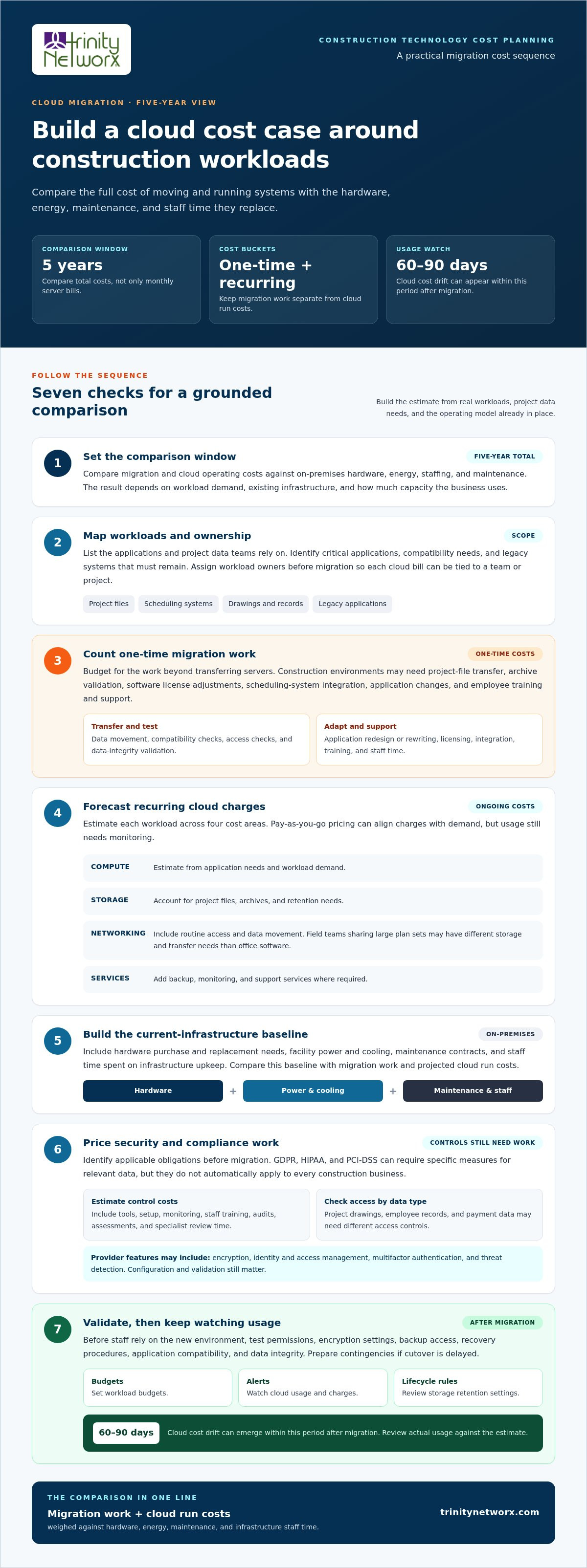
Compare total costs over five years, not just monthly server bills. Add migration and cloud operating costs, then weigh them against on-premises hardware, energy, staffing, and maintenance. The result depends on workload demand, existing infrastructure, and how much capacity the business actually uses.
Migration costs are one-time project expenses; cloud operating costs recur for as long as workloads run. Separate the two in your budget so setup work doesn’t obscure ongoing charges for computing, storage, network traffic, and support.
For a construction firm, migration labor may include transferring project files, testing software, integrating scheduling systems, and adapting applications that don’t fit the new environment. If old and cloud systems overlap during cutover, include the cost of both in the five-year comparison. Track workload ownership before migration so you can assign each bill to a team or project.
Cloud service costs vary with resource use across computing, storage, networking, and additional services. Pay-as-you-go pricing can align charges with demand, but each workload still needs monitoring.
Estimate computing from application needs, storage from project files and retention, and networking from routine access and data movement. Include backup or monitoring services where required. A field team sharing large plan sets can create different storage and transfer needs than office software. Review usage and set budgets, alerts, and storage lifecycle rules; cloud cost drift can appear within 60 to 90 days after migration.
On-premises infrastructure requires capital investment in hardware, along with power, cooling, maintenance, and staff time. Cloud hosting shifts spending toward operating charges and reduces the need to buy and maintain physical servers.
For a five-year comparison, include hardware replacement needs, facility energy, maintenance contracts, and labor under the current model. Then compare those costs with projected cloud run costs and migration work. Existing staff may spend less time maintaining infrastructure, while cloud capacity can change with demand. To assess the construction workload and its cost drivers, discuss a cloud cost model for your business.
Cloud migration estimates often miss work beyond transferring servers. Construction teams also need to plan for application readiness, access to project data, and costs that continue after deployment.
Migration planning coordinates data protection, testing, and cutover to limit disruption to business operations. That matters when construction teams need current drawings, schedules, and project records on site.
Inventory critical applications, identify those that need immediate attention, and plan for legacy systems that must remain. Test compatibility and recovery before transferring production data. Validate access and data integrity before staff rely on the new environment, and prepare contingencies in case cutover is delayed.
Hidden expenses can include data transfer, software licensing, system integration, employee training, and support. Leaving them out weakens both the budget and the investment decision.
For example, a construction application may need a license adjustment or compatibility work before it can run in the cloud. Large project archives add transfer and validation work. Include employee time for training and support, as well as any application redesign or rewriting needed for the new environment.
A workload strategy assigns each application a migration path based on business priority, compatibility, and operational needs. This helps organizations decide what to move first, consolidate, retire, or retain.
Complexity and overlap between old and new systems also affect expenses.
Pay-as-you-go charges can rise when workloads consume more computing, storage, or network capacity than planned. Without tagging, budgets, alerts, and storage lifecycle rules, cloud cost drift can appear within 60 to 90 days after migration.
Delayed cutovers and compatibility issues can disrupt construction operations. Assign workload ownership before migration, monitor usage, and test deployment plans. Contact the team to discuss cloud migration planning.
Trinity Networx, LLC helps construction businesses assess cloud decisions alongside the systems that keep project teams connected. Managed IT Services can support planning and ongoing oversight, while Cybersecurity Solutions and Data Backup & Recovery address business data protection and recovery. Co-Managed IT can also support internal teams through migration and day-to-day operations.
Turn to Trinity Networx when project software, shared files, and field access need to remain dependable during a server move. A practical review connects workload requirements with security, backup, and operating needs, so the business case reflects how construction teams work, not just server costs.
Contact Trinity Networx to discuss your cloud plans.
A cloud decision should support how construction teams plan, coordinate, and deliver work, not create another technology burden. Use the analysis as a working business tool: connect migration choices to project priorities, assign ownership for ongoing decisions, and revisit assumptions as applications and field needs change. This keeps technology decisions tied to operational goals.
A cost-benefit analysis of moving servers to the cloud gives your team a clear basis for deciding what to move and what to retain. Trinity Networx, LLC offers Managed IT Services, Cybersecurity Solutions, and Data Backup & Recovery to support business technology planning, protection, and continuity.
Contact Trinity Networx about your cloud migration and take the next step with a plan shaped around your construction operations.
Moving suitable systems to the cloud can give office and field teams access to shared business applications without relying on a server room at one location. For construction firms, this can support coordination between project offices and active sites. The decision still depends on application compatibility, connectivity, data handling needs, and how teams work.
Consider a move when its expected operational and financial advantages outweigh migration work and ongoing cloud expenses over a defined period. Start with a workload that affects daily coordination, such as project files or scheduling software. Compare its current support demands with the proposed cloud setup, then account for staff workflows and any systems that need to remain on-premises.
The main benefits are easier access to business systems across locations, flexible computing capacity, and less reliance on company-owned server hardware. Construction teams can assess whether these advantages fit office-to-field coordination, project collaboration, or changing workload demand. The strongest case connects each benefit to a real operational need rather than moving every application by default.
Provider-managed infrastructure updates reduce the server upkeep an internal team handles directly. This can free staff to focus on construction technology tasks, such as supporting project applications and coordinating access for office and field users. Businesses still need to manage application settings, user permissions, and data practices, so provider maintenance doesn’t replace internal oversight.
A cost-benefit analysis of moving servers to the cloud gives decision-makers a structured basis for comparing current operations with a proposed environment. It brings direct expenses, staff impact, workload requirements, and business effects into one view. For construction leaders, it can clarify which systems support project delivery, which can move, and which should remain in place for now.

Article by
Lance Reichenberger, Ph.D.., J.D. (Candidate)
Dr. Lance Reichenberger is the founder of Trinity Networx, a Southern California technology firm specializing in managed IT services, cybersecurity, network infrastructure, and business technology strategy. With nearly four decades of experience in the IT industry, he works with businesses to improve operational efficiency, strengthen security, and align technology with long-term growth objectives.
Lance focuses on proactive IT management, enterprise wireless infrastructure, cybersecurity integration, and scalable technology solutions for growing organizations throughout Southern California.
The content published on this website is provided for general informational and educational purposes only. Articles may be created, edited, or enhanced with the assistance of artificial intelligence and automation tools under the direction and review of Trinity Networx. While every effort is made to ensure accuracy and relevance, the information provided should not be considered professional, legal, financial, cybersecurity, or technical advice specific to your organization. Businesses should consult directly with a qualified professional regarding their unique environment, compliance requirements, and operational needs. Trinity Networx makes no warranties regarding completeness, reliability, or applicability of the information contained within these articles.
Schedule a brief conversation with Trinity Networx to discuss your business technology needs.
Get a practical roadmap built around your business, your users, your systems, and the technology issues that need attention first.
Put the right technology, support, security, and infrastructure in place so your business can grow, adapt, and move forward with confidence.

