

3281 E. Guasti Rd, STE 700, Ontario, CA 91761
1712 9th Ave SW, Watertown, SD 57201

What if a production line is ready to run, but a cabling change or network move leaves scanners, ERP access, or line visibility unavailable? The cost of IT downtime for a manufacturing company can extend well beyond idle equipment, yet many teams struggle to put a defensible figure on the disruption. Construction and relocation projects add risk when technology dependencies are not identified before work begins.
An outage can affect production and office teams at the same time. The challenge is connecting that interruption to measurable business impact and preventing avoidable project-related failures. This article explains how to estimate downtime using internal production and labor figures, map critical systems before construction or relocation, and plan practical safeguards. The focus is on network, cabling, connectivity, and recovery decisions that help keep facility changes from becoming production interruptions.
• Estimate the cost of IT downtime for a manufacturing company using internal figures for lost output, idle labor, delayed orders, recovery work, and material loss.
• Map which production, office, and field workflows depend on networks and business applications before construction or relocation begins.
• Coordinate project contacts, technology changes, and recovery tests early to reduce the risk that facility work disrupts operations.
• Review monitoring, backup verification, and disaster recovery plans, then contact Trinity Networx, LLC about construction-focused IT planning.
Downtime is not limited to a production line standing still. If a network interruption during construction or relocation blocks ERP access, scanning, label printing, or coordination between the office and the facility, technology-dependent work may stop even while machinery remains operational. The Downtime definition includes both industrial and computing contexts, a useful distinction when deciding what belongs in your estimate.
Track losses that apply to the specific incident rather than adding every possible category. Consider lost output, idle labor, delayed orders, recovery work, and damaged or unusable material. Avoid double counting: delayed output, for example, should not be recorded both as lost production and as a separate order loss unless those are distinct impacts.
Record when the interruption began and ended, including when affected work could resume.
Identify the line, office task, or facility workflow that was interrupted.
Use company-recorded output or labor costs for the affected work and time period.
Document recovery work and material loss, along with confirmed order impacts.
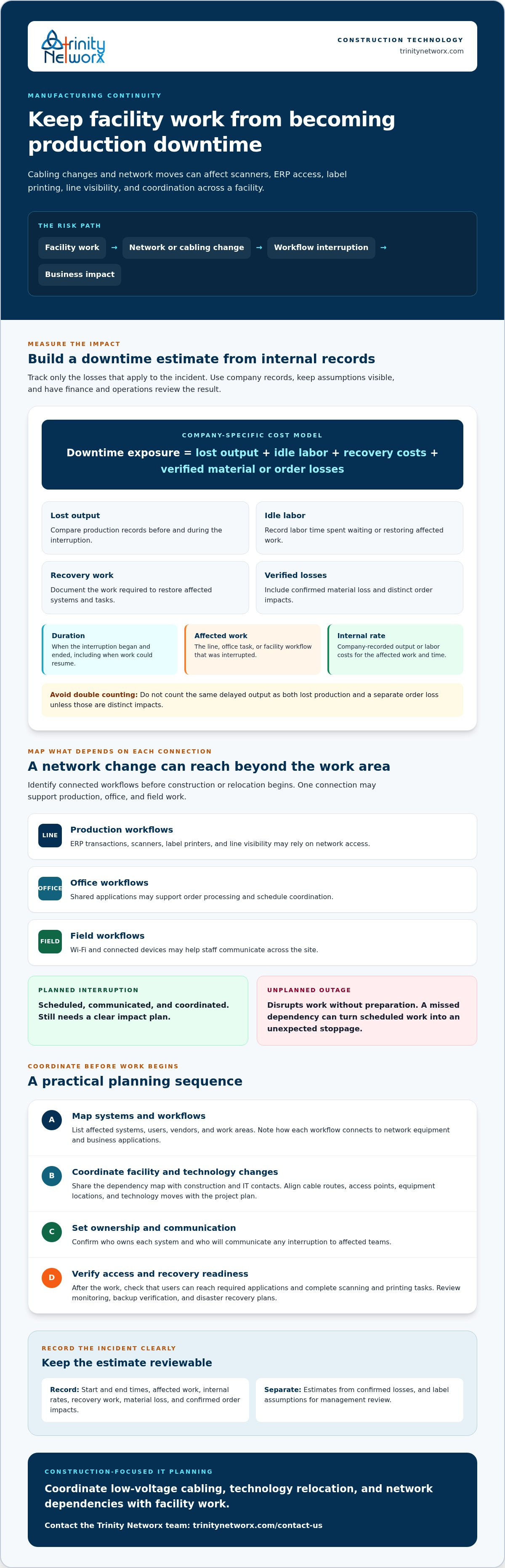
Use a company-specific formula: downtime exposure = lost output + idle labor + recovery costs + verified material or order losses. Calculate each component from records that finance and operations can review. For example, compare production records before and during the interruption, then document labor time spent waiting or restoring affected work. Keep estimates separate from confirmed losses, label assumptions, and have management review the result. For industry context, see IT services for manufacturing.
Include construction changes in the assessment. Planned cabling work, network moves, or facility expansion can affect connected workflows when dependencies have not been mapped. If a project is planned at a facility in California, Nevada, Arizona, or Utah, coordinate technology needs with the construction schedule early. For construction-focused IT planning around your project, contact Trinity Networx, LLC.
A facility project can interrupt more than the equipment inside the work area. Production may rely on network access for ERP transactions, scanners, label printers, or line visibility. Office teams may need shared applications to process orders and coordinate schedules. Field staff may depend on Wi-Fi or connected devices to communicate across the site. When one connection supports several workflows, a cabling change or network move can affect work well beyond the construction zone.
A planned interruption is scheduled, communicated, and coordinated; an unplanned outage disrupts work without that preparation. Planned work still needs a clear impact plan. A missed dependency can turn a scheduled change into an unexpected production stoppage, so identify what relies on each connection before the work begins.
Start with a practical dependency map. List affected systems, users, vendors, and work areas, then note how each workflow connects to network equipment and business applications. For each planned change, identify the teams that use the affected service and any connected equipment, such as access points or printers. Share the map with construction and IT contacts before work begins. Coordinate cable routes, access points, equipment locations, and technology moves with the project plan, rather than waiting until walls or work areas are closed.
Construction-focused IT planning can account for both building work and operational needs. Trinity Networx, LLC provides commercial construction IT services, including low-voltage cabling and technology relocation support. Early coordination can help teams identify network dependencies before they become project surprises. For additional context on equipment continuity, IBM outlines ways to reduce machine and equipment downtime.
Before approving a change, confirm who owns each system, who will communicate any interruption, and how teams will verify access after the work. Include a clear check for each affected workflow, such as confirming that users can reach required applications or complete scanning and printing tasks. For help planning technology around a facility project, talk with Trinity Networx, LLC about your project.
Facility work creates technology risks that are easier to manage before crews move equipment or alter cabling. The IIoT World reports unplanned manufacturing downtime can cost a company as much as $260,000 an hour, citing Aberdeen Research. That figure is not a forecast for your facility or a measure of IT downtime alone. It does show why project teams need a clear plan for systems production depends on.
Record critical systems, network connections, users, and work areas that could be affected by construction or relocation.
Name who approves technology changes and who tells production, office, and construction teams about operational impacts.
Coordinate cabling, equipment moves, access requirements, and the sequence of work with the facility project schedule.
Confirm backup status and rehearse how affected systems and workflows will be restored if a change causes an interruption.
Monitoring can help teams spot technology issues, while verified backups and disaster recovery planning give them a defined path to restore data and services. Neither removes every risk or promises zero downtime. Before work begins, review what the recovery arrangements cover, who makes decisions, and how teams will confirm systems are available again. Trinity Networx, LLC offers data backup and disaster recovery services, along with proactive IT monitoring.
For construction or relocation work in California, Nevada, Arizona, or Utah, early technical coordination can help keep project decisions aligned with operational needs. Contact Trinity Networx, LLC to discuss IT planning for your facility project.
A useful estimate of the cost of IT downtime for a manufacturing company starts with internal production, labor, and recovery records. But numbers alone do not explain which workflows depend on network access, who approves technology changes, or how systems will be checked after construction or relocation work.
Early coordination can surface risks before cabling, equipment moves, or facility changes affect production. Trinity Networx provides construction-focused IT planning and technology relocation support, along with low-voltage cabling, proactive monitoring, data backup, and disaster recovery. These services can help manufacturers prepare for technology changes and define recovery steps. No plan can promise that interruptions will never happen, but preparation gives your team a clearer way to respond and protect continuity.
Discuss construction-focused IT planning for your manufacturing operation. With dependencies mapped and recovery arrangements reviewed, your next facility project can move forward with greater confidence.
Calculate the cost of IT downtime for a manufacturing company by adding documented lost output, idle labor, recovery work, and verified material or order losses for the interruption period. Apply internal production and labor rates, then separate confirmed figures from estimates. For example, record how a network change affects scanner use or ERP transactions, and ask finance and operations to review the assumptions.
Include lost production, labor time spent waiting, recovery work, delayed orders, and material that becomes unusable because of the interruption. Use records such as production logs, payroll data, recovery work entries, and order records to verify impacts. Keep estimates distinct from confirmed losses, and check for overlap so the same interruption is not counted twice under different categories.
Yes. Construction, expansion, cabling changes, or technology relocation can affect network connections that production and office workflows rely on. A moved access point, interrupted cable route, or equipment change could disrupt Wi-Fi, application access, scanning, or communication. Map affected systems and work areas before the project begins, then coordinate technology changes with construction planning to reduce unexpected disruption.
Document technology dependencies, assign people to approve changes and communicate impacts, plan work with the construction schedule, and test recovery arrangements before facility work starts. Verify backups and review disaster recovery plans. Proactive monitoring can help teams identify technology issues. Manufacturers in California, Nevada, Arizona, and Utah can discuss construction-focused IT planning with Trinity Networx, LLC.

Article by
Lance Reichenberger, Ph.D.., J.D. (Candidate)
Dr. Lance Reichenberger is the founder of Trinity Networx, a Southern California technology firm specializing in managed IT services, cybersecurity, network infrastructure, and business technology strategy. With nearly four decades of experience in the IT industry, he works with businesses to improve operational efficiency, strengthen security, and align technology with long-term growth objectives.
Lance focuses on proactive IT management, enterprise wireless infrastructure, cybersecurity integration, and scalable technology solutions for growing organizations throughout Southern California.
The content published on this website is provided for general informational and educational purposes only. Articles may be created, edited, or enhanced with the assistance of artificial intelligence and automation tools under the direction and review of Trinity Networx. While every effort is made to ensure accuracy and relevance, the information provided should not be considered professional, legal, financial, cybersecurity, or technical advice specific to your organization. Businesses should consult directly with a qualified professional regarding their unique environment, compliance requirements, and operational needs. Trinity Networx makes no warranties regarding completeness, reliability, or applicability of the information contained within these articles.
Schedule a brief conversation with Trinity Networx to discuss your business technology needs.
Get a practical roadmap built around your business, your users, your systems, and the technology issues that need attention first.
Put the right technology, support, security, and infrastructure in place so your business can grow, adapt, and move forward with confidence.

