

3281 E. Guasti Rd, STE 700, Ontario, CA 91761
1712 9th Ave SW, Watertown, SD 57201

Seventy percent of construction executives reported their firm faced at least one cybersecurity incident in the past year. That statistic is a wake up call for every general contractor. You already know that a laptop on a dusty, remote job site is a sitting duck for physical damage. However, the digital threats are often more dangerous and harder to spot. Standard antivirus programs regularly miss the sophisticated, fileless attacks that can halt your operations in an instant.
Implementing endpoint detection and response (EDR) for business laptops ensures that your field staff stays productive without risking the entire network. You will learn how this specialized protection prevents project killing downtime by securing your mobile devices against modern cyber threats. This guide explains how to gain clear visibility into device activity and maintain a security stack that performs even on slow job site internet. We focus on turning your field technology into a reliable driver of progress.
• Identify why standard antivirus fails to catch sophisticated attacks on remote job sites.
• See how endpoint detection and response (EDR) for business laptops monitors every device action to catch malicious activity in real time.
• Stop project killing downtime by isolating infected laptops before they can spread malware to your main office network.
• Secure your field staff with a security model that works effectively on slow job site internet without adding internal IT overhead.
Legacy antivirus software is essentially a digital wanted poster system. It works by checking files against a database of known threats. If the virus isn't on the list, it gets through. This reactive approach creates a dangerous gap for field laptops. Hackers constantly modify their code to stay one step ahead of these databases. In the construction sector, where staff often work on remote, unsecured networks, waiting for a signature update is a recipe for disaster.
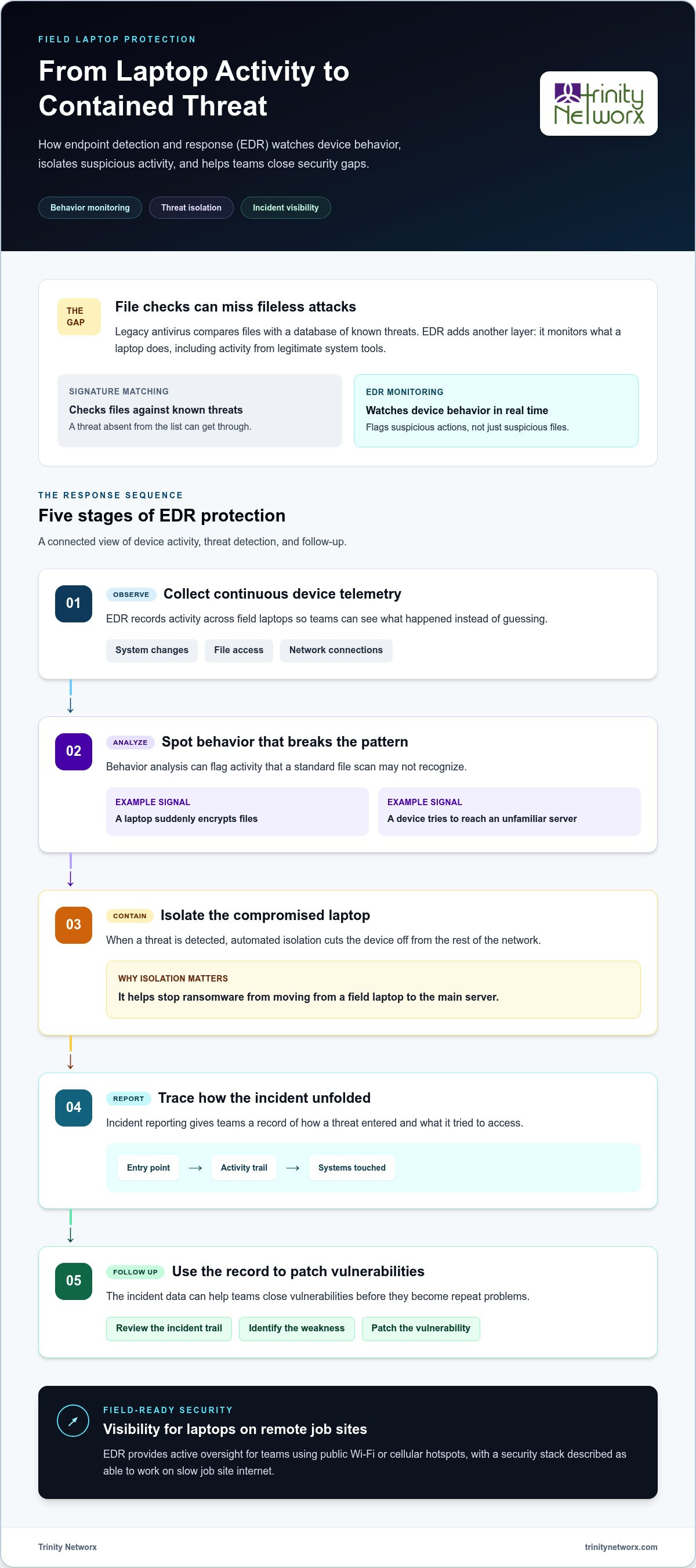
Modern criminals favor fileless attacks. These threats don't download a traditional file that antivirus can scan. Instead, they exploit legitimate system tools to run malicious commands in memory. Endpoint detection and response (EDR) for business laptops solves this by watching what the computer actually does, not just what files it contains. Monitoring behavior identifies anomalies that signature matching misses entirely. It's the difference between checking an ID and watching for suspicious behavior at the gate. Endpoint detection and response (EDR) provides the active oversight necessary to stop these invisible intruders.
Proactive protection is non negotiable for field operations. While legacy tools sit idle, cybersecurity and antivirus Ontario services using EDR monitor device behavior in real time. If a laptop suddenly starts encrypting files or trying to access the main office server at 2 AM, the system flags it. This prevents lateral movement. Without this oversight, a single compromised laptop on a job site can become a bridge for hackers to infiltrate your entire corporate network. Endpoint detection and response (EDR) for business laptops turns every device into a sensor that actively hunts for trouble. This level of visibility is essential when your team relies on public Wi-Fi or cellular hotspots to submit project updates. It ensures that a breach at the job site doesn't bring down your entire headquarters.
Effective security requires more than just a perimeter wall. It demands constant visibility. Endpoint detection and response (EDR) for business laptops functions like a black box flight recorder for your field devices. It collects continuous telemetry. This data logs every system change, file access, and network connection. If a project manager’s laptop starts acting up on a job site, you don't have to guess what happened. You have a forensic record. This visibility is so critical that the federal government highlighted its necessity in the Executive Order on Cybersecurity, mandating better detection across all agencies.
Suspicious activity often flies under the radar of traditional scans. For example, a laptop might suddenly attempt to access a database it never uses or try to ping servers in a different country. EDR identifies these patterns instantly. Once the system detects a threat, it triggers automated isolation. The compromised device is cut off from the rest of the network. This prevents ransomware from jumping from a field laptop to your main server. Protecting sensitive IT services for commercial construction means ensuring that one mistake doesn't halt an entire project. It keeps your field data safe without slowing down your crew.
Detailed incident reporting provides the final piece of the puzzle. You get a clear map of how the threat entered and what it tried to touch. This data allows you to patch vulnerabilities before they become repeat problems. Deploying endpoint detection and response (EDR) for business laptops gives you the upper hand against modern attackers. If you're concerned about your current field visibility, talk to our team about a proactive security assessment. We ensure your technology stays out of the way of your progress.
Every minute a project manager's laptop stays offline, your project costs climb. Labor hours vanish while staff waits for instructions or plans. You don't just lose time; you lose momentum. Managed endpoint detection and response (EDR) for business laptops acts as a strategic driver for operational continuity. It isn't just about stopping hackers. It's about ensuring your field staff has the tools they need to stay productive. Proactive monitoring identifies potential hardware failures before a device actually dies, allowing you to swap equipment without missing a beat. For specialized enterprise security and data loss prevention, oadtechnologies.com offers comprehensive managed detection solutions.
Building an internal IT team to watch laptops 24/7 is expensive. It adds significant overhead that eats into your margins. Outsourcing this to experts provides professional assurance without the high headcount. You can read more about how specialist managed IT services help maintain infrastructure and security for growing firms. You get steady competence and a security stack that works on slow job site internet. This approach allows you to focus on building, not troubleshooting. Using Endpoint detection and response (EDR) ensures that your mobile workforce remains a secure extension of your office.
Speed is everything on a job site. Trinity Networx operates a Southern California NOC with a 20 minute response guarantee for technical issues. We don't believe in the status quo of waiting hours for a callback. Our managed cybersecurity services use a flat fee model to keep your budgeting predictable. You can reduce IT costs by 30 to 50 percent while gaining a team of authoritative experts. This setup ensures that your endpoint detection and response (EDR) for business laptops is always active and monitored. We value your time and your growth. If you are tired of reactive support, contact our team to secure your operations today.
Standard antivirus software leaves your field laptops vulnerable to sophisticated, fileless attacks that can halt your progress. Implementing endpoint detection and response (EDR) for business laptops is a strategic move that treats your technology as a core driver of progress. You gain continuous visibility and the ability to isolate threats before they spread. This proactive approach prevents project killing downtime and protects your labor investment. Trinity Networx is a CIO Review Top 20 IT Services Company with a 100 percent in-house local staff ready to support your Southern California operations. We back our work with a 20 minute response guarantee for all technical issues. Don't let a cyberattack derail your schedule or damage your reputation. Secure your field operations and contact Trinity Networx today to ensure your operations remain stable and profitable.
Yes, EDR provides continuous protection regardless of your connection to the corporate office. The software agent lives directly on the device. It records telemetry even when a project manager is on a remote job site with no internet. Once the laptop reconnects to a hotspot or Wi-Fi, it syncs that data with our Southern California NOC. This ensures your field staff stays secure anywhere in California, Nevada, Arizona, or Utah.
Modern EDR solutions are designed to be lightweight and won't bog down your hardware. Unlike legacy security tools that perform resource heavy scans, EDR monitors behavioral patterns in the background. It uses minimal CPU and memory. This allows your team to run demanding software like Building Information Modeling (BIM) without performance lag. We ensure your existing laptops remain productive while staying protected against modern threats.
EDR identifies ransomware by spotting behaviors associated with encryption. If a process starts rapidly changing file extensions or locking folders, the system triggers an immediate alert. Automated isolation then cuts the device off from the network to prevent the infection from spreading. Endpoint detection and response (EDR) for business laptops allows us to contain the threat and roll back affected files to their original state.

Article by
Lance Reichenberger, Ph.D.., J.D. (Candidate)
Dr. Lance Reichenberger is the founder of Trinity Networx, a Southern California technology firm specializing in managed IT services, cybersecurity, network infrastructure, and business technology strategy. With nearly four decades of experience in the IT industry, he works with businesses to improve operational efficiency, strengthen security, and align technology with long-term growth objectives.
Lance focuses on proactive IT management, enterprise wireless infrastructure, cybersecurity integration, and scalable technology solutions for growing organizations throughout Southern California.
The content published on this website is provided for general informational and educational purposes only. Articles may be created, edited, or enhanced with the assistance of artificial intelligence and automation tools under the direction and review of Trinity Networx. While every effort is made to ensure accuracy and relevance, the information provided should not be considered professional, legal, financial, cybersecurity, or technical advice specific to your organization. Businesses should consult directly with a qualified professional regarding their unique environment, compliance requirements, and operational needs. Trinity Networx makes no warranties regarding completeness, reliability, or applicability of the information contained within these articles.
Schedule a brief conversation with Trinity Networx to discuss your business technology needs.
Get a practical roadmap built around your business, your users, your systems, and the technology issues that need attention first.
Put the right technology, support, security, and infrastructure in place so your business can grow, adapt, and move forward with confidence.

