3281 E. Guasti Rd, STE 700, Ontario, CA 91761
1712 9th Ave SW, Watertown, SD 57201

What protects patient data when a clinic’s systems, staff access, and recovery plans all need to work together? Healthcare IT solutions coordinate security, compliance support, backups, and disaster recovery. HIPAA established a legislative foundation for health information privacy and security, according to the U.S. Congress.
Meeting obligations takes more than paperwork; it depends on the technology and daily practices behind care. This article explains how technology management can support HIPAA-focused compliance, help limit risks to patient data, and prepare systems to recover after disruption. It also outlines what an IT provider can do, from security oversight to backup planning, to keep operational continuity in view.
• See how HIPAA, HITRUST, and PCI considerations shape healthcare security and compliance support.
• Learn how infrastructure planning, managed networks, and enterprise Wi-Fi can support clinical technology.
• Understand what backup and recovery planning should account for when patient data and care systems are at stake.
• Recognize when cybersecurity, managed IT, backup and recovery, or co-managed support may fit your organization.
The Health Insurance Portability and Accountability Act (HIPAA) established a legislative foundation for security and privacy, according to the U.S. Congress. Managed IT support can map systems, user access, and incident procedures to an organization’s HIPAA responsibilities. This connects policy to daily operations, including how staff access patient records.
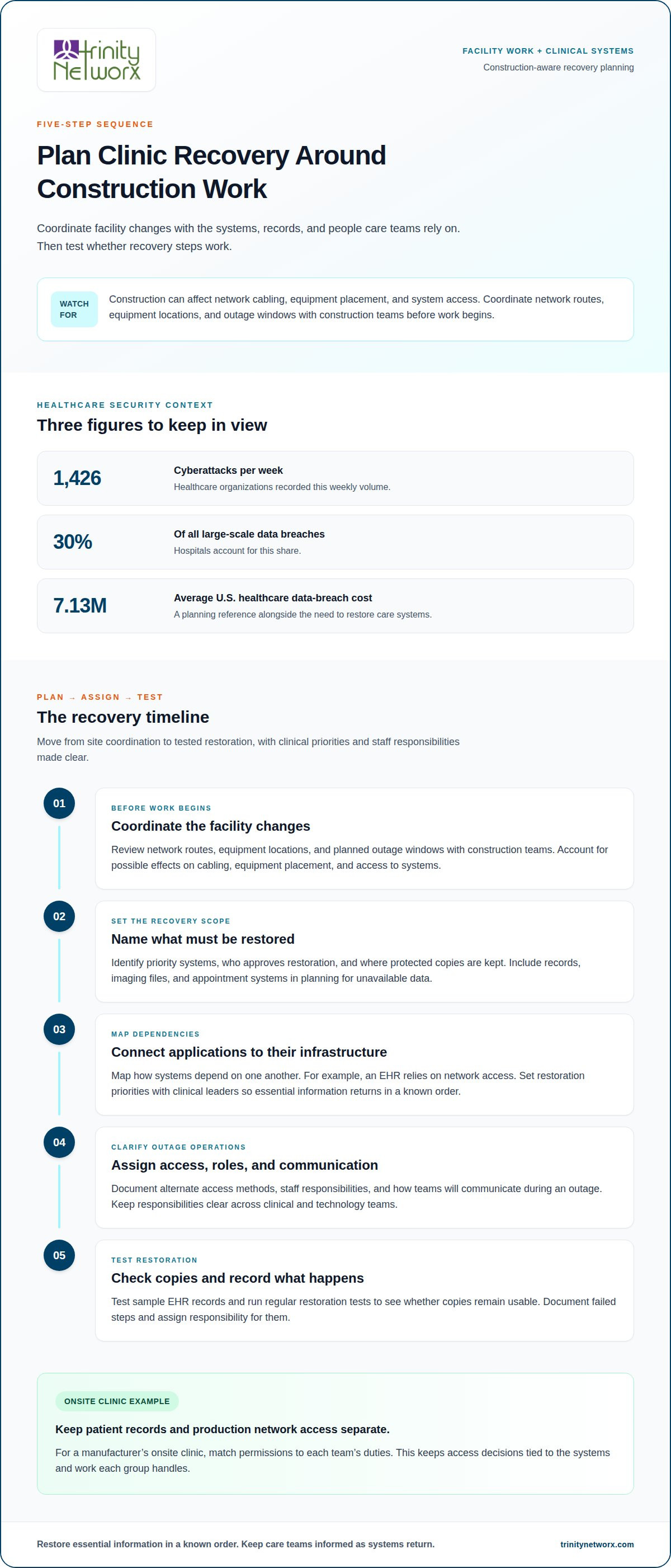
Healthcare organizations recorded 1426 cyberattacks per week. Threat monitoring and response planning therefore matter to routine operations. Security teams can review account permissions, apply software updates, monitor alerts, and set clear incident escalation procedures. These steps reduce openings attackers may exploit and help clinical teams respond when suspicious activity affects applications or connected devices.
When choosing a healthcare IT provider, compare its understanding of HIPAA and HITECH requirements, its security practices, and how it documents controls. Clarify whether HITRUST or PCI DSS applies to specific systems, such as payment-card processing. Relevance depends on the organization’s operations and the data it handles.
Healthcare IT providers can help reduce cybersecurity risks by reviewing access, monitoring systems, and applying security updates. They can also coordinate incident response and backup planning, so teams understand what to do if an account or application is compromised. Clear responsibilities for medical staff and technology teams help keep protective measures consistent.
Start a compliance discussion by confirming the provider understands HIPAA and HITECH requirements, then clarify how they relate to the organization’s technology needs. HIPAA presents technological challenges for healthcare providers, so understanding its role is part of choosing support that fits the organization.
PCI DSS is an industry standard that can also shape healthcare technology decisions. Ask whether the provider understands the standard and how it applies to your systems. Discussing HIPAA, HITECH, and PCI DSS together helps focus the conversation on the requirements and standards relevant to your organization.
Healthcare IT solutions connect clinical software, networks, devices, and data workflows. Infrastructure may include secure servers, cloud services, managed network equipment, and enterprise Wi-Fi. Electronic health records (EHRs), telemedicine, and patient-monitoring applications rely on these systems. Healthcare IT consulting maps existing equipment and workflows before recommending upgrades. A planned IT infrastructure can help organizations modernize systems while supporting day-to-day care.
Costs in the United States depend on factors such as the number of locations, applications, devices, and support needs. Providers receive pricing after requesting a quote, with project scope and service requirements shaping the amount. Well-planned technology can give care teams more reliable access to records and support smoother coordination. Patients may benefit when clinicians can retrieve relevant information and communicate through connected services.
To connect an EHR with existing systems, IT professionals first map data flows, access rules, and software dependencies. They then configure interfaces, test information exchange, and address workflow conflicts before deployment. A step-by-step plan sets priorities, assigns responsibilities, stages changes, and schedules staff training. Testing each stage helps teams identify disruptions before a wider rollout.
Network planning should account for Wi-Fi coverage in clinical spaces, device demands, and network separation. Virtual desktop infrastructure gives staff access to a managed desktop environment across approved devices. These solutions can support consistent applications and workflows while keeping infrastructure decisions tied to clinical needs.
Healthcare IT solutions must protect patient records while keeping clinical systems available. Hospitals account for 30% of all large-scale data breaches. Records, imaging files, and appointment systems can disrupt care when unavailable. A security plan should classify data, restrict access by role, and log sensitive activity. For a manufacturer’s onsite clinic, patient records and production network access should remain separate, with permissions matched to each team’s duties.
Healthcare IT solutions also need recovery plans that account for facility work. During a clinic renovation, construction can affect network cabling, equipment placement, and system access. Coordinate network routes, equipment locations, and outage windows with construction teams before work begins. The backup plan should identify priority systems, restoration approvals, and protected copy locations. Test sample EHR records and document any failed steps and assigned responsibilities.
Disaster recovery ties those preparations to clinical operations. Teams can map dependencies, such as an EHR relying on network access, then set restoration priorities with clinical leaders. A backup and disaster recovery plan should cover alternate access methods, staff responsibilities, and outage communications. Healthcare IT solutions can include backup as a service to help manage growing data volumes. Regular restoration tests show whether copies remain usable. The goal is to restore essential information in a known order and keep care teams informed as systems return.
The average cost of data breaches in the U.S. healthcare sector is 7.13M. That cost can inform decisions about security controls and recovery readiness, alongside the operational need to restore care systems. Organizations can use it as a planning reference when weighing protections for records and continuity measures.
Trinity Networx helps manufacturers turn security and continuity concerns into practical IT work across production and business systems. Its Cybersecurity Solutions can support reviews of account access, system alerts, and incident procedures. For example, a plant can assign access by staff role, then track who can reach production data. Construction technical expertise can help connect technology needs with facility systems and project requirements.
Managed IT Services can suit manufacturers that need ongoing oversight of business systems, maintenance, and technical support. Co-Managed IT can fit organizations with an internal IT team that needs added capacity or shared responsibility for specific tasks. Set clear ownership so teams know who handles alerts, user-access changes, and incident coordination. This helps keep work from falling between internal staff and IT support.
When recovery planning is the gap, Data Backup & Recovery can help protect business information and prepare systems for restoration. A practical plan identifies essential applications, backup coverage, and the order for restoring access after disruption. For a manufacturer, this may mean prioritizing systems staff need to coordinate production and facility operations. Recovery procedures should reflect the site’s work and each system’s role.
These services can work together or address a defined need. Contact Trinity Networx to discuss your manufacturing technology and construction-related IT needs.
Managed services assign ongoing technology work to an external IT team, while traditional in-house management relies on employees within the organization. The right model depends on internal capacity, clinical priorities, and how responsibilities are divided. For example, a clinic might keep vendor coordination in-house while an external team handles routine IT operations. A co-managed arrangement shares duties between the two teams.
Hospitals and clinics use electronic health records, telemedicine platforms, mobile health applications, remote patient monitoring, analytics, and cloud infrastructure. Other examples include hospital management and revenue cycle management systems. A rural clinic might rely on telemedicine to connect patients with clinicians, while a hospital may use analytics to organize operational information. The mix depends on care models, existing systems, and organizational workflows.
HIPAA established a legislative foundation for health information privacy and security, according to the U.S. Congress. Technology decisions should account for how protected health information is stored, accessed, and shared. Providers can map systems that handle this information, define staff responsibilities, and document relevant procedures. Organizations operating across California, Nevada, Arizona, and Utah should ensure compliance planning reflects the rules applicable to their operations.
Healthcare IT solutions include electronic health records, telemedicine, patient monitoring, analytics, and cloud infrastructure. Trinity Networx offers cybersecurity, managed IT, and backup and recovery services.

Article by
Lance Reichenberger, Ph.D.., J.D. (Candidate)
Dr. Lance Reichenberger is the founder of Trinity Networx, a Southern California technology firm specializing in managed IT services, cybersecurity, network infrastructure, and business technology strategy. With nearly four decades of experience in the IT industry, he works with businesses to improve operational efficiency, strengthen security, and align technology with long-term growth objectives.
Lance focuses on proactive IT management, enterprise wireless infrastructure, cybersecurity integration, and scalable technology solutions for growing organizations throughout Southern California.
The content published on this website is provided for general informational and educational purposes only. Articles may be created, edited, or enhanced with the assistance of artificial intelligence and automation tools under the direction and review of Trinity Networx. While every effort is made to ensure accuracy and relevance, the information provided should not be considered professional, legal, financial, cybersecurity, or technical advice specific to your organization. Businesses should consult directly with a qualified professional regarding their unique environment, compliance requirements, and operational needs. Trinity Networx makes no warranties regarding completeness, reliability, or applicability of the information contained within these articles.
Schedule a brief conversation with Trinity Networx to discuss your business technology needs.
Get a practical roadmap built around your business, your users, your systems, and the technology issues that need attention first.
Put the right technology, support, security, and infrastructure in place so your business can grow, adapt, and move forward with confidence.