

3281 E. Guasti Rd, STE 700, Ontario, CA 91761
1712 9th Ave SW, Watertown, SD 57201

A backup alone can’t keep a critical application running during an outage. Ensuring high availability for critical business applications means designing systems to stay accessible, with 99.99% or higher uptime as a common target. Redundant components and automatic failover limit interruption when a server or service fails.
Keeping applications available matters because production schedules, order processing, and daily operations depend on systems working when people need them. But uptime figures alone do not tell the whole story: replicated data can keep services current, while backups help restore information after loss or corruption. This article explains how ensuring high availability for critical business applications works, how it differs from disaster recovery, and why replication, backups, and data consistency must fit together. You will also see how failover, recovery targets, and redundant infrastructure shape the right design for each critical workload, including manufacturing systems where an interruption can stall connected operations.
• Set availability goals around the business impact of an outage, then design redundancy and failover to match.
• Use replication to keep working data aligned across systems, and backups to restore data after loss or corruption.
• Separate rapid service recovery from disaster recovery planning by defining how quickly applications must return and how much data the business can lose.
• Connect availability planning with Managed IT Services, Co-Managed IT, cybersecurity, and backup and recovery support where operations need closer oversight.
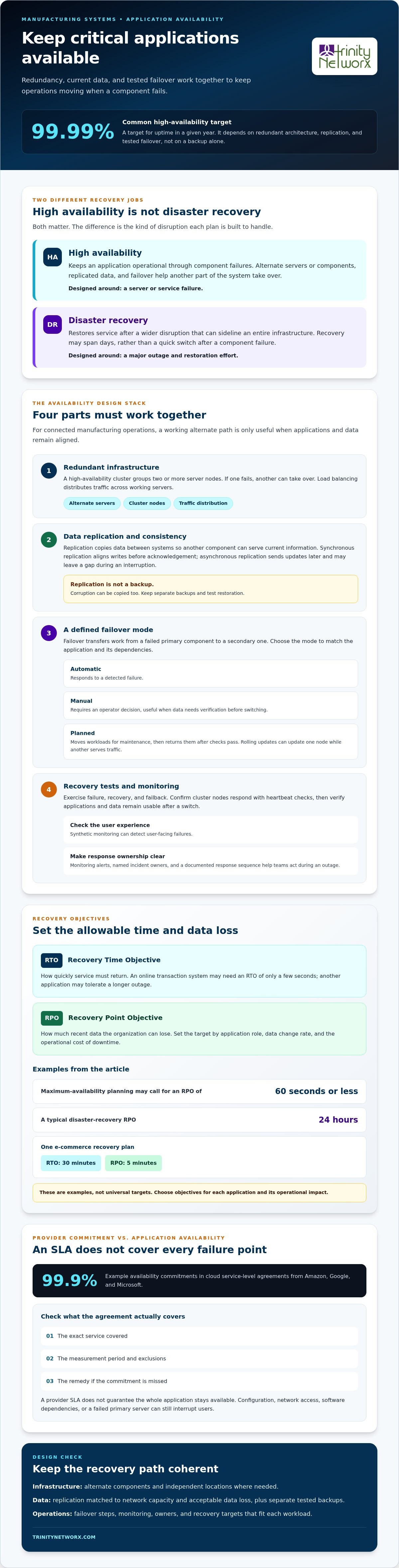
High availability keeps an application operational through component failures; disaster recovery restores service after a larger disruption. A common availability target is 99.99% in any given year, supported by redundant architecture, replication, and tested failover.
Redundancy gives an application alternate servers or components, while replication copies data between them and load balancing distributes traffic across working servers. If a manufacturing system loses one server, a load balancer can direct requests to another. Infrastructure costs depend on the number of redundant components, data replication needs, and cloud resource use. Plan capacity around workload and recovery goals. See how business IT services connect infrastructure to daily operations.
Failover transfers work from a failed primary component to a secondary one. Design the sequence so applications, network routes, and data remain aligned when a switch occurs. Rolling maintenance updates one node at a time while another serves traffic. Planned failover lets teams move workloads before maintenance, then return them after checks pass.
A high-availability cluster groups two or more server nodes so another node can take over if one fails. Automatic failover responds to a detected failure; manual failover requires an operator decision; planned failover moves workloads for maintenance. In the United States, availability requirements depend on applicable sector rules and contracts, so map those obligations to service objectives.
Testing exercises failure, recovery, and failback so teams can find broken dependencies before an incident. Use heartbeat checks to confirm cluster nodes respond, then test whether applications and data remain usable after a switch. Synthetic monitoring can detect user-facing failures. Monitoring alerts, named incident owners, and a documented response sequence help teams act quickly and limit downtime. For planning support, contact Trinity Networx.
Replication keeps current data available across systems, while backups preserve recovery copies. For manufacturing operations, consistent records help connected applications resume without conflicting production or order data.
Replication copies data between nodes, including those within a cluster, so another component can serve current information after a failure. Synchronous replication can keep writes aligned before they are acknowledged; asynchronous replication sends updates later, which can leave a gap during an interruption. The right method depends on network capacity and how much data loss operations can tolerate. Replication supports availability, but it is not a separate backup.
Geographic replication keeps independent application stacks and their data at separate locations, so one site can continue operating if another is disrupted. Distance alone does not create redundancy: the sites need independent infrastructure and a recovery path. For example, a manufacturing operation can maintain data at another location, then direct work there if a local outage affects its primary systems. Hardware, network links, and data consistency all affect whether that move works.
RPO defines how much recent data an organization can lose; RTO sets how quickly service must return. A target of maximum availability may call for an RPO of 60 seconds or less. By comparison, 24 hours is a typical disaster-recovery RPO. One e-commerce recovery plan sets an RTO of 30 minutes and an RPO of five minutes. These are different objectives, not universal targets. Replication can copy corruption automatically, so retain separate backups and test restoration. Choose manual recovery when an operator must verify data before switching; automate the process when dependencies and consistency checks are clear. Discuss backup and recovery planning for your operations.
High availability keeps service running through smaller component failures, while disaster recovery restores operations after a wider disruption. This distinction shapes whether a business plans for a switch in minutes or a recovery effort spanning days.
Recovery Time Objectives (RTO) set the time allowed to restore an application; Recovery Point Objectives (RPO) set how much recent data loss is acceptable. Together, they turn business impact into recovery targets. For example, an online transaction system may need an RTO of only a few seconds, while another application can tolerate a longer outage. Set each target by application role, data change rate, and the operational cost of downtime.
A cloud service-level agreement (SLA) sets an availability commitment for the provider’s service. Amazon, Google, and Microsoft cloud services include SLA availability commitments such as 99.9%. Compare the exact service covered, measurement period, exclusions, and remedy for a missed commitment. An SLA doesn’t guarantee that an entire application stays available: configuration, network access, software dependencies, or a failed primary server can still interrupt users.
Fault tolerance aims for zero downtime by continuing operation despite failure, while high availability aims to minimize downtime. Fault-tolerant designs can require duplicated hardware, software, and power. Disaster recovery addresses major events that can sideline an entire infrastructure, rather than a single component. Common failure points include shared storage, a single network path, and untested recovery dependencies. Any one of these can undermine uptime even when other components remain operational.
Set recovery objectives around business impact, then discuss application availability planning with our team.
Trinity Networx, LLC helps manufacturing businesses manage the technology that supports production and daily operations. When plant-floor systems and business applications depend on reliable connections, the company’s construction-focused technical expertise can help address infrastructure gaps through commercial structured cabling and fiber optic installations.
Managed IT Services and Cybersecurity Solutions support the broader business environment, while Co-Managed IT can complement an internal technology team. A practical starting point is the operational issue: a weak connection between work areas, technology changes during a facility project, or IT needs that outpace internal capacity.
To discuss your business’s IT needs, contact Trinity Networx, LLC.
Make availability planning part of production planning, not a response drafted after an outage. Identify which manufacturing workflows depend on each application, who owns recovery decisions, and how staff will keep essential work moving during a disruption. Use that map to set a clear next step: review one critical workflow with the people who rely on it and the team responsible for its technology.
Trinity Networx, LLC helps manufacturing businesses connect operational requirements with IT planning. Start with the process that would create the greatest disruption if its supporting technology became unavailable, then build the discussion around that business need.
Contact Trinity Networx, LLC to discuss application availability. A focused planning conversation can help your team move forward with clarity.
High availability describes an application’s ability to keep essential user tasks working reliably. For a manufacturing team, that could mean viewing a current work order or recording a completed inspection, even if a nonessential feature is unavailable. Define availability around the business actions people must complete, then assess the user experience against those priorities.
Begin by mapping dependencies, including identity services, network paths, databases, and equipment connections. For each dependency, record who owns it, what symptoms users will see, and what the recovery runbook should direct staff to do. This dependency map helps teams spot shared failure points that a diagram of application servers alone can miss.
Load-balancing decisions should account for how an application handles user sessions and ongoing transactions. For example, moving a user between servers mid-order can disrupt a workflow if session state is held only on the original server. Test sign-in, form submission, and transaction completion under changing traffic, not just whether a server responds to a basic health check.
For systems with several dependent services, separate failure domains so one fault does not disable every function. A queue can hold incoming work while a downstream service is unavailable, and an application can preserve core functions while pausing secondary features. Teams ensuring high availability for critical business applications should map these dependencies and decide which functions must remain usable during disruption.
Assign a named owner to each critical application and keep operating procedures aligned with actual production workflows. After a system change, review its dependencies and update the relevant runbook. Practice a realistic business scenario, such as a shift being unable to retrieve production instructions, and record where staff lose time or lack clear direction. Use those findings to guide the next planning cycle.

Article by
Lance Reichenberger, Ph.D.., J.D. (Candidate)
Dr. Lance Reichenberger is the founder of Trinity Networx, a Southern California technology firm specializing in managed IT services, cybersecurity, network infrastructure, and business technology strategy. With nearly four decades of experience in the IT industry, he works with businesses to improve operational efficiency, strengthen security, and align technology with long-term growth objectives.
Lance focuses on proactive IT management, enterprise wireless infrastructure, cybersecurity integration, and scalable technology solutions for growing organizations throughout Southern California.
The content published on this website is provided for general informational and educational purposes only. Articles may be created, edited, or enhanced with the assistance of artificial intelligence and automation tools under the direction and review of Trinity Networx. While every effort is made to ensure accuracy and relevance, the information provided should not be considered professional, legal, financial, cybersecurity, or technical advice specific to your organization. Businesses should consult directly with a qualified professional regarding their unique environment, compliance requirements, and operational needs. Trinity Networx makes no warranties regarding completeness, reliability, or applicability of the information contained within these articles.
Schedule a brief conversation with Trinity Networx to discuss your business technology needs.
Get a practical roadmap built around your business, your users, your systems, and the technology issues that need attention first.
Put the right technology, support, security, and infrastructure in place so your business can grow, adapt, and move forward with confidence.

