

3281 E. Guasti Rd, STE 700, Ontario, CA 91761
1712 9th Ave SW, Watertown, SD 57201

Could construction work put ePHI at risk before a new space opens? A cable run, relocated workstation, or temporary network connection can change how clinical systems operate, expose information to people who should not see it, or interrupt access when staff need it. A HIPAA risk analysis for healthcare providers should account for these technology changes, not just the finished room.
Renovation planning involves many moving parts. One practical starting point is to identify which systems and workflows the work may affect, then document who will follow up on each finding. This checklist shows how to trace where ePHI is created, received, stored, and transmitted, and connect construction changes to safeguards that need review. It covers cabling, network access, temporary work areas, and service interruptions. For healthcare projects in California, Nevada, Arizona, and Utah, construction-focused IT planning can help teams identify technology gaps before work reaches the site.
• HIPAA risk analysis for healthcare providers should account for construction changes that affect ePHI, including cabling routes, device moves, and new network connections.
• Set the project boundary by listing affected systems, locations, devices, and workflows before work begins.
• Record relevant threats, vulnerabilities, safeguards, likelihood, and potential impact so follow-up actions have a clear basis.
• Revisit findings when project changes affect ePHI flows or access. For construction technology planning, contact the Trinity Networx, LLC team.
A HIPAA risk analysis identifies potential risks and vulnerabilities that could affect electronic protected health information (ePHI). During construction or renovation, define the scope by following the technology and work that may change, not only the walls being moved. Include affected systems, locations, clinical workflows, devices, and network connections. The Health Insurance Portability and Accountability Act (HIPAA) provides the broader context. A project technology review alone is not a declaration of full compliance or legal advice.
Trace where ePHI is created, accessed, stored, and transmitted in the areas affected by the project. Include clinical systems and workstations, along with the network connections that link them. A workstation moved to a temporary room, a new cable route, or a changed connection between a clinical area and a server can alter how staff access information. These changes are not automatically risks. They are prompts to examine the flow and document what the project changes.
Mark areas where equipment will move, access will be temporary, or staff workflows may shift. For each area, note the systems and connections involved. Trinity Networx, LLC provides construction-focused IT planning, commercial structured cabling, and wireless networking to help teams identify technology changes before plans become field work. A clear map gives the risk review a practical boundary and helps the provider decide which changes need closer assessment.
The provider’s designated leadership and advisors remain responsible for compliance decisions. For construction technology planning, cabling, or connectivity support, contact the Trinity Networx, LLC team.
Define the project boundary before assessing findings. For a HIPAA risk analysis for healthcare providers, list the ePHI involved, affected systems, sites, devices, and construction workflows. Include temporary setups and planned technology connections, not only equipment that will remain after the project. For projects in California, Nevada, Arizona, and Utah, align the review with the actual site plan and the technology changes planned for that location.
For each relevant finding, record the potential threat, vulnerability, safeguards already in place, likelihood, and possible impact. Tie the assessment to evidence, such as a project plan, network diagram, or documented equipment move. Do not invent a numerical score or imply that one formula applies to every project. Explain the reasoning behind each decision, assign an action owner, and track the status until follow-up is complete.
A concise tracking table connects technical observations to project decisions. The examples below are prompts, not assumed risks. Add evidence from the site review, identify who owns the follow-up, and update the status when plans or field conditions change.
| Finding | Affected asset | Evidence | Action owner | Review status |
|---|---|---|---|---|
| Planned cabling route | Network connection serving a clinical area | Current drawing or site review | Assigned project or IT lead | Open, in progress, or reviewed |
| Temporary workstation move | Device and related workflow | Relocation plan and access review | Assigned department or IT lead | Open, in progress, or reviewed |
Bring cabling routes and connectivity into project discussions before installation. Trinity Networx provides construction IT planning and commercial cabling services, helping teams connect technology findings with project decisions. For support with construction technology planning, contact the Trinity Networx, LLC team.
Plans can change once work reaches the site. A cable route may shift, equipment may move, or a temporary connection may become part of the workflow. Revisit relevant findings in the HIPAA risk analysis for healthcare providers when a change affects ePHI flows, systems, access, or safeguards. Base the review on actual project conditions rather than assuming the original plan still matches the work.
Set review points with the people who understand the construction schedule and affected systems. Planning, installation, testing, and handoff can each surface changes. Review a change when it affects an ePHI system or its connections. For example, compare the installed cabling route with the planned route, then document whether the difference affects access or safeguards.
Note proposed changes to rooms, network paths, or device locations.
Record field changes that differ from the approved technology plan.
Document what was tested, what remains open, and who owns follow-up.
Keep dated findings and decisions together. For each update, record the change, affected system or workflow, review outcome, assigned action, owner, and status. This creates a usable record of how the project changed and how the team responded. Review technical safeguards in context, including cybersecurity and antivirus measures relevant to affected systems.
Trinity Networx provides construction IT planning, cabling, connectivity, and technology setup. This technical support does not certify a provider’s HIPAA compliance or replace the provider’s compliance decisions or legal advice. Contact the Trinity Networx, LLC team to discuss construction technology needs for your healthcare project.
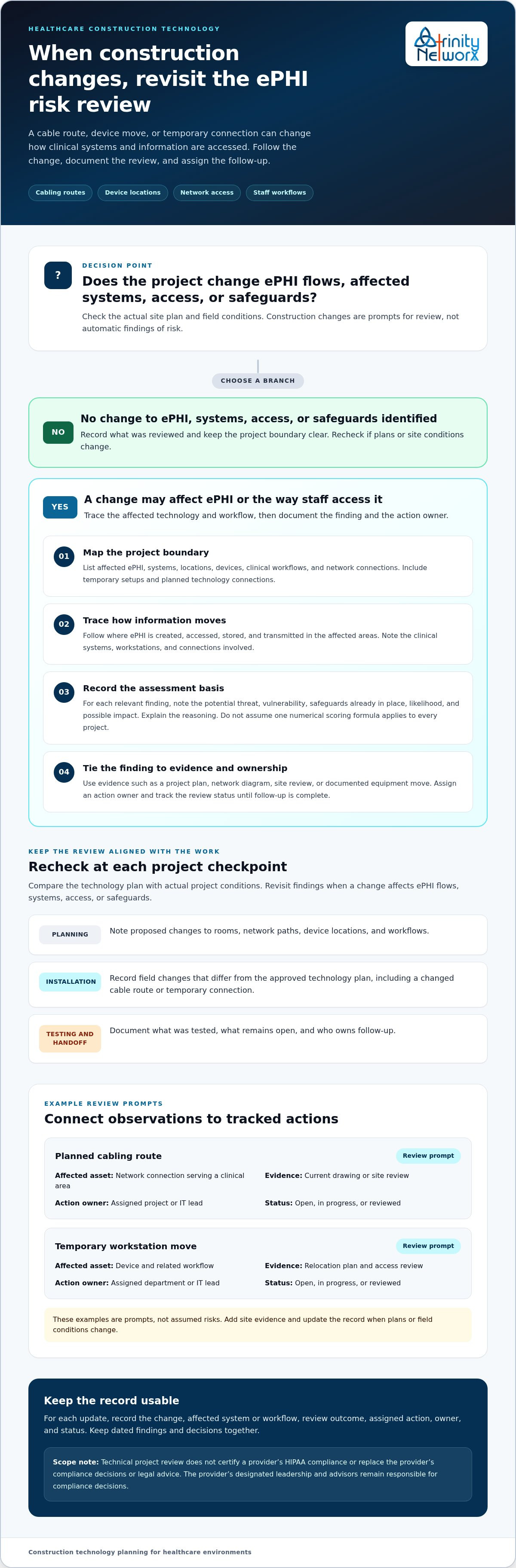
A useful HIPAA risk analysis for healthcare providers follows the technology affected by construction, from ePHI workflows and network connections to equipment moves and temporary access. Record findings, decisions, assigned actions, and updates as the project moves from planning through handoff.
Construction-focused IT planning can help teams coordinate office-to-field connectivity, low-voltage cabling, and technology setup for healthcare spaces. Trinity Networx provides these services with local, in-house technical resources for projects in California, Nevada, Arizona, and Utah. That technical support can inform the review, while the provider remains responsible for its compliance decisions.
Bring technology questions into the project plan early, before a changed connection or room layout catches the team off guard. Discuss construction technology needs with the Trinity Networx, LLC team. Clear coordination and documented follow-up help the team manage technology changes through project handoff.
A HIPAA risk analysis identifies potential risks and vulnerabilities that could affect the confidentiality, integrity, or availability of electronic protected health information (ePHI). For a construction project, review technology changes such as relocated workstations, new network connections, or temporary workflows that involve ePHI. The analysis informs risk decisions, but it is not, by itself, proof of complete HIPAA compliance.
Reassess relevant findings when construction changes affect systems, locations, access, or workflows involving ePHI. A changed cabling route or temporary equipment move can warrant a closer review, though it does not automatically indicate a security problem. Document what changed and the review outcome. For regulatory interpretation, consult current guidance from the U.S. Department of Health and Human Services Office for Civil Rights (OCR).
Include ePHI flows, affected sites, systems, devices, and project workflows. For relevant assets, record potential threats and vulnerabilities, existing safeguards, likelihood, and possible impact. Document the reasoning behind decisions, supporting evidence, assigned actions, owners, and status. Keep the checklist tied to the organization’s actual environment and the construction project’s scope, rather than relying on a generic template or assumed scoring formula.
Yes. Changes to cabling, connectivity, equipment locations, access, or staff workflows can affect systems that create, receive, store, or transmit ePHI. A temporary workstation move, for example, may change a device’s connection or who can access the space. Construction activity does not automatically create a security incident. Document relevant changes, then assess their effect on the systems and safeguards involved.

Article by
Lance Reichenberger, Ph.D.., J.D. (Candidate)
Dr. Lance Reichenberger is the founder of Trinity Networx, a Southern California technology firm specializing in managed IT services, cybersecurity, network infrastructure, and business technology strategy. With nearly four decades of experience in the IT industry, he works with businesses to improve operational efficiency, strengthen security, and align technology with long-term growth objectives.
Lance focuses on proactive IT management, enterprise wireless infrastructure, cybersecurity integration, and scalable technology solutions for growing organizations throughout Southern California.
The content published on this website is provided for general informational and educational purposes only. Articles may be created, edited, or enhanced with the assistance of artificial intelligence and automation tools under the direction and review of Trinity Networx. While every effort is made to ensure accuracy and relevance, the information provided should not be considered professional, legal, financial, cybersecurity, or technical advice specific to your organization. Businesses should consult directly with a qualified professional regarding their unique environment, compliance requirements, and operational needs. Trinity Networx makes no warranties regarding completeness, reliability, or applicability of the information contained within these articles.
Schedule a brief conversation with Trinity Networx to discuss your business technology needs.
Get a practical roadmap built around your business, your users, your systems, and the technology issues that need attention first.
Put the right technology, support, security, and infrastructure in place so your business can grow, adapt, and move forward with confidence.

