

3281 E. Guasti Rd, STE 700, Ontario, CA 91761
1712 9th Ave SW, Watertown, SD 57201

A single hour of unplanned jobsite downtime can drain more than $300,000 from a commercial contractor. When superintendents lose access to current BIM models or project estimators work from unmanaged home laptops, jobs stall and security gaps widen. Knowing how to manage IT for a hybrid workforce is no longer just an administrative chore. It is a critical operational baseline for protecting project schedules and your bottom line.
You already know the frustration of unstable trailer Wi-Fi and the constant threat of ransomware hitting active project files. Here, you will learn how to secure jobsite connectivity, protect project data, and support hybrid construction teams without slowing down field production. We examine reliable networking standards, centralized endpoint controls, and proactive technical support models built specifically for commercial builders.
• Eliminate trailer connection lag to give field superintendents instant access to large BIM models and blueprint revisions.
• Discover how to manage IT for a hybrid workforce through zero-trust access and strict authentication across all field tablets and estimator laptops.
• Prevent rework by establishing central cloud document repositories that synchronize live plan markups between the jobsite and the main office.
• Shield project schedules against costly delays with proactive network monitoring and server virtualization ready in 30 to 40 minutes.
Commercial construction relies on split-second coordination. Yet, 92 percent of construction firms now maintain hybrid schedules for estimators, project managers, and back-office staff. Disconnected jobsite technology directly causes project deadline overruns. When field supervisors pull multi-gigabyte Revit models or dynamic Bluebeam sets across weak cellular links, production grinds to a halt. Crews wait. Equipment sits idle. The disconnect grows when off-site teams update project documentation without immediate field synchronization, leaving trades working from outdated revisions.
Solving these issues requires understanding how to manage IT for a hybrid workforce across distinct environments. Standard enterprise strategies fail under harsh jobsite conditions. Without unified technical planning, communication breakdowns between the corporate office and the jobsite trailer turn into expensive rework.
Temporary jobsite trailers often rely on basic consumer mobile hotspots or unmanaged cellular routers. These consumer devices fail under heavy workloads. They buckle when multiple field engineers attempt to sync heavy project files simultaneously. Reliable communications demand enterprise structured network cabling alongside business Wi-Fi hardware engineered to handle heavy data traffic in industrial settings.
Field exposure brings serious data liabilities. Subcontractors and remote estimators frequently review confidential bid packages or payroll records on personal laptops over unsecured home networks. Enforcing enterprise mobile device management solutions helps companies segment private corporate records from personal applications. This containerization prevents unapproved device access from compromising primary business databases. Learning how to manage IT for a hybrid workforce means closing the gap between trailer infrastructure and corporate data security.
Executing a reliable technical strategy requires systematic control over endpoints, cloud platforms, and access permissions. Jobsite trailers and home offices cannot run on ad hoc configurations. When deciding how to manage IT for a hybrid workforce, commercial builders must replace disconnected setups with four concrete operational steps:
Maintain drawings, submittals, and BIM files in shared cloud directories. This ensures estimators and field supervisors work from identical revisions instead of competing local files.
Replace vulnerable VPN tunnels with strict identity verification that aligns with NIST enterprise telework and BYOD security guidelines. Mandate multi-factor authentication across every field endpoint.
Hardened tablets and smartphones get lost on active jobsites or taken from work trucks. Centralized controls let administrators wipe sensitive project data instantly.
Connect field teams and office personnel through managed business VoIP systems. These setups keep subcontractor calling records unified and communications professional.
Field production depends on reliable application performance. Dedicated commercial construction IT services configure platforms such as Procore, PlanGrid, and Autodesk Construction Cloud to manage offline caching during cellular dead zones. When signal returns, queues push changes without data loss. Pairing these applications with unified business VoIP bridges the distance between active trailers and corporate desks. To evaluate your setup and learn how to manage IT for a hybrid workforce effectively, contact our team to schedule a technical review.
Building an internal IT division drains capital through inflated salaries and administrative overhead. Commercial general contractors avoid this expense by partnering with managed service providers who specialize in field technology. Proactive network monitoring identifies failing hardware, degrading access points, and router faults before trade crews arrive on site. Research by McKinsey emphasizes that digitization and technology infusion in construction prevents operational lag and safeguards project margins. When primary systems fail, Datto-backed continuity executes full server virtualization within 30 to 40 minutes, keeping estimators and superintendents working without multi-day disruptions.
Trailer connectivity cannot wait for standard corporate business hours. Based in Ontario, California, our local NOC engineers monitor remote field networks 24x7x365, diagnosing jobsite packet loss and connection drops in real time. Instead of dealing with offshore call centers, builders work with local US-based specialists who resolve field tickets quickly.
A predictable flat-fee support model replaces erratic billing with fixed monthly costs, lowering IT support expenses by 30 to 50 percent. This disciplined structure shows leadership how to manage IT for a hybrid workforce across active builds, corporate desks, and satellite trailers without budget surprises. To stabilize your jobsite connectivity and safeguard project timelines, contact us today.
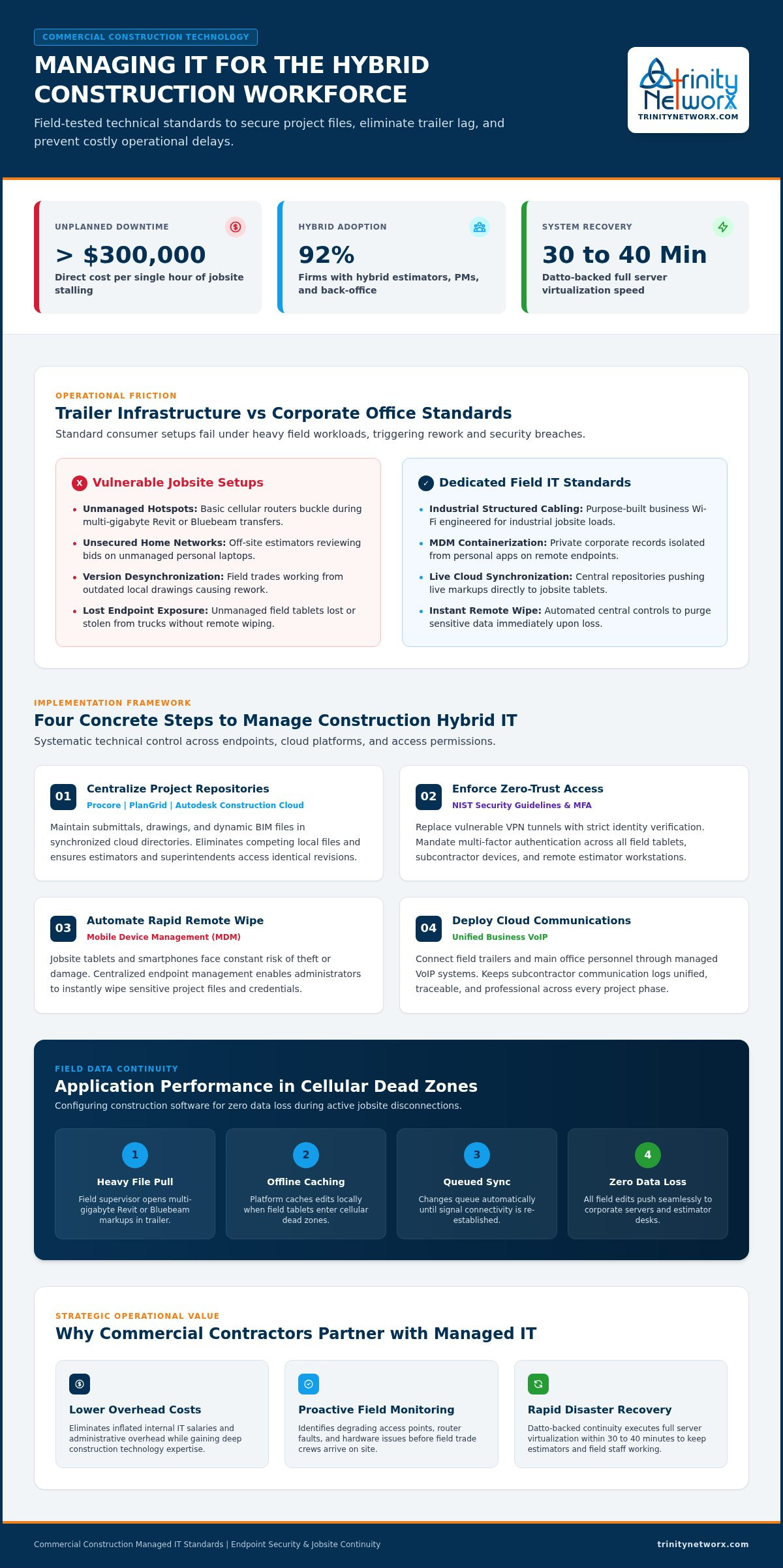
Maintaining project momentum requires reliable trailer networks, synchronized cloud blueprint repositories, and strict zero-trust endpoint security. Mastering how to manage IT for a hybrid workforce protects your active jobsites from expensive trade delays and data loss.
Recognized by CIO Review among the top 20 most promising IT services companies, Trinity Networx supports your projects with an entirely local, 100 percent US-based technical engineering team. When unexpected hardware crashes occur, our continuity systems deliver rapid virtualization and complete server restore in 30 to 40 minutes. Keep your jobs moving forward. Eliminate jobsite downtime with specialized construction IT support: contact Trinity Networx today.
Secure project documents by enforcing zero-trust access controls, multi-factor authentication, and centralized cloud repositories with role-based permissions. Commercial builders across California and Nevada should isolate jobsite hardware through mobile device management. This prevents subcontractors and remote estimators from downloading proprietary bid packages, financial records, or CAD files directly to unencrypted personal hard drives.
Install business-grade cellular routers paired with high-gain external directional antennas and structured cabling inside the trailer. Consumer mobile hotspots lack the signal penetration needed on rugged building sites. Commercial contractors in Arizona and Utah achieve dependable connections by working with specialists who configure industrial wireless access points and combine multiple cellular carriers for automatic failover.
Yes, by deploying cloud-hosted virtual desktops and platforms with intelligent local caching. Instead of downloading multi-gigabyte models over cellular links, field engineers interact with high-performance desktop sessions hosted in secure data centers. This setup shows how to manage IT for a hybrid workforce, enabling superintendents on California jobsites to review complex designs instantly on portable tablets.
A single in-house technician cannot provide continuous coverage across distributed jobsites and remote home offices. Managed IT delivers an entire technical department for a predictable flat monthly fee. This operational model shows leadership how to manage IT for a hybrid workforce efficiently, delivering 24x7x365 network monitoring and guaranteed fast response without inflated internal payroll costs.

Article by
Lance Reichenberger, Ph.D.., J.D. (Candidate)
Dr. Lance Reichenberger is the founder of Trinity Networx, a Southern California technology firm specializing in managed IT services, cybersecurity, network infrastructure, and business technology strategy. With nearly four decades of experience in the IT industry, he works with businesses to improve operational efficiency, strengthen security, and align technology with long-term growth objectives.
Lance focuses on proactive IT management, enterprise wireless infrastructure, cybersecurity integration, and scalable technology solutions for growing organizations throughout Southern California.
The content published on this website is provided for general informational and educational purposes only. Articles may be created, edited, or enhanced with the assistance of artificial intelligence and automation tools under the direction and review of Trinity Networx. While every effort is made to ensure accuracy and relevance, the information provided should not be considered professional, legal, financial, cybersecurity, or technical advice specific to your organization. Businesses should consult directly with a qualified professional regarding their unique environment, compliance requirements, and operational needs. Trinity Networx makes no warranties regarding completeness, reliability, or applicability of the information contained within these articles.
Schedule a brief conversation with Trinity Networx to discuss your business technology needs.
Get a practical roadmap built around your business, your users, your systems, and the technology issues that need attention first.
Put the right technology, support, security, and infrastructure in place so your business can grow, adapt, and move forward with confidence.

