3281 E. Guasti Rd, STE 700, Ontario, CA 91761
1712 9th Ave SW, Watertown, SD 57201

Growth can expose weak infrastructure faster than a busy team can patch it. Knowing how to scale IT infrastructure effectively means matching capacity to demand and making each expansion repeatable. Infrastructure as Code (IaC) and zero-touch provisioning replace repetitive setup with defined configurations, helping new systems follow a consistent baseline rather than relying on manual steps.
More users, connected equipment, and additional production or construction sites all put pressure on networks, storage, and security. Adding capacity without a plan can create bottlenecks or leave new devices configured inconsistently. This article explains infrastructure scaling, the performance, cost, and security factors to weigh, and how IaC and zero-touch setup can support growth. It also covers why manufacturing and construction expertise matters when networks and systems have to support real-world operations.
• Map workload patterns, network capacity, storage needs, and security exposure before adding infrastructure.
• Choose vertical scaling to expand an existing machine, or horizontal scaling to spread workloads across more nodes.
• Use IaC and zero-touch provisioning to repeat approved configurations and reduce manual setup work.
• For manufacturing and construction sites, plan WiFi coverage and infrastructure around equipment, workflows, and operational demands.
Start with a capacity baseline: measure compute, storage, and network throughput before expanding. Benchmark these resources against the platform you plan to provision, then map peak demand, database activity, and growth plans to likely bottlenecks. A cloud-native design can package services in containers, while orchestration coordinates deployment and resource allocation as demand changes.
Choose cloud, on-premises, or hybrid environments by weighing performance, cost, and compliance needs. Cloud platforms can provision computing and storage on demand, while on-premises systems keep workloads on equipment managed at a business site. A hybrid setup combines both. According to the National Institute of Standards and Technology, cloud computing supports rapid automated provisioning of computing and storage resources. Track consumption and storage limits as users and data increase. In the United States, security, compliance, and data-residency requirements depend on the information handled and applicable contracts or rules; define access controls, approved locations, and retention needs before deployment. For network planning and build-outs, see IT infrastructure services.
To scale networks, storage, compute, and databases without bottlenecks, monitor CPU, memory, storage use, latency, and response times together. Add capacity where measurements show pressure, and use load balancers to distribute requests across healthy servers. For example, a database may need more storage while the network needs greater throughput.
High availability and business continuity depend on redundancy, tested backups, and documented recovery procedures. Replicated systems or failover capacity can keep essential workloads available during an outage. Common mistakes include adding resources without monitoring dependencies, overlooking security exposure, and skipping recovery tests. Use change planning, configuration documentation, and stress testing to catch these gaps before deployment.
Scaling IT infrastructure means increasing capacity so systems can handle more users, data, or workload without full replacement. Two methods shape the approach: vertical scaling expands one machine, while horizontal scaling distributes work across additional machines or nodes.
With vertical scaling, teams add CPU, memory, or storage to an existing server. It suits predictable growth or software tied to one machine, but that server remains a capacity ceiling. Depending on the architecture, hardware upgrades may also require downtime. The key question is whether one system can continue meeting performance and availability needs as demand rises.
Horizontal scaling adds servers or nodes, then distributes requests across them. An application that runs parallel instances may serve more users this way. Distributed infrastructure can place compute and storage closer to where data is created, reducing latency and supporting local operations—a principle seen in high-demand, latency-sensitive hosting where specialized providers like Twisted Servers deploy regional nodes to maintain reliable performance under fluctuating loads. Network links, shared databases, and data consistency still need attention, or extra nodes may shift rather than solve a bottleneck.
Immutable infrastructure supports horizontal growth through replacement rather than in-place changes. Teams create a tested image, then deploy matching instances through automation. If a release fails, they can roll back by restoring the previous image. This keeps configurations consistent across environments, but requires version control, monitoring, and a clear process for persistent data.
Choose based on workload: a database may benefit from a larger server, while stateless application servers may expand across nodes. Mixed designs are common. Hardware limits, software requirements, response targets, and failure tolerance all factor into the decision. Manufacturing floors and construction sites also depend on reliable wireless coverage as devices and work areas increase. To discuss network expansion, contact our team.
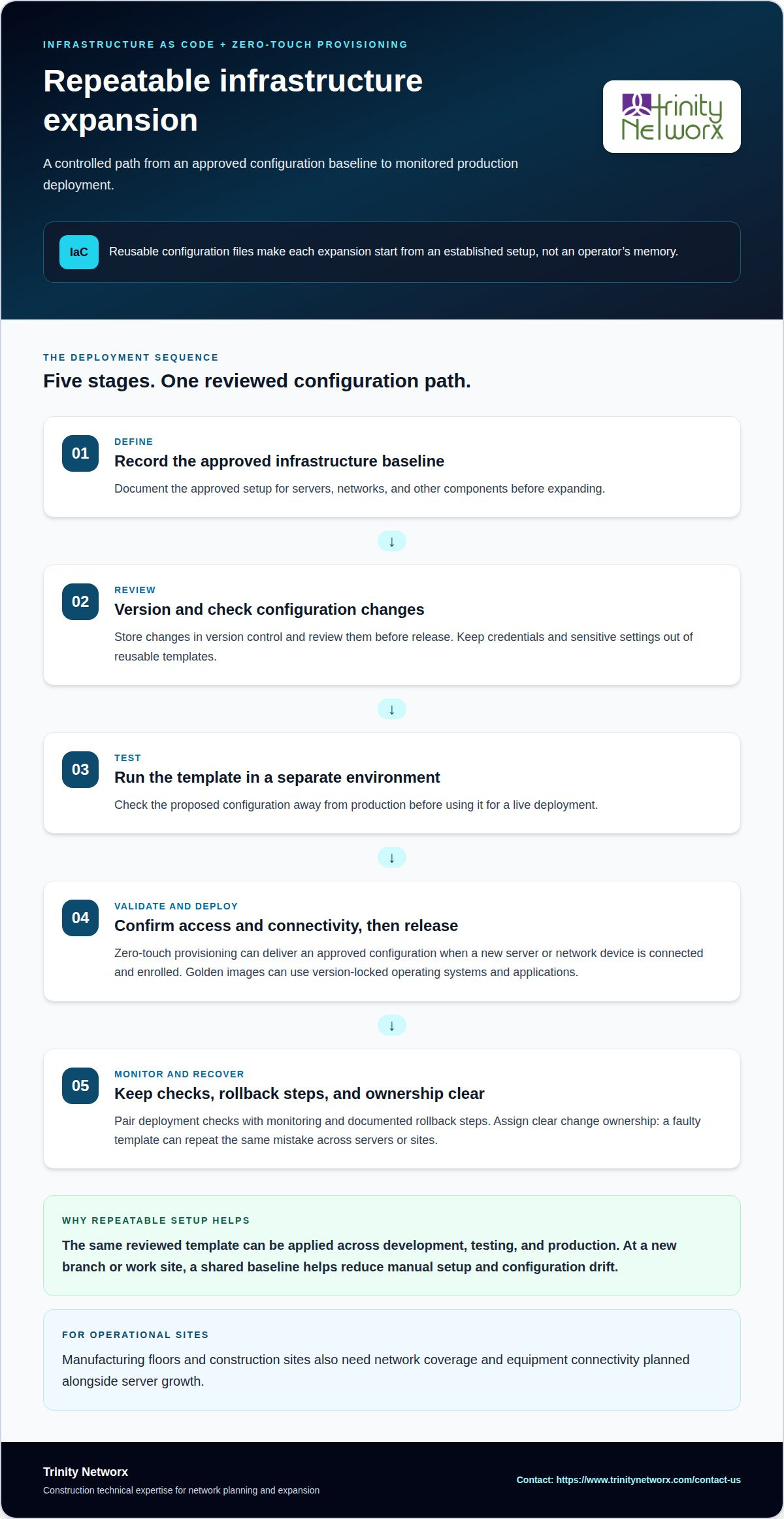
Infrastructure as Code (IaC) defines servers, networks, and other components in reusable configuration files. Rather than setting up each environment by hand, teams apply the same reviewed template to development, testing, and production. A network setting change can follow the same documented process as a server deployment. The practical benefit is repeatability: each expansion starts from an established configuration, not an operator’s memory.
Zero-touch provisioning extends that approach to device setup. A new server or network device receives its approved configuration automatically when connected and enrolled. Standard deployments can use golden images with version-locked operating systems and applications. For example, a new branch can receive the same baseline as an existing site, reducing manual setup and configuration drift.
Build the workflow in stages. First, record the approved infrastructure baseline. Next, store configuration changes in version control and review them before release. Test the template in a separate environment, validate access and connectivity, then deploy it to production. Configuration management documents settings and controls changes, while automation applies approved updates consistently as demand grows. Keep credentials and sensitive settings out of reusable templates.
Automation can reduce human error, but it does not replace oversight. A faulty template can repeat a mistake across every server or site. Pair deployment checks with monitoring, rollback steps, and clear change ownership. For manufacturing and construction operations, network coverage and equipment connectivity also need planning alongside server growth. Invest in repeatable setup where manual configuration slows expansion, then discuss infrastructure planning.
Trinity Networx, LLC helps organizations manage network demands as manufacturing and construction operations grow. New work areas, connected equipment, or expanded facilities can reveal WiFi coverage gaps and unreliable device connections. WiFi Infrastructure Build outs and Maintenance can support site connectivity as operations change, while Managed IT Services can help coordinate day-to-day technology needs.
Growth also brings security and continuity concerns. Cybersecurity Solutions can help protect expanding systems, while Data Backup & Recovery helps prepare for data loss or disruption. These services address practical infrastructure needs alongside capacity planning, especially when networks must support people, devices, and business systems across active sites.
If your infrastructure is changing with your operations, contact Trinity Networx, LLC to discuss your needs.
Growth plans become actionable when every infrastructure decision has an owner, a business reason, and a sequence. Planning how to scale IT infrastructure effectively means connecting technology work to production schedules, facility changes, and employee workflows. For manufacturers adding equipment or construction teams opening a site, timing matters. Late network changes can disrupt operations, while uncoordinated work leaves teams navigating gaps.
Set the next step around the operational pressure point. Define required uptime, affected teams, and how changes will be tested. Assign a decision owner and document approval and rollback steps before work begins. Align technical work with the business calendar so infrastructure planning supports expansion rather than interrupting it. Keep production priorities and employee workflows in view.
When you’re ready to map the next stage, contact Trinity Networx, LLC. Move forward with a plan built around your operations.
Scaling also means adapting technology capacity and support arrangements as a business grows or changes direction. After an acquisition, for example, teams may need compatible identity access, shared business applications, and clear data ownership. The work is not just about adding equipment; it also involves aligning systems and responsibilities so employees can run the combined operation.
Growth-ready infrastructure can accommodate new business needs without leaving ownership, support, or system lifecycles unclear. A company opening another office, for instance, benefits from consistent access policies and documented responsibility for each application. That clarity helps teams bring new staff into established workflows and keeps technology decisions connected to how the business operates.
Review software licensing, vendor support terms, and hardware or application end-of-life dates alongside technical needs. A new site may depend on licenses that do not cover additional users, or on equipment nearing retirement. Identify those constraints early, assign an owner to each, and include them in procurement and transition plans.
Start with an inventory of applications, devices, contracts, and accountable business owners. Map which departments rely on each system, including less visible processes such as payroll or order approvals. Compare that map with planned hiring, acquisitions, or site changes. This reveals dependencies and ownership gaps that equipment counts alone can miss.
Translate each business goal into a technology outcome, such as supporting a new location’s daily workflows or integrating an acquired team. To decide how to scale IT infrastructure effectively, rank proposed work by business value, operational dependency, and budget ownership. Record who funds each change and how leaders will assess its success, then revisit priorities as business plans evolve.

Article by
Lance Reichenberger, Ph.D.., J.D. (Candidate)
Dr. Lance Reichenberger is the founder of Trinity Networx, a Southern California technology firm specializing in managed IT services, cybersecurity, network infrastructure, and business technology strategy. With nearly four decades of experience in the IT industry, he works with businesses to improve operational efficiency, strengthen security, and align technology with long-term growth objectives.
Lance focuses on proactive IT management, enterprise wireless infrastructure, cybersecurity integration, and scalable technology solutions for growing organizations throughout Southern California.
The content published on this website is provided for general informational and educational purposes only. Articles may be created, edited, or enhanced with the assistance of artificial intelligence and automation tools under the direction and review of Trinity Networx. While every effort is made to ensure accuracy and relevance, the information provided should not be considered professional, legal, financial, cybersecurity, or technical advice specific to your organization. Businesses should consult directly with a qualified professional regarding their unique environment, compliance requirements, and operational needs. Trinity Networx makes no warranties regarding completeness, reliability, or applicability of the information contained within these articles.
Schedule a brief conversation with Trinity Networx to discuss your business technology needs.
Get a practical roadmap built around your business, your users, your systems, and the technology issues that need attention first.
Put the right technology, support, security, and infrastructure in place so your business can grow, adapt, and move forward with confidence.