

3281 E. Guasti Rd, STE 700, Ontario, CA 91761
1712 9th Ave SW, Watertown, SD 57201

A month-end close can stall even when the accounting team is ready if financial systems stop passing accurate data. Effective IT support for accounting month-end close keeps integrations working, access available, and data flowing into financial systems. Coordinate technical checks with the close calendar so they support reconciliation, review, and reporting rather than interrupting them.
That coordination matters: accounting teams need complete records and dependable systems to finish their work with confidence. This guide explains how to map critical data flows, test integrations, manage access, and respond to system issues during close. It also shows how IT and finance can agree on responsibilities and timing, keeping the focus on accurate records and timely decisions.
• Map each financial data flow and assign an owner, so teams can trace where missing or delayed entries originate.
• Schedule integration checks around close deadlines, and flag failed transfers before they disrupt reconciliation.
• Set clear access procedures and escalation steps so finance staff can keep work moving when systems or permissions fail.
• Coordinate IT support with finance’s calendar, using managed or co-managed services when internal teams need added coverage.
Set support priorities around close deadlines and the impact of each system issue. Assign an owner and an escalation path for blocked payroll, payable imports, or production data finance needs for reporting. IT and finance should agree on which requests take priority at each stage of the close.
For slow software or faulty reports, isolate the affected system and data transfer. Compare source and destination totals, timestamps, error logs, and permissions. Correct the underlying issue, rerun the transfer, then have finance verify the output before using it in statements.
Record each source, destination, owner, schedule, and expected output. For a manufacturer, document how inventory or production records enter accounting, including which team owns missing or duplicated entries.
Review transfer status and rejected records before reconciliation. Use automation for repeatable imports, while routing exceptions for review. Compare totals across systems and document approved corrections.
Prepare draft financial statements after expenses, accruals, and depreciation entries post. Management reviews the statements and approves them before the period closes. Retain the approved version and supporting documentation.
After approval, restrict further posting according to the organization’s close controls. Assemble reconciliations, explanations, and approval records into the reporting package. Distribute it to intended readers and document any later adjustment through the established approval process.
Gathering financial documents, reviewing and reflecting, and generating financial statements are steps in the closing process. Templates, checklists, Excel models, Power Query, and ERP-integrated dashboards can support automation of month-end close tasks.
Automating repeatable accounting tasks can improve efficiency. Close the accounting period in the system only after management and governance have reviewed and approved the financial statements.
Set a close calendar that coordinates finance deadlines with IT changes. For manufacturers, plant-floor technology and facility work can affect records and staff access, so schedule both around close activities.
Schedule pre-close work for 1-2 days before month-end, execution for days 1-5 after month-end, and post-close tasks for days 6-7. Most US finance teams target completion within 5-10 business days.
Give each checklist item a finance or IT owner, a due date, and a clear handoff. Include planned facility work that could affect accounting workstations or production systems.
Confirm production-related entries have reached finance before staff prepare statements. Compare recorded activity with approved operating reports, then resolve differences with the responsible department.
Review revenue, cash flow, and balance-sheet results against prior periods. Record explanations, secure management approval, then close the period in accounting software.
Rank requests by their effect on reporting deadlines, and assign a named IT contact to each priority. If a manufacturer is upgrading a facility, coordinate construction cabling or wireless work with finance’s calendar. Construction IT expertise can help plan network changes around production and office needs, reducing the risk that site work disrupts close tasks. Keep routine software questions in a separate queue.
Before close, review account permissions and confirm that scheduled data-protection jobs completed. If construction work affects network access, coordinate the change window with IT and finance, then test accounting access from affected work areas. Keep close-critical systems free of unplanned changes while statements are under review, and document approval for any necessary exception.
For help coordinating IT and close schedules, discuss month-end support needs.
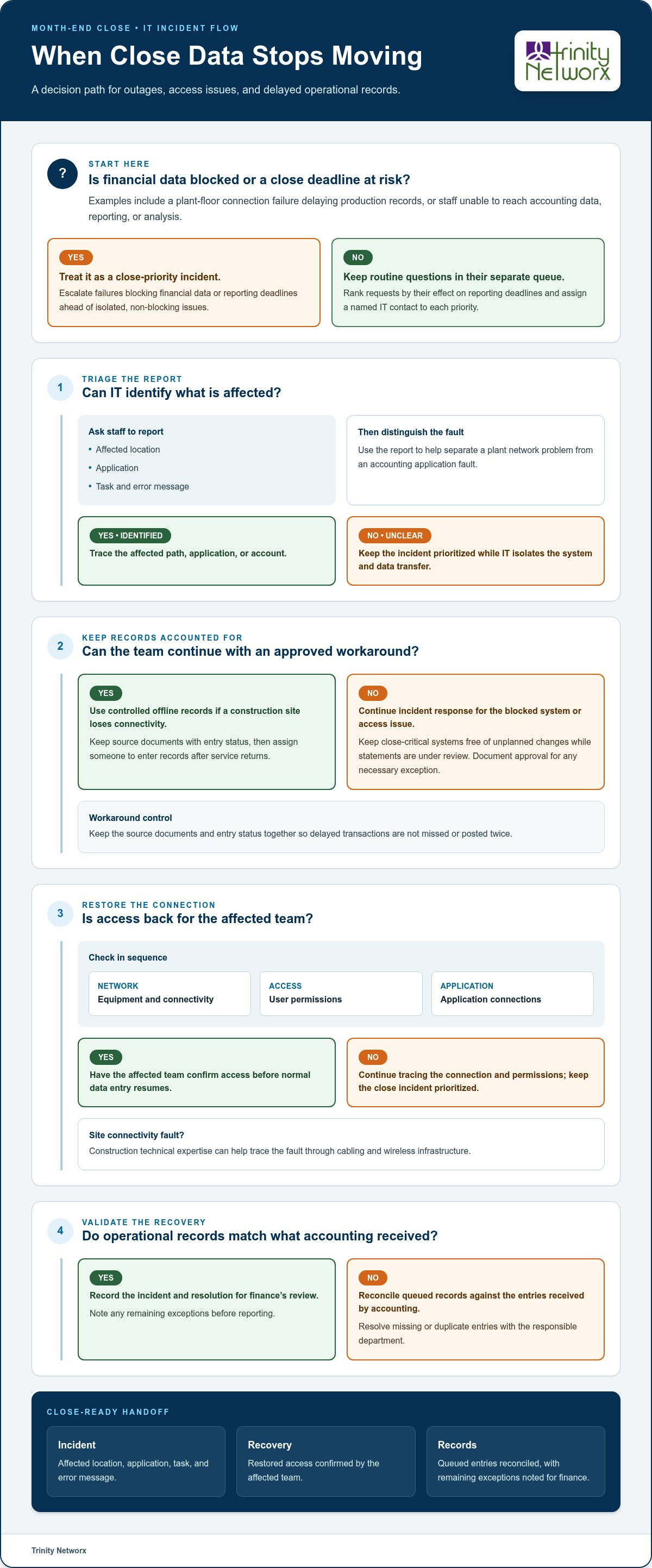
Build an incident plan around the systems connecting operations with accounting. Losing access to accounting data, reporting, and analysis can extend the close significantly. For example, a plant-floor connection failure can delay production records reaching the finance system.
Identify the network paths, applications, and user accounts that carry production or jobsite records into accounting. For a manufacturer, note which production data feeds inventory and cost reporting. For a construction operation, identify how field teams submit purchasing or project records.
Escalate failures that block financial data or close deadlines ahead of isolated, non-blocking issues. Ask staff to report the affected location, application, task, and error message. This helps IT distinguish a plant network problem from an accounting application fault.
If a construction site loses connectivity, document approved offline records and assign someone to enter them after service returns. Keep source documents and entry status together, so delayed transactions aren’t missed or posted twice.
Check network equipment, permissions, and application connections in sequence. Construction technical expertise can help trace a site connectivity fault through cabling and wireless infrastructure. Have the affected team confirm restored access before normal data entry resumes.
Compare queued production or project records with entries received by accounting. Record the incident, resolution, and any remaining exceptions for finance’s review before reporting.
Review outage response for plant and jobsite systems with Trinity Networx, LLC’s IT team.
Trinity Networx supports businesses across California, Nevada, Arizona, and Utah that need dependable systems during month-end close. Managed IT Services can coordinate accounting-system support, user access, and issue response around finance’s closing schedule. Organizations with an internal IT team can use Co-Managed IT for shared technical support while internal staff retain their responsibilities.
When close work reveals gaps in access controls or system protection, Cybersecurity Solutions can support the security of business systems. Data Backup & Recovery can help restore accounting records after a system issue. These services support the technology behind the close; finance remains responsible for reviewing records and approving statements.
If your close workflow needs stronger IT coordination, contact Trinity Networx, LLC to discuss your needs.
Use each completed close to identify what needs attention before the next reporting cycle. Note recurring interruptions, unclear ownership, and handoffs that leave finance waiting. Assign a responsible person to each follow-up and include it in routine IT planning. This turns month-end pressure into practical improvements to the systems supporting accounting work.
Reliable IT support for accounting month-end close connects those operational decisions with the technology finance depends on. Trinity Networx, LLC can discuss how its services fit your business needs and existing IT team. Contact Trinity Networx, LLC to discuss your close support and take a clear next step toward a more controlled reporting cycle.
Critical tasks include monitoring accounting systems, managing user access, and checking scheduled jobs that post transactions. IT support for accounting month-end close should also track software changes that could affect reports or permissions. For example, schedule accounting application updates outside finance’s review window, and record who approved each change and when.
Automate repeatable, rules-based work, then route exceptions to a person for review. For an import, define required fields such as account code, transaction date, and entity. Send incomplete records to an exception queue rather than accepting them silently. For reconciliations, apply matching rules to consistent references while preserving a review trail for unmatched items and changes to automation settings.
Use one shared checklist, with an owner and completion status for each task. Include application access, scheduled job results, pending software changes, data-import exceptions, backup status, and the contact path for urgent issues. Add a final sign-off for finance to confirm that reports open correctly and supporting files are available. Review unresolved items together before the next close cycle.

Article by
Lance Reichenberger, Ph.D.., J.D. (Candidate)
Dr. Lance Reichenberger is the founder of Trinity Networx, a Southern California technology firm specializing in managed IT services, cybersecurity, network infrastructure, and business technology strategy. With nearly four decades of experience in the IT industry, he works with businesses to improve operational efficiency, strengthen security, and align technology with long-term growth objectives.
Lance focuses on proactive IT management, enterprise wireless infrastructure, cybersecurity integration, and scalable technology solutions for growing organizations throughout Southern California.
The content published on this website is provided for general informational and educational purposes only. Articles may be created, edited, or enhanced with the assistance of artificial intelligence and automation tools under the direction and review of Trinity Networx. While every effort is made to ensure accuracy and relevance, the information provided should not be considered professional, legal, financial, cybersecurity, or technical advice specific to your organization. Businesses should consult directly with a qualified professional regarding their unique environment, compliance requirements, and operational needs. Trinity Networx makes no warranties regarding completeness, reliability, or applicability of the information contained within these articles.
Schedule a brief conversation with Trinity Networx to discuss your business technology needs.
Get a practical roadmap built around your business, your users, your systems, and the technology issues that need attention first.
Put the right technology, support, security, and infrastructure in place so your business can grow, adapt, and move forward with confidence.

