

3281 E. Guasti Rd, STE 700, Ontario, CA 91761
1712 9th Ave SW, Watertown, SD 57201

What if ransomware locks the project files, schedules, and business systems your crews need, then targets the backups meant to get them working again? Immutable backups for ransomware protection can help prevent stored copies from being altered or deleted during a defined retention period. They don’t stop data theft, repair every compromised system, or guarantee a fast recovery.
For construction companies, the real test is whether recovery supports the work: which systems come back first, how quickly teams can access project data, and whether restored files are usable. A provider’s backup claims should reflect your office-to-field workflows. This guide explains what immutability protects, where its limits are, and how to compare backup options with construction operations in mind. It also covers what to ask for as evidence, including backup verification, test-restore results, retention controls, and recovery timelines.
• Learn what immutable backups for ransomware protection can safeguard, and where their limits may leave construction project data exposed.
• Assess backup isolation, retention controls, and access permissions against the systems your office and field teams rely on.
• Set a recovery order for critical construction systems, then use test restores to uncover gaps before an incident.
• Discuss construction backup and recovery planning with Trinity Networx, LLC by contacting the team.
An immutable backup is a data copy protected from alteration or deletion for a defined period. The controls vary by provider, so ask how immutability is enforced, who can change retention settings, and what happens when the protection period ends. A backup copy is useful only if your team can restore it and the recovered data supports active project work.
Ordinary backups may remain exposed if they share access paths, credentials, or management systems with compromised production systems. An attacker with sufficient access could target connected backup resources too. Data backup provides a copy for recovery; immutability adds a restriction on changing or removing that copy during its protected period. It does not prevent an intrusion or restore every system by itself.
Immutability protects a backup copy from specified changes; a recovery plan determines how a construction business restores its systems, data, and field operations.
Start with the work teams must resume: project files and design documents, accounting records, and the applications used to access them. Then map dependencies. Can office staff and field teams reach project information if identity services, network access, or business communications are unavailable? Trace those connections before selecting backup controls. Recovery priorities depend on how each firm manages projects, offices, and jobsite access.
Construction-focused IT expertise can help connect backup planning to these day-to-day dependencies. Trinity Networx, LLC provides data backup and recovery services. Ask the team whether a specific solution meets your immutability requirements, then contact the team to discuss your construction recovery needs.
Compare recovery evidence, not just the backup schedule. When assessing immutable backups for ransomware protection, use this sequence:
List project files, business applications, accounting records, and the services field teams need to access them.
Ask how backup copies are separated from production systems and whether compromised accounts or systems could reach them.
Find out how immutability is enforced, who can change settings, and what happens when the protected period expires.
Confirm which systems and files are restored, who performs the test, and how results are recorded.
These questions align with the CISA ransomware guide, which includes backups among its mitigation guidance. Ask the provider for specific answers. The word “immutable” alone doesn’t explain access controls, retention behavior, or recovery steps.
Request documented backup verification, details about off-site storage, and the schedule and procedure for test restores. Then ask how recovery priorities account for project files, business systems, and office-to-field access. Which dependencies must return first so staff can open current plans or share updates with a jobsite?
Backup verification shows that a backup process or copy passed its checks; a restore test shows whether selected data can be recovered and used. Both matter, and neither replaces the other. Trinity Networx, LLC documents daily backups, verification, off-site storage, and monthly test restores. Review its data backup and disaster recovery service, then contact the team to discuss recovery priorities for your construction workflows.
A recovery plan should reflect how a construction firm works, not just the order in which servers appear on an inventory. Map the systems and dependencies crews need to resume project work: identity and network access, project applications, current files, accounting systems, and communication between the office and jobsite. Decide which services return first, who confirms access, and how teams coordinate while systems remain unavailable.
Immutable backups for ransomware protection can preserve copies against specified changes during a retention period, but a recovery plan must also answer what gets restored and how staff will use it. Scheduled restore exercises can expose practical gaps before an incident, such as missing access credentials, overlooked application dependencies, or files that restore but cannot be opened by the right team.
After each exercise, record what was tested, what restored successfully, how users confirmed access, and which dependencies still need attention. Track unresolved issues and assign follow-up actions. A successful backup check alone doesn’t show that project operations can resume.
Trinity Networx, LLC documents Datto-powered backups, backup verification, off-site storage, monthly test restores, and instant virtualization. Its documented server spin-up estimate is 30-40 minutes. Confirm whether that timing applies to your environment before using it in recovery planning.
Construction-focused IT expertise can connect backup decisions to jobsite access and project operations. Explore IT services for commercial construction, then contact Trinity Networx, LLC to discuss backup and recovery planning for your firm.
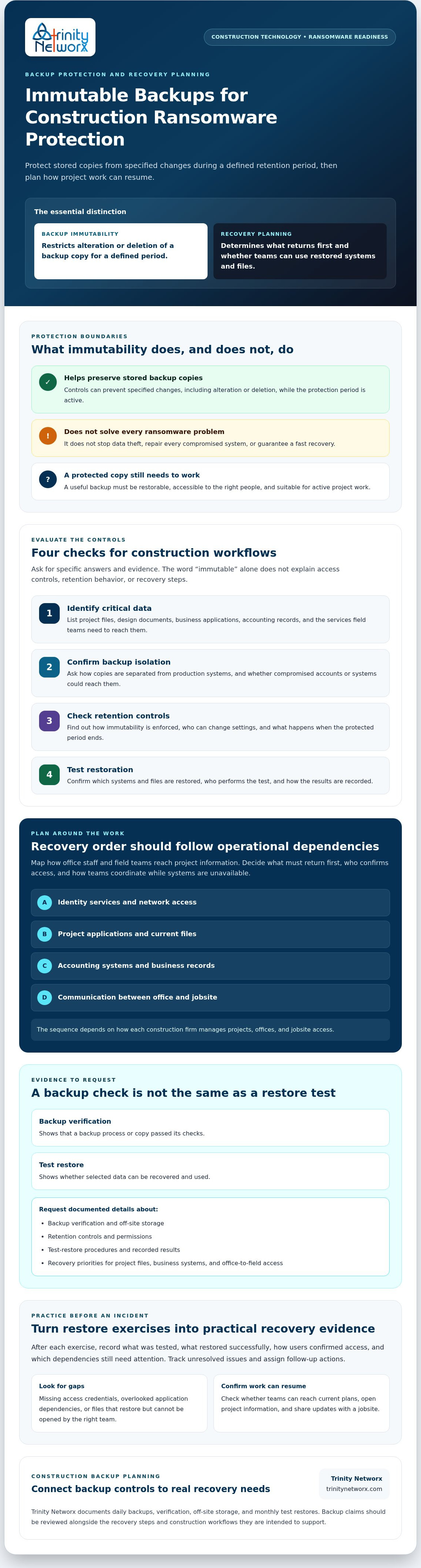
Immutable backups for ransomware protection can help preserve backup copies from alteration or deletion during a set retention period. They don’t replace a recovery plan. Construction firms still need to know which systems and project data to restore first, how teams will regain access, and whether restored files work in daily operations.
Test the plan before an incident. Trinity Networx documents daily backups, backup verification, off-site storage, and monthly test restores. Construction-focused IT planning can also account for office-to-field connectivity, so recovery priorities reflect how project teams share information.
Ask Trinity Networx which backup controls are available and how they fit your recovery requirements. Contact Trinity Networx about backup and recovery planning for your construction firm.
Immutable backups are data copies protected against alteration or deletion for a defined period, according to the backup system’s controls. For construction firms, immutable backups for ransomware protection may help preserve project files or business records if attackers reach production systems. They’re one security control, not a complete recovery plan. Teams still need tested restores, recovery priorities, and access to required applications.
Whether attackers can delete an immutable backup depends on its design, permissions, and retention settings. Ask the provider how immutability is enforced, which accounts can change backup or retention controls, whether management access is separated from production, and what happens when retention expires. Request written answers and confirm them against provider documentation before relying on a copy during a construction outage.
Set a documented restore-testing schedule based on how often construction data changes, how quickly teams need access, and the consequences of losing systems or project files. Test representative applications and confirm users can open restored data. Trinity Networx documents monthly test restores, a useful reference point for discussion, not a universal schedule for every firm in California, Nevada, Arizona, or Utah.
No. Immutability can protect a backup copy from specified changes during its retention period, but it doesn’t prove that required data is current, complete, or restorable. A construction firm must test recovery of key systems, project records, and access dependencies, then document gaps. To discuss construction backup and recovery planning, contact Trinity Networx.

Article by
Lance Reichenberger, Ph.D.., J.D. (Candidate)
Dr. Lance Reichenberger is the founder of Trinity Networx, a Southern California technology firm specializing in managed IT services, cybersecurity, network infrastructure, and business technology strategy. With nearly four decades of experience in the IT industry, he works with businesses to improve operational efficiency, strengthen security, and align technology with long-term growth objectives.
Lance focuses on proactive IT management, enterprise wireless infrastructure, cybersecurity integration, and scalable technology solutions for growing organizations throughout Southern California.
The content published on this website is provided for general informational and educational purposes only. Articles may be created, edited, or enhanced with the assistance of artificial intelligence and automation tools under the direction and review of Trinity Networx. While every effort is made to ensure accuracy and relevance, the information provided should not be considered professional, legal, financial, cybersecurity, or technical advice specific to your organization. Businesses should consult directly with a qualified professional regarding their unique environment, compliance requirements, and operational needs. Trinity Networx makes no warranties regarding completeness, reliability, or applicability of the information contained within these articles.
Schedule a brief conversation with Trinity Networx to discuss your business technology needs.
Get a practical roadmap built around your business, your users, your systems, and the technology issues that need attention first.
Put the right technology, support, security, and infrastructure in place so your business can grow, adapt, and move forward with confidence.

