

3281 E. Guasti Rd, STE 700, Ontario, CA 91761
1712 9th Ave SW, Watertown, SD 57201

What if a choppy call is not a handset problem? On a construction project, unclear audio can slow coordination between the office, field crews, and subcontractors. Improving call quality on our VoIP system starts with identifying where the issue occurs, not changing devices or settings at random. An office desk, site trailer, truck, and active jobsite can each have different network conditions. If a call breaks up in one location but works elsewhere, that pattern points to a location-specific connection or equipment issue worth investigating.
This guide provides a practical way to narrow down the cause before making network changes. First, identify whether the fault affects one user, one location, or the wider business. Then check devices and connections in a consistent order. We’ll also cover when recurring problems call for construction-focused expertise across hosted voice, network infrastructure, and office-to-field connectivity.
• Improving call quality on our VoIP system starts with recording what callers hear, such as echo, delay, choppy audio, one-way audio, or dropped calls.
• Compare call problems across crews, devices, and locations to see whether the issue is isolated or connected to an office or jobsite.
• Check wireless coverage, network activity, cabling, and internet stability before changing phone settings or network equipment. These checks help make troubleshooting more focused.
• If faults keep returning, construction-focused hosted voice and network support can help trace the issue across office-to-field connections. Contact Trinity Networx, LLC for help improving call quality on our VoIP system.
A missed measurement, a repeated call to confirm a delivery, or a delayed handoff between the site and the office can interrupt construction work before anyone knows why. Echo makes voices sound repeated. Delay creates awkward pauses. Choppy audio cuts words in and out, while one-way audio means only one caller can be heard. A dropped call ends the conversation.
VoIP carries voice over a network, so the path between a caller’s phone and the service affects what each person hears. The Voice over Internet Protocol (VoIP) overview explains the basic technology. For a construction team, the first step is to determine whether the fault follows a person, a device, or a location.
If a fault follows one user, start by examining that user’s device and connection. If several people at one location report the same problem, focus on what they share at that site. Compare calls from one handset, several office users, and crews calling from the same jobsite. When practical, note whether the same person has the issue with another device or connection.
Keep a brief record of when each symptom occurs and whether incoming, outgoing, or internal calls are affected. Include the caller’s location and device. A problem limited to a jobsite calls for a different investigation than poor audio reported by office staff and field crews alike. These details help narrow the fault before anyone changes equipment or network settings.
Trinity Networx, LLC provides construction-focused IT support across hosted voice, network conditions, cabling, and office-to-field connectivity. If call faults keep disrupting coordination, contact Trinity Networx, LLC to discuss the issue.
Follow the same checks in order before changing network settings. The Federal Communications Commission’s overview of Voice over Internet Protocol (VoIP) describes calls carried over internet connections. For construction teams, tracing the call path step by step can help isolate the problem while avoiding unnecessary changes that affect other users.
Record what callers hear, when it happens, and whether incoming, outgoing, or internal calls are affected. Include the device and location.
Check reports from the office, site trailer, and field. Note whether each phone uses a wired, Wi-Fi, or mobile connection, and whether the fault appears at a particular time.
Determine whether the handset, headset, or calling application is involved. If an approved alternative is available, test it without changing system settings.
Change one thing at a time, if a change is needed. Adjusting several settings at once makes it difficult to tell what affected the call and can complicate the investigation.
Look for repeatable patterns rather than guessing at the cause. If calls degrade in one part of a trailer, record where the caller was standing and whether the phone was on Wi-Fi. If problems occur during busy network periods, note the time and what else was happening on the connection. For desk phones, check whether the issue follows a cable or connection, and whether internet interruptions happen at the same time. These observations help direct the investigation, but they do not prove a cause on their own.
Keep the notes together for the person managing your voice and network systems. Trinity Networx provides Hosted Voice over IP for business communications. If the pattern remains unclear across office and jobsite connections, contact Trinity Networx for construction-focused troubleshooting.
Get technical support when call faults return after basic device and connection checks, affect several users, or appear consistently at one office or jobsite. A location-specific pattern is useful: calls may work from the main office but break up in a site trailer, where wireless coverage, cabling, or internet conditions differ. Avoid swapping equipment without a clear reason. Share your troubleshooting notes so the investigation can focus on the pattern.
Improving call quality on our VoIP system can require looking beyond the handset. Construction-focused support can assess hosted voice alongside network conditions, cabling, and the connections crews rely on between the office and field. Investigating the full call path helps avoid assuming that one device or setting is responsible.
An assessment can compare affected users and locations with the call details you have recorded, then examine the relevant voice, network, and site infrastructure. That can include how phones connect, whether cabling is involved, and how office-to-field connectivity differs across project locations. The findings guide the next steps, which depend on the conditions identified.
Trinity Networx provides commercial construction IT services for technology needs across construction offices and jobsites. For recurring call-quality problems, contact Trinity Networx about construction VoIP call quality and share what you’ve observed. Notes about users, locations, devices, and affected call types give the team a practical starting point.
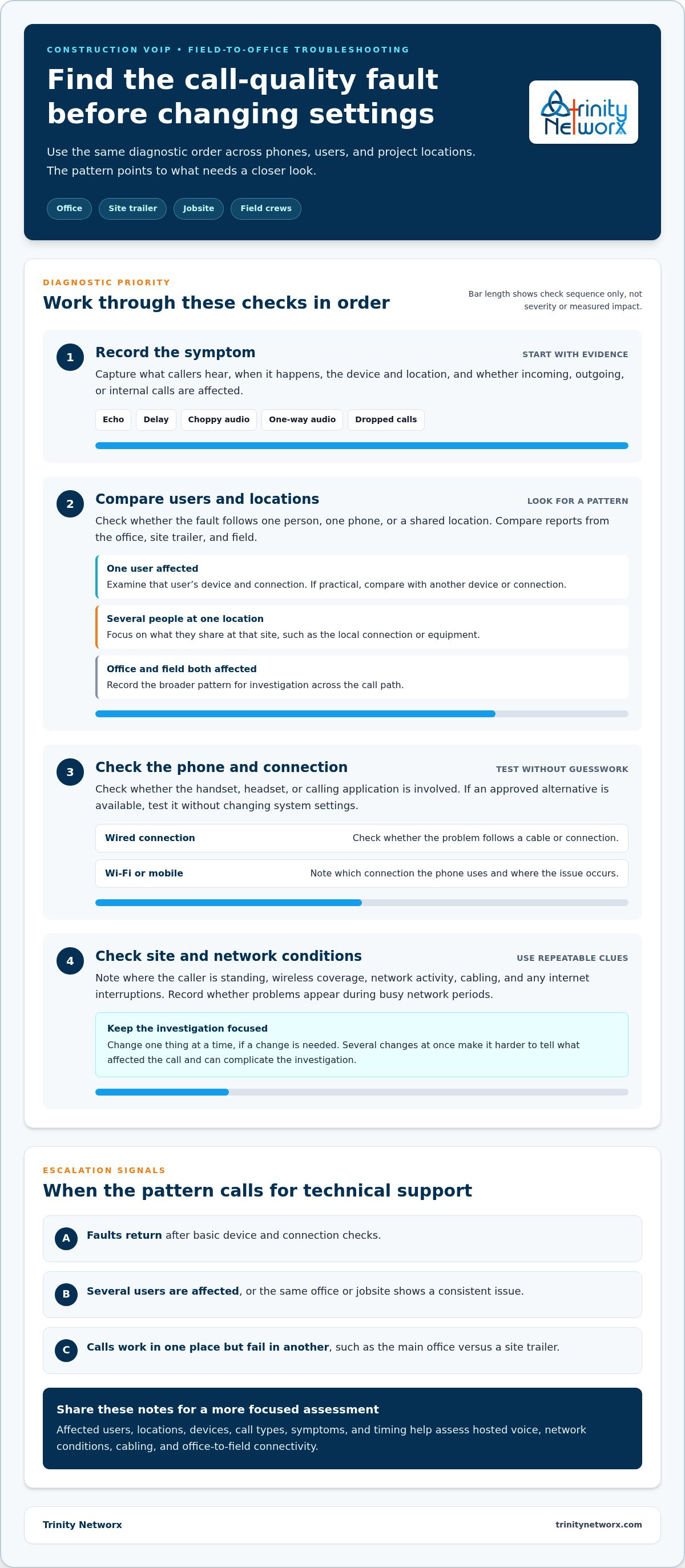
Improving call quality on our VoIP system starts with evidence, not guesswork. Track whether faults follow one phone, several users, or a particular jobsite, then check the device and connection in a consistent order. Those patterns help distinguish a local equipment issue from a wider network or location problem and keep troubleshooting focused.
Recurring issues can call for a closer look at hosted voice, network conditions, cabling, or office-to-field connectivity. Trinity Networx provides Hosted Voice over IP and construction technology support that includes low-voltage cabling and office-to-field connectivity. Contact Trinity Networx to address construction VoIP call issues. The team supports construction businesses across California, Nevada, Arizona, and Utah. Bring your notes about users, locations, and call symptoms to help focus the next steps.
Choppy audio can result from an unstable internet connection, network congestion, weak wireless coverage, or a problem with the phone or headset. Notice whether it happens on one device, across several users, or only at a particular construction location. Record when calls break up and whether incoming, outgoing, or internal calls are affected. Those details help narrow the investigation.
Improving call quality on our VoIP system at a construction site starts with comparing calls across locations and devices. Note whether the phone connects through Wi-Fi, mobile data, or a wired connection, and record when audio degrades. Check the handset or headset, then compare with another approved device if available. Avoid changing network settings until the pattern is clearer.
Yes. Weak or inconsistent Wi-Fi coverage can affect calls, especially when a crew moves around a site trailer or work area. Other network activity may also coincide with poor audio, so note where and when the problem occurs rather than assuming Wi-Fi is the only cause. Comparing calls from different locations and connection types helps identify whether wireless coverage needs closer attention.
Get help when call faults keep returning, affect several users, stay tied to one location, or persist after basic device and connection checks. Share your notes about call times, locations, devices, and affected call types. Trinity Networx supports construction teams across California, Nevada, Arizona, and Utah with Hosted Voice over IP and construction-focused IT expertise. Contact the team about construction VoIP issues.

Article by
Lance Reichenberger, Ph.D.., J.D. (Candidate)
Dr. Lance Reichenberger is the founder of Trinity Networx, a Southern California technology firm specializing in managed IT services, cybersecurity, network infrastructure, and business technology strategy. With nearly four decades of experience in the IT industry, he works with businesses to improve operational efficiency, strengthen security, and align technology with long-term growth objectives.
Lance focuses on proactive IT management, enterprise wireless infrastructure, cybersecurity integration, and scalable technology solutions for growing organizations throughout Southern California.
The content published on this website is provided for general informational and educational purposes only. Articles may be created, edited, or enhanced with the assistance of artificial intelligence and automation tools under the direction and review of Trinity Networx. While every effort is made to ensure accuracy and relevance, the information provided should not be considered professional, legal, financial, cybersecurity, or technical advice specific to your organization. Businesses should consult directly with a qualified professional regarding their unique environment, compliance requirements, and operational needs. Trinity Networx makes no warranties regarding completeness, reliability, or applicability of the information contained within these articles.
Schedule a brief conversation with Trinity Networx to discuss your business technology needs.
Get a practical roadmap built around your business, your users, your systems, and the technology issues that need attention first.
Put the right technology, support, security, and infrastructure in place so your business can grow, adapt, and move forward with confidence.

