3281 E. Guasti Rd, STE 700, Ontario, CA 91761
1712 9th Ave SW, Watertown, SD 57201
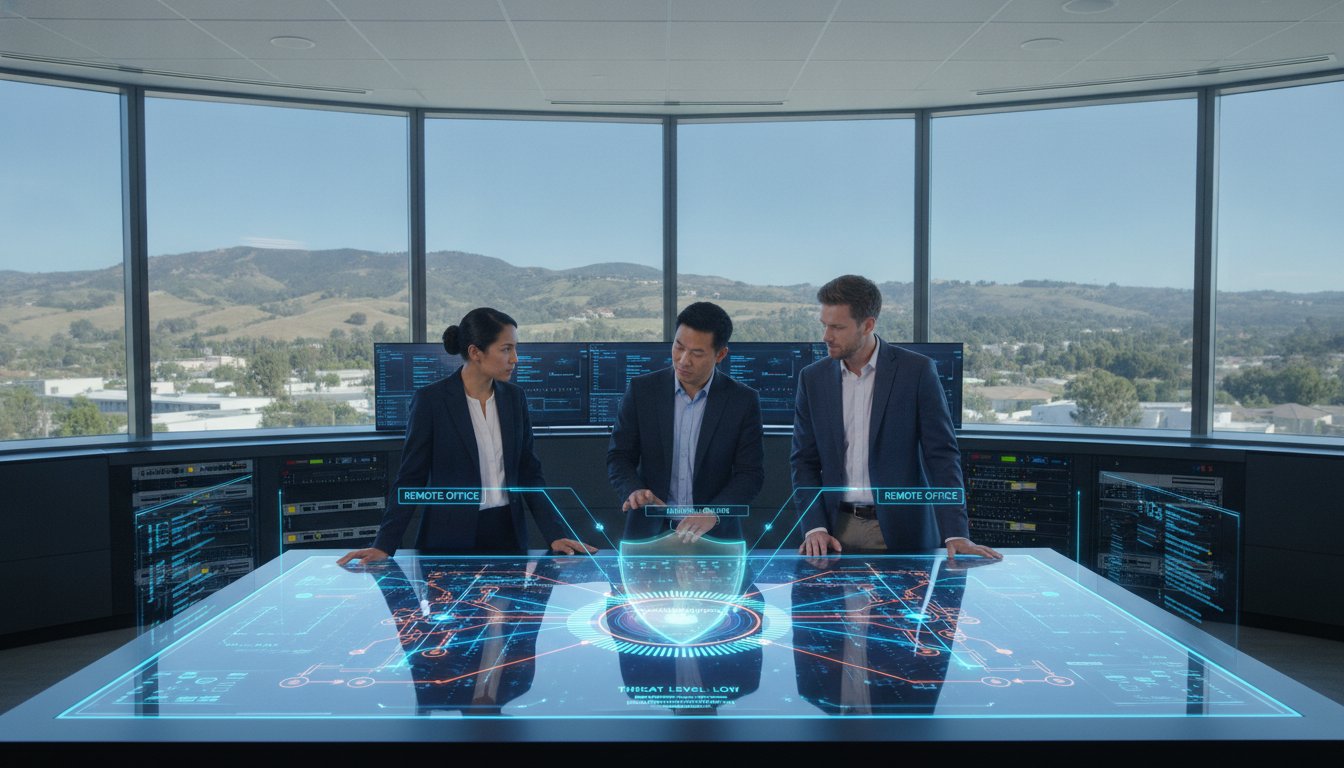
Lance Reichenberger, Ph.D.
Contact us at contact us | Share: [Facebook] [LinkedIn] [X]
Your network perimeter evaporated the moment your staff logged on from home. In 2026, the average cost of a U.S. data breach reached a record $10.22 million. Relying on employee diligence to protect your assets is a losing gamble. You feel the constant pressure of phishing attacks. You lack control over unmanaged hardware. Improving network security for remote employees isn't about asking staff to be more careful. It requires a hard shift toward proactive, managed infrastructure. We know the frustration of watching protocols get ignored for convenience. This article delivers a strategic defense plan to eliminate vulnerabilities in home networks and remote access points. We will examine WireGuard protocols and NIST 800-46 standards to reclaim control. You'll move past reactive technical support to build an assertive security posture that protects your business growth. Stop treating remote access as a utility. Start treating it as a strategic driver of progress.
Contact us at contact us | Share: [Facebook] [LinkedIn] [X]
• Recognize that residential hardware lacks the defensive capabilities of enterprise systems. You will learn to identify the specific gaps in home routers that invite external intrusions.
• Replace static passwords with mandatory multi-factor authentication for every access point. This shift is a requirement for improving network security for remote employees and blocking unauthorized logins.
• Enforce technical standards like WPA3 encryption and disabled remote management on personal routers. These specific configurations prevent attackers from seizing control of employee connection points.
• Transition to proactive managed detection and response for constant network oversight. Professional monitoring identifies threats before they penetrate your core assets or disrupt business health.
• Shift the responsibility of security from the individual staff member to a managed infrastructure. A strategic defense ensures operational continuity and projects an image of assertive reliability.
Lance Reichenberger, Ph.D.
Contact us at contact us | Share: [Facebook] [LinkedIn] [X]
The traditional office firewall vanished when your team moved to their living rooms. Most home routers are basic consumer tools compared to high performance enterprise hardware. They lack deep packet inspection. They rarely receive security updates. This creates a massive gap in your defense. Attackers know this. They hunt for these weak entry points to bypass your protection. Improving network security for remote employees starts by acknowledging that the home environment is hostile by default.
Your employee's work laptop likely shares a connection with smart refrigerators and unpatched Wi-Fi cameras. These IoT devices are notorious for hardcoded passwords. They serve as perfect backdoors into your corporate data. Southern California businesses face unique risks here. We see specialized phishing campaigns targeting the manufacturing and legal sectors in the Inland Empire and Orange County. These attackers use local references to bypass the natural skepticism of your staff. They want quick access. They expect you to be unprepared.
Security stops when a family member borrows a work laptop to check social media. One accidental click on a malicious ad can infect the entire machine. Personal web browsing often bypasses the corporate filters you rely on at the office. Strict data separation is the first step in a reliable remote defense. It ensures that professional assets remain isolated from the unpredictable nature of home life. You cannot afford to let personal habits dictate your business risk.
Convenience often trumps security in a home office. Employees download unapproved cloud storage tools or free software to finish tasks faster. This is shadow IT. It hides data from your visibility and control. Without a secure Virtual Private Network (VPN), this activity is often exposed to prying eyes. You need professional cybersecurity and antivirus Ontario services to regain that lost visibility. Don't let convenience compromise your business health. Assertive monitoring is the only way to maintain operational continuity.
Lance Reichenberger, Ph.D.
Contact us at contact us | Share: [Facebook] [LinkedIn] [X]
Static passwords are a liability. They're easily phished, bought, or cracked by automated scripts. Relying on them is a gamble you'll eventually lose. 48% of all data breaches now involve ransomware, often fueled by a single compromised credential. Multi-Factor Authentication (MFA) is your first real line of defense. It must be mandatory for every entry point into your system. No exceptions. This layer of protection ensures that even if a password is stolen, the attacker hits a wall.
Encrypted tunnels are equally vital. Use a VPN to protect data as it moves across the public internet. It prevents prying eyes from intercepting your business communications. For higher security needs, Virtual Desktop Infrastructure (VDI) is a superior choice. It keeps sensitive data off local hard drives entirely. Your information stays in your secure environment, not on an unmanaged laptop in a home office. This approach is essential for improving network security for remote employees who handle proprietary data.
Don't leave your front door open to the entire world. Use conditional access to restrict logins based on device health or geographic location. Southern California firms should block login attempts from high-risk international regions that have no business accessing your servers. It's a simple, proactive way to stop attacks before they start. You can see exactly who is trying to get in with status monitoring Ontario services. Real-time tracking gives you the upper hand.
Basic antivirus is reactive and insufficient. You need active threat detection that watches for suspicious behavior, not just known malware signatures. Every remote device must have a managed security stack that reports back to your central team. Endpoint protection acts as the final gatekeeper for remote workers, blocking lateral movement within your network. If you want to move past basic technical support to a more assertive defense, reach out to a strategic partner today.
Lance Reichenberger, Ph.D.
Contact us at contact us | Share: [Facebook] [LinkedIn] [X]
Your business assets shouldn't sit on the same network as a child's gaming console or a compromised smart thermostat. Improving network security for remote employees requires enforcing technical standards inside the home. Most consumer routers are set to the least secure defaults out of the box. You must change that. We advocate for a specific set of non-negotiable home network configurations:
This protocol provides a more secure handshake that resists modern password cracking.
This closes the front door to external takeovers from the public internet.
Keeping work devices on a separate network prevents lateral movement from vulnerable smart home appliances.
Outdated router software is a playground for attackers.
Public Wi-Fi is an open invitation for data interception. Without a managed VPN, your proprietary data is visible to anyone on the same network. We also insist on privacy screens to prevent visual eavesdropping in crowded cafes or transit hubs. Hardware locks are a simple, effective way to stop physical theft in public environments. Read our guide on managed cybersecurity services for more on this proactive defense.
Employees must have a direct line to your security team. If a laptop vanishes, every second matters. We aim for a sub-20-minute response time to lock down accounts and wipe devices remotely. Immediate reporting prevents the lateral movement that leads to catastrophic data loss. Speed is your greatest ally in a crisis. To implement these protocols for your team, contact Trinity Networx, LLC today.
Lance Reichenberger, Ph.D.
Contact us at contact us | Share: [Facebook] [LinkedIn] [X]
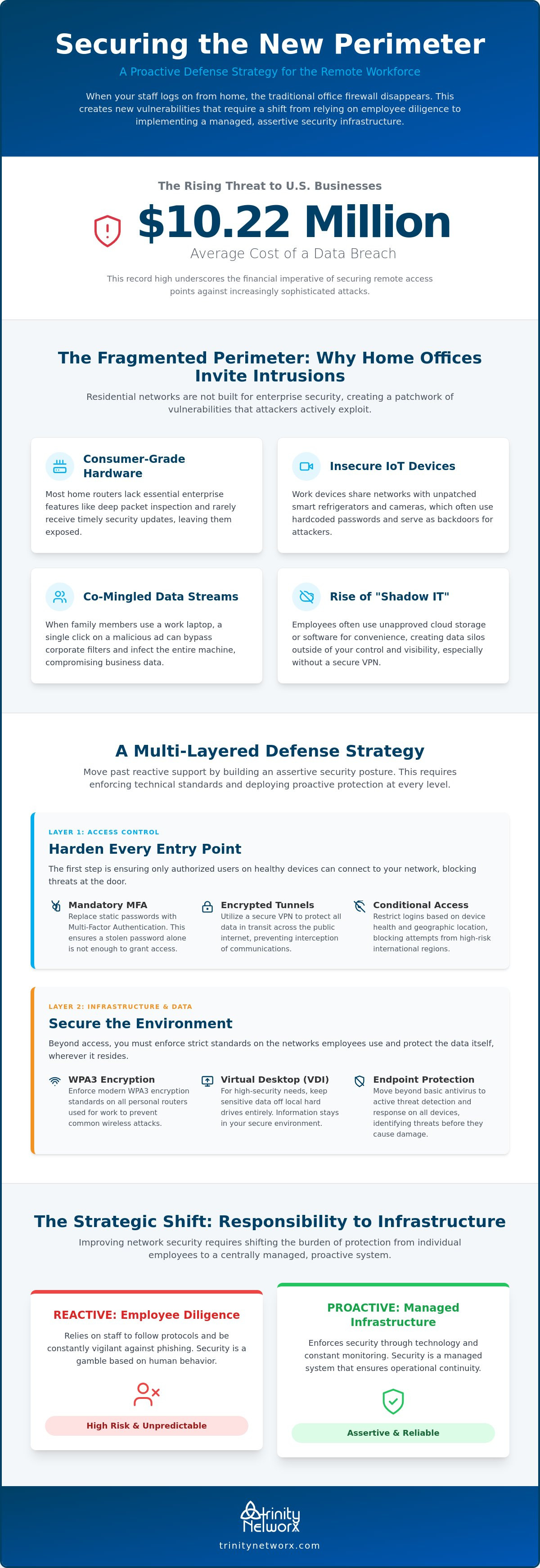
Protocols and encryption are vital, but they are static. Improving network security for remote employees requires a dynamic force that monitors your environment in real time. Attackers don't work bank hours. They wait for the gaps in your internal team's schedule. Managed IT providers offer the 24/7 oversight necessary to catch a threat before it moves from a home router to your central server. We provide the eyes on the wire that your staff cannot. This is about total visibility across every remote access point.
Custom security training for your remote staff is the final piece of the defense. It reduces the chance of human error by teaching your team to recognize the specific phishing tactics used against Southern California manufacturing and legal firms. We understand the local compliance landscape. We know the regional risks. Our team acts as a strategic partner that ensures your business remains operational regardless of where your employees log in. You get assertive reliability from a team that knows your industry.
Data isolation is only effective if you have a recovery plan. If a remote device is compromised, your business continuity depends on secure cloud backups. We ensure your remote data is stored in encrypted environments that are separate from the local machine. You can find local solutions through our data backups and disaster recovery Ontario services. For a deeper look at long term strategy, see our executive guide on business data backup. Don't leave your recovery to chance.
Reactive IT is a relic of the past. We focus on stopping issues before they cause downtime or data loss. This proactive stance is a driver of business health and operational stability. It allows you to scale your distributed workforce with confidence. You deserve a partner that values your time and growth above all else. Contact Trinity Networx, LLC today to secure your remote team with a defense that actually delivers results.
Lance Reichenberger, Ph.D.
Contact us at contact us | Share: [Facebook] [LinkedIn] [X]
The days of relying on employee intuition to protect your assets are over. You've seen how fragmented perimeters and unmanaged home hardware invite intrusions that your business cannot afford. Improving network security for remote employees is not a one-time project. It is a continuous, managed business requirement. By implementing the multi-layered authentication and strict home protocols discussed, you transform your distributed team into a resilient asset. You move from a state of constant vulnerability to one of professional assurance.
Trinity Networx, LLC provides the steady competence needed to maintain this defense. We specialize in protecting Southern California businesses with proactive monitoring and helpdesk response times under 20 minutes. This level of oversight ensures that technical efficiency drives your business health forward. Don't wait for a record-breaking breach to reveal your weaknesses. Secure your remote workforce today by contacting Trinity Networx, LLC. Your growth depends on a network that stays secure, stable, and ready for what's next.
Lance Reichenberger, Ph.D.
Contact us at contact us | Share: [Facebook] [LinkedIn] [X]
Enable WPA3 encryption and change your router's default admin credentials immediately. These simple steps block common automated attacks. You must also disable remote management features to prevent external takeovers. Isolate your work laptop on a guest network. This keeps compromised smart home devices away from your business assets. It is a proactive way to build a firm defense.
A VPN is only one layer of a strategic defense. It protects data in transit but fails to stop an attacker using stolen credentials. You must combine encrypted tunnels with mandatory multi-factor authentication. Endpoint protection is also required to identify suspicious behavior on the device itself. No single tool is sufficient to stop modern intrusions. You need a managed security stack.
Phishing remains the top threat, particularly campaigns targeting Southern California manufacturing and legal firms. Unmanaged IoT devices like smart cameras often serve as backdoors into home networks. Improving network security for remote employees is essential to counter these risks. The average U.S. data breach cost reached a record $10.22 million this year. You cannot afford to leave your perimeter unmonitored.
You can enforce this through strict policies and Virtual Desktop Infrastructure (VDI). VDI keeps all sensitive data within your secure cloud environment rather than on local hardware. This ensures that even if a personal device is used, the data never leaves your control. It eliminates the risk of local data theft. It protects your business assets. You maintain absolute visibility over your proprietary information.
Managed services provide a strategic advantage by stopping threats before they impact your business health. Remote work adds $131,000 to breach costs on average. Professional oversight is a driver of stability. It ensures your distributed team operates with the same security as your main office. This is an investment in operational continuity. We act as a protective and empowering force for your growth.

Article by
Lance Reichenberger, Ph.D.., J.D. (Candidate)
Dr. Lance Reichenberger is the founder of Trinity Networx, a Southern California technology firm specializing in managed IT services, cybersecurity, network infrastructure, and business technology strategy. With nearly four decades of experience in the IT industry, he works with businesses to improve operational efficiency, strengthen security, and align technology with long-term growth objectives.
Lance focuses on proactive IT management, enterprise wireless infrastructure, cybersecurity integration, and scalable technology solutions for growing organizations throughout Southern California.
The content published on this website is provided for general informational and educational purposes only. Articles may be created, edited, or enhanced with the assistance of artificial intelligence and automation tools under the direction and review of Trinity Networx. While every effort is made to ensure accuracy and relevance, the information provided should not be considered professional, legal, financial, cybersecurity, or technical advice specific to your organization. Businesses should consult directly with a qualified professional regarding their unique environment, compliance requirements, and operational needs. Trinity Networx makes no warranties regarding completeness, reliability, or applicability of the information contained within these articles.
Schedule a brief conversation with Trinity Networx to discuss your business technology needs.
Get a practical roadmap built around your business, your users, your systems, and the technology issues that need attention first.
Put the right technology, support, security, and infrastructure in place so your business can grow, adapt, and move forward with confidence.