

3281 E. Guasti Rd, STE 700, Ontario, CA 91761
1712 9th Ave SW, Watertown, SD 57201

If a data breach hits your job site today, you have exactly 30 days to notify every affected person or face the California Attorney General. Waiting until a server goes dark to figure out your next move is a recipe for project failure. You already understand that a single day of downtime on a major build bleeds thousands in liquidated damages and wasted labor. Security is not just a tech issue anymore. It is a critical operational requirement for modern field work.
Knowing exactly what to include in an incident response plan is your primary defense against total project paralysis. This guide provides the specific technical components needed to meet CMMC requirements and lower insurance premiums. We will break down the essential steps that keep your crews moving and your data protected when a crisis strikes. You will gain the confidence to lead through a breach without the usual confusion over roles and responsibilities.
• Designate a primary incident commander. Inventory field assets like BIM files to ensure accountability during a breach.
• Stop ransomware in its tracks. Isolate networks and verify backup integrity before you attempt restoration.
• Prepare pre-written templates. Use clear notification chains to manage project owner expectations without causing crew panic.
• Identify exactly what to include in an incident response plan. Beat the 30-day notification deadline and prevent project delays.
A plan is just paper without people to execute it. You must designate a primary incident commander who has the authority to make high stakes decisions without waiting for a board meeting. This person leads the charge when systems fail. They need a clear inventory of what is at risk. Your list of critical field assets must include every BIM file, CAD drawing, and project management tool that keeps your job site active. If these go offline, your labor costs keep climbing while production stops. This inventory is a foundational part of what to include in an incident response plan to ensure you aren't guessing which server to save first.
Distinguish between a minor technical glitch and a reportable security incident. A printer error is a ticket; a locked BIM database is a crisis. Establish secondary responders early. Your cybersecurity partner and legal counsel should be on speed dial. They provide the technical and regulatory muscle needed to hit the 30 day California notification window. Acting quickly prevents a local breach from becoming a federal compliance nightmare.
Assign a field liaison to bridge the gap between the office and the foreman. They manage expectations on the ground so crews stay productive on manual tasks while the digital recovery happens. Involve your vCIO to ensure technical fixes align with your bottom line. Every responder needs a printed copy of their duties. Digital plans are useless if your network is encrypted. Reliability starts with preparation that survives a total blackout.
Speed is the only metric that matters when your network is under fire. Isolate affected systems immediately. If a laptop on a job site shows signs of ransomware, kill its connection to the office server before the infection spreads. This containment stops a local issue from becoming a company wide disaster. Knowing what to include in an incident response plan regarding containment protocols ensures your team acts without hesitation. You must document every technical action as it happens. This log is vital for forensic analysis and simplifies your insurance claim process later.
Don't rush the restoration. Verify the integrity of your daily backups before you attempt to bring data back online. Restoring from a compromised backup only reintroduces the threat. A high quality data backup and recovery system ensures your files are clean and ready for use. This verification step is a critical component of what to include in an incident response plan to avoid repeating the same failure twice.
Project timelines don't wait for server repairs. Use instant virtualization to keep your team working. We provide rapid server spin up in 30 to 40 minutes, allowing crews to access BIM files and schedules while the primary hardware is fixed. Deploy secure remote access so field teams reconnect without exposing the network to further risk. Test these restores monthly to confirm your recovery time objectives are actually achievable. If you aren't sure your systems can bounce back this fast, speak with our team to evaluate your current setup.
Clear communication prevents a technical failure from becoming a reputational disaster. You must establish a rigid chain of command for notifying clients and project owners about potential delays. Don't let them hear about a breach through rumors. This transparency is a core element of what to include in an incident response plan to maintain professional trust. Use pre-written templates for employee alerts. This proactive approach stops panic on the job site. It ensures your crews follow safety protocols instead of speculating on social media.
Keep a meticulous log of every incident related cost. Every hour of downtime and every dollar spent on emergency hardware matters for your bottom line. Accurate insurance reimbursement depends entirely on the quality of these records. This documentation is another vital piece of what to include in an incident response plan to protect your financial health. Once your systems are stable, schedule a post incident review. Identify exactly where the plan worked and where it fell short. This feedback loop ensures your business continuity strategy evolves alongside new threats.
Coordinate directly with your internet and software providers to secure the network edge. Your line of business applications often require specific vendor coordination during a recovery. Ensure your plan meets the strict requirements for CMMC level 2 or HIPAA if your projects involve sensitive data. Working with a local Southern California NOC provides 24/7 monitoring from 100% in-house staff. Regional expertise matters. It ensures you hit the 30 day California notification deadline without fail. If you need a partner to audit your current documentation, contact our team today.
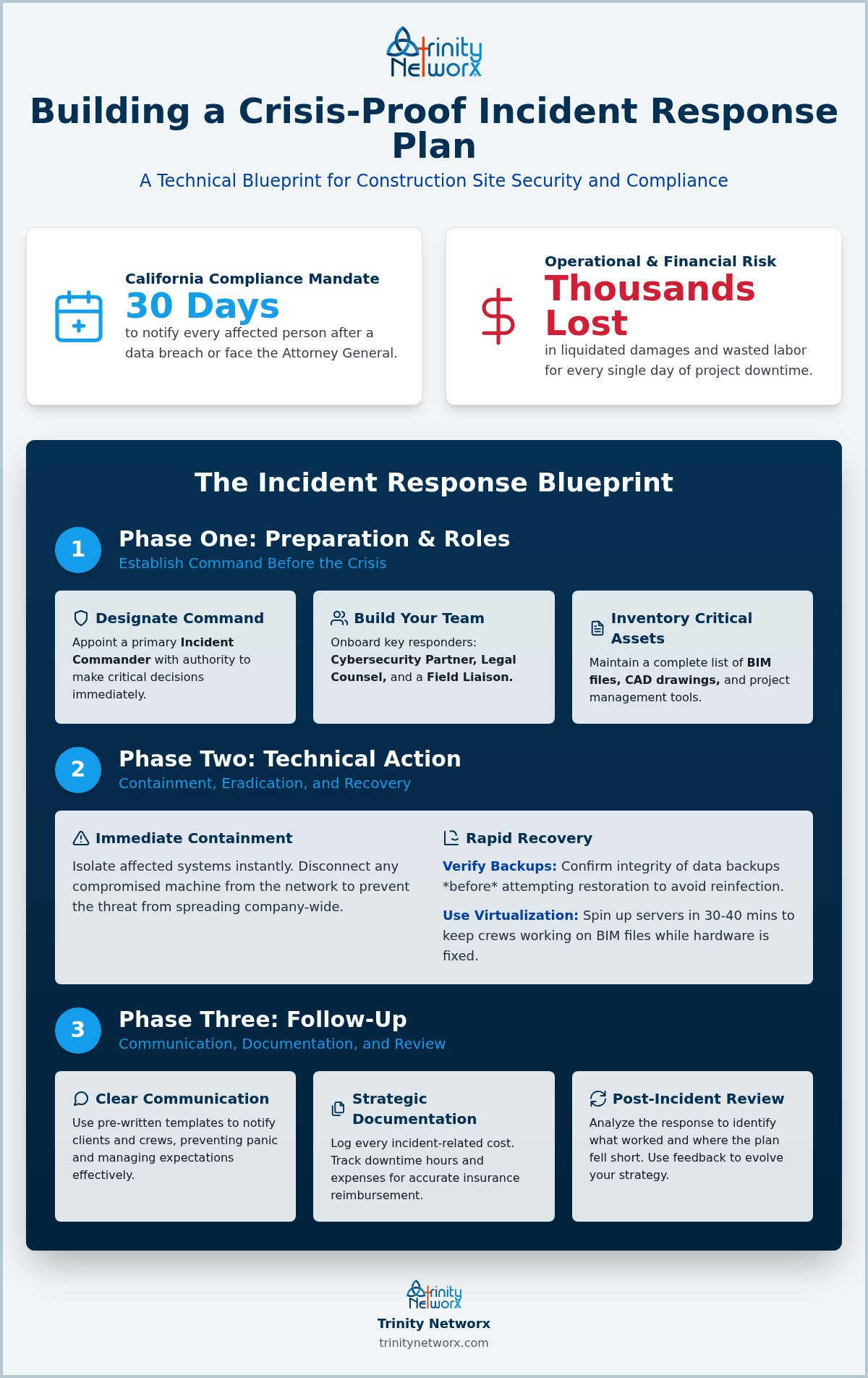
Protecting your job site data requires more than just luck. You now have a clear checklist for what to include in an incident response plan to keep your field operations moving. From designating an incident commander to verifying backup integrity before restoration, every step reduces the risk of project downtime. Don't let technical confusion stop your production. Reliable documentation and rapid containment are the tools that save your profit margins when a breach occurs.
Trinity Networx, LLC brings over 30 years of collective IT expertise to every build. As one of the CIO Review 20 Most Promising IT Services Companies, we understand that construction technology demands speed. We back our services with a 20 minute response guarantee to ensure you are never left waiting during a crisis. Contact Trinity Networx, LLC today to secure your construction data and keep your projects on schedule. Your business continuity is our priority.
Update your plan at least once a year or whenever you introduce new construction technology to your job sites. If you change project management software or add major subcontractors, your documentation must reflect these shifts. Regular testing through tabletop exercises ensures your team remains sharp. An outdated plan is a liability that causes project delays when a real threat emerges.
An incident response plan focuses on the immediate technical and communicative actions taken during an active security breach. A disaster recovery plan deals with the long term restoration of systems after a total failure or physical catastrophe. Knowing exactly what to include in an incident response plan ensures you can stop an attack before it necessitates a full disaster recovery effort.
Absolutely. Cybercriminals often target smaller subcontractors because they serve as entry points into the networks of larger general contractors. A single ransomware attack can bankrupt a small firm through liquidated damages and field data loss. Having a written plan proves to your partners that you are a reliable link in the supply chain. It protects your daily cash flow.
Insurers now require documented security protocols before they issue a policy or renew a quote. A detailed plan demonstrates that you are a lower risk, which often leads to reduced premiums. It shows you have proactive measures like 24/7 monitoring ready to go. Providing a clear list of what to include in an incident response plan proves your firm is a safety conscious partner.

Article by
Lance Reichenberger, Ph.D.., J.D. (Candidate)
Dr. Lance Reichenberger is the founder of Trinity Networx, a Southern California technology firm specializing in managed IT services, cybersecurity, network infrastructure, and business technology strategy. With nearly four decades of experience in the IT industry, he works with businesses to improve operational efficiency, strengthen security, and align technology with long-term growth objectives.
Lance focuses on proactive IT management, enterprise wireless infrastructure, cybersecurity integration, and scalable technology solutions for growing organizations throughout Southern California.
The content published on this website is provided for general informational and educational purposes only. Articles may be created, edited, or enhanced with the assistance of artificial intelligence and automation tools under the direction and review of Trinity Networx. While every effort is made to ensure accuracy and relevance, the information provided should not be considered professional, legal, financial, cybersecurity, or technical advice specific to your organization. Businesses should consult directly with a qualified professional regarding their unique environment, compliance requirements, and operational needs. Trinity Networx makes no warranties regarding completeness, reliability, or applicability of the information contained within these articles.
Schedule a brief conversation with Trinity Networx to discuss your business technology needs.
Get a practical roadmap built around your business, your users, your systems, and the technology issues that need attention first.
Put the right technology, support, security, and infrastructure in place so your business can grow, adapt, and move forward with confidence.

