

3281 E. Guasti Rd, STE 700, Ontario, CA 91761
1712 9th Ave SW, Watertown, SD 57201

How much revenue did your firm lose last month because a verbal change order from the field never made it into your project management system? You know the frustration of chasing down subcontractors or field supervisors to reconstruct a conversation that happened three days ago. Manual data entry is a slow, unreliable bridge between the job site and the back office. It's a liability that creates project delays and fragmented records. By integrating VoIP with business CRM software, you turn every phone call into a permanent, searchable project asset.
We will show you how to protect your profit margins by unifying field communications with your central database. This guide explores the transition from redundant, disconnected tools to a single source of truth. You will discover how automated call logging eliminates manual errors and reduces the administrative burden on your team.
• Stop losing money on undocumented field changes by linking your voice and data systems.
• Master the steps for integrating VoIP with business CRM software to ensure every call becomes a permanent project record.
• Verify your bandwidth can handle unified traffic and choose vendors that support your specific construction tools.
• Defend your firm against cyber threats by hardening the connections between your phone system and project database.
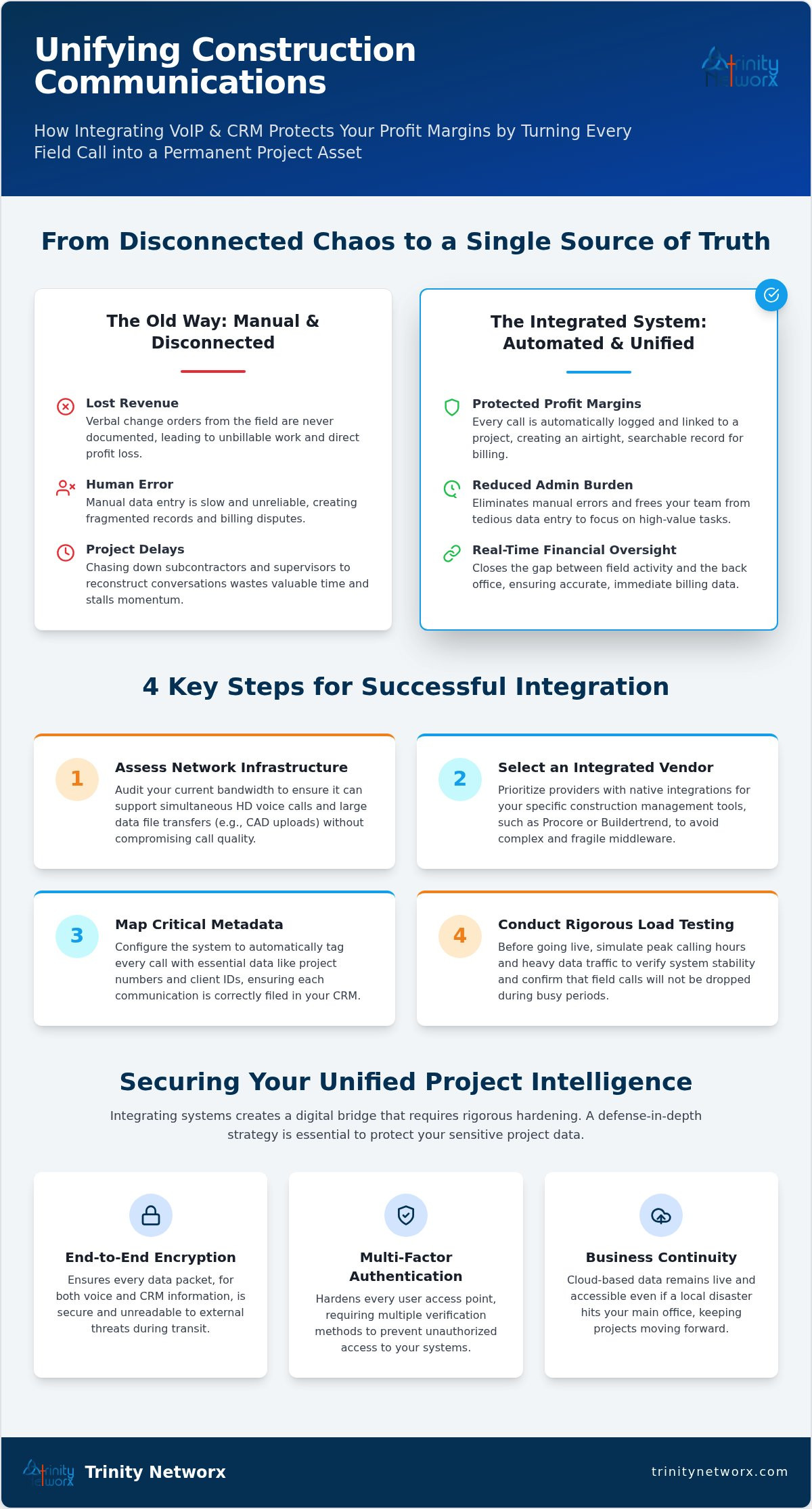
Project friction starts the moment a site supervisor makes a decision that the back office never hears about. If your field staff relies on memory to log calls at the end of a long shift, you are bleeding money. Manual call logging is fundamentally flawed; it invites human error and creates massive billing disputes when a client questions a change order. Modern Voice over IP (VoIP) systems capture data immediately. By integrating VoIP with business CRM software, you close the gap between field activity and financial oversight. Subcontractors and project managers often work in separate data silos, leading to redundant software costs and fragmented records. This lack of visibility is a primary cause of project friction that stalls momentum and erodes your bottom line. For firms focused on IT services for commercial construction, this synchronization is a necessity.
Protecting your project margins requires an airtight record of every verbal agreement made on the job site. Fragmented logs aren't just messy; they create severe liability issues during construction audits when you can't prove who authorized a specific expense. Waiting for field reports is a profit killer. It's too slow. Your office needs real-time data to bill accurately. Manual entry costs you in administrative overhead and lost billables. Automated synchronization ensures that every interaction is logged immediately, removing the risk of forgotten details. This proactive approach turns your communication infrastructure into a strategic driver of growth. Contact the team at contact us to start your integration.
Successful implementation requires more than just a software license. You must audit your current network capacity to ensure it supports the simultaneous flow of high definition voice and massive project data files. If your bandwidth is choked by large CAD uploads, call quality will suffer. When selecting a provider for integrating VoIP with business CRM software, prioritize those with native hooks for tools like Procore or Buildertrend. Avoid generic solutions that require complex middleware. You need direct communication between your phone system and your database to maintain operational continuity. We recommend local resources for this setup to ensure your technical support understands the unique demands of Southern California construction environments.
Mapping metadata fields is the next critical step. Every call must carry project numbers and client IDs into your CRM automatically. This ensures that a foreman's update from the job site attaches to the correct project file without manual intervention. Without precise mapping, your data becomes a disorganized pile of timestamps. Before going live, test the connection under heavy load. Simulate peak calling hours to verify that field calls don't drop when the office is busy. Following NIST security guidelines helps protect these data exchanges from interception. This methodical approach prevents the technical friction that often leads to staff abandonment of new tools.
Stable VoIP performance relies on high quality physical connections. Your warehouse or office needs professional infrastructure network cabling to prevent packet loss and jitter. Wi-Fi alone often fails in industrial environments with heavy machinery or metal framing. Proactive monitoring identifies bottlenecks before they cause downtime on the job site. We act as your internal IT department to manage these technical details with a 20 minute response guarantee. If you need assistance with your setup, you can speak with our technical team today to eliminate communication gaps.
Opening network ports for integrating VoIP with business CRM software expands your attack surface. You aren't just connecting two applications; you're creating a digital bridge that requires rigorous hardening. Ransomware that targets a voice platform shouldn't be allowed to compromise your project database. You need a defense in depth strategy. This includes end to end encryption for every packet and multi factor authentication for every user access point. We prioritize these cybersecurity and antivirus measures to ensure your project intelligence remains private and protected from external threats.
Integration also functions as a vital tool for business continuity. If a local disaster hits your main office, your cloud based project intelligence stays live. Field supervisors can keep calling subcontractors while the office database remains accessible from any mobile device. It is a disaster recovery plan hidden in your communication stack. Maintaining this level of uptime is easier with a flat fee IT model. You get proactive monitoring and constant security updates without the sting of hourly billing or surprise invoices. This predictability allows you to focus on project delivery rather than technical troubleshooting.
We lead with a security first networking strategy tailored specifically for Southern California firms. You aren't dealing with a distant, faceless vendor. Our 100% US based help desk delivers a 20 minute response time for all VoIP issues. We act as your internal IT department to keep your field and office staff in sync. Our local resources ensure that your technical infrastructure is managed by experts who understand the construction industry. Contact our team today for a free network assessment to verify your infrastructure is ready for a secure integration.
You can't afford to let verbal change orders vanish into the field. By integrating VoIP with business CRM software, you ensure every conversation becomes an actionable project record. This eliminates manual entry errors and protects your firm from billing disputes. Stable infrastructure and a security first approach are the foundations of this synchronization. Trinity Networx, LLC provides the technical expertise to make this transition simple. As a CIO Review Top 20 Most Promising IT Services Company, we offer 100% local in house technicians who understand the specific needs of Southern California construction. Our 20 minute response guarantee ensures your field to office connection stays live when it matters most. It's time to stop letting fragmented data stall your progress and build a more resilient operation today.
Solve your IT nightmares and integrate your communications today
Integrating your phone system with your CRM automates the documentation process for supervisors on job sites in Nevada or California. Instead of manual logs after a long shift, every call to a subcontractor attaches to the project file automatically. This prevents missed change orders and billing disputes. Your team focuses on site safety and production while the technology handles the administrative burden.
Most modern platforms like Procore or Buildertrend support integrating VoIP with business CRM software through native APIs. We audit your software stack to ensure compatibility before any installation begins. If a direct hook isn't available, we configure secure connectors to bridge the gap. This ensures your office database receives real time updates from every field interaction without requiring manual entry.
Project data stays protected through cloud redundancy and mobile failover protocols. If a site in Utah loses primary internet, calls route through 5G mobile apps to maintain connectivity. All call metadata is cached and syncs with your CRM the moment the connection returns. We monitor these links 24/7 from our Southern California NOC to keep your communication chains unbroken.
Training is minimal because the integration works silently in the background. Your crew continues using their existing mobile devices or desk phones as they always have. We provide simple, direct training sessions for your staff to show them how to retrieve automated call recordings and logs. Our local technicians are available with a 20 minute response guarantee to assist whenever questions arise.

Article by
Lance Reichenberger, Ph.D.., J.D. (Candidate)
Dr. Lance Reichenberger is the founder of Trinity Networx, a Southern California technology firm specializing in managed IT services, cybersecurity, network infrastructure, and business technology strategy. With nearly four decades of experience in the IT industry, he works with businesses to improve operational efficiency, strengthen security, and align technology with long-term growth objectives.
Lance focuses on proactive IT management, enterprise wireless infrastructure, cybersecurity integration, and scalable technology solutions for growing organizations throughout Southern California.
The content published on this website is provided for general informational and educational purposes only. Articles may be created, edited, or enhanced with the assistance of artificial intelligence and automation tools under the direction and review of Trinity Networx. While every effort is made to ensure accuracy and relevance, the information provided should not be considered professional, legal, financial, cybersecurity, or technical advice specific to your organization. Businesses should consult directly with a qualified professional regarding their unique environment, compliance requirements, and operational needs. Trinity Networx makes no warranties regarding completeness, reliability, or applicability of the information contained within these articles.
Schedule a brief conversation with Trinity Networx to discuss your business technology needs.
Get a practical roadmap built around your business, your users, your systems, and the technology issues that need attention first.
Put the right technology, support, security, and infrastructure in place so your business can grow, adapt, and move forward with confidence.

