

3281 E. Guasti Rd, STE 700, Ontario, CA 91761
1712 9th Ave SW, Watertown, SD 57201

What if a compliance gap on a government construction project starts when information moves between the office, jobsite, and field crew? IT compliance for government contractors in Southern California begins by identifying which contract requirements apply, then checking whether protections cover every place your team works. It can be difficult to know which clauses matter or whether your IT support can document the controls.
This construction-focused checklist helps you review contract requirements with the contracting authority or a qualified adviser, then assess access, devices, connectivity, data handling, backups, and incident response. It also explains how to evaluate IT support that can maintain and document agreed controls across office-to-field systems. The aim is to connect contract obligations to construction workflows before choosing tools or support, whether your projects are in Southern California or span California, Nevada, Arizona, and Utah.
• Review contract documents with the contracting authority or a qualified adviser to identify which IT requirements apply to your construction projects.
• Use the checklist to assess user access, field devices, project files, jobsite connectivity, backups, and incident escalation.
• Evaluate whether IT support can document and maintain controls across your office, jobsites, and field teams. IT compliance for government contractors in Southern California depends on matching support to both contract needs and construction workflows.
• Discuss your contract context and construction technology needs with Trinity Networx, LLC through the contact page.
Government construction work doesn’t put every contractor under the same IT requirements. A prime contractor, specialty subcontractor, and project vendor may handle different information and have different contract terms. Treating them as interchangeable can leave field devices, project files, or office systems outside the controls a particular agreement requires.
For IT compliance for government contractors in Southern California, start with the documents, not assumptions. Review contract clauses, the information your team will handle, direction from the contracting agency, and cybersecurity language passed down through subcontracts. Flag unclear terms for the contracting authority or a qualified compliance adviser. The fact that a project involves government funding alone doesn’t establish which controls apply.
Applicable IT requirements depend on the contract terms and the information your team handles, not simply on the fact that the work is government-funded.
Treat CMMC, NIST SP 800-171, DFARS, and Controlled Unclassified Information (CUI) as references to verify. Don’t assume a standard applies, or that a subcontract passes down the same requirements, until the relevant contract language and information types have been reviewed. The Cybersecurity Maturity Model Certification (CMMC) overview provides general background, not a decision about your contract. For the separate CMMC support topic, see Trinity Networx, LLC’s CMMC compliance consultants article.
Once requirements are confirmed, map them to real construction workflows: who opens project files from a jobsite, which devices access those files, and how subcontractor access is managed. This gives your IT team a defined scope to assess and document instead of a checklist built on guesswork.
Need to discuss your contract context and construction technology environment? Contact the Trinity Networx, LLC team.
A control that works in the main office may not cover a trailer laptop, a shared tablet, or a crew member connecting from a remote jobsite. For IT compliance for government contractors in Southern California, trace how project information moves between people, devices, and locations, then compare those practices with the requirements confirmed for your contract.
Identify who can open project data and review permissions when a worker changes assignments or leaves the project. Confirm who is responsible for making each update.
Record which company or shared devices access project files, who is responsible for each one, and how the device is used to connect to work systems.
Confirm where files are stored, who can access them, and whether permissions match each person’s project responsibilities.
Review how field teams connect to office systems and whether jobsite access follows the security controls agreed for the contract.
Ask the IT provider how backups are verified, where recovery procedures are documented, and who needs to take part if a restore is required.
Name who receives a report, who coordinates the response, and how employees can raise a concern promptly from a jobsite or the office.
Ask who can access project data, from which devices, and how permissions change when assignments end. Review backup verification, recovery procedures, security awareness, and escalation responsibilities with your IT provider. Shared devices and changing crews can make ownership easy to lose track of. Write down the process, then check it against actual field practice, including how crews connect at each project site.
Checklist rule: Mark each control as documented, validated in practice, or still requiring review. A written procedure alone doesn’t show that the process works on a jobsite.
Construction-focused IT services for commercial construction can help connect project offices, jobsites, and field teams. For help reviewing your construction technology environment, contact Trinity Networx, LLC.
Compliance readiness depends on more than security tools. Your IT support should understand how construction work moves between the office, project sites, and changing field teams. Ask how the provider handles jobsite connectivity, technology changes between projects, user access updates, and business continuity when a system or connection fails.
Look for construction experience that translates into clear records and repeatable support. For example, ask whether the provider can document the network linking your office and jobsites, support technology relocations, and help maintain office-to-field connectivity. IT services for commercial construction can connect day-to-day technology needs with field operations.
Ask for specific examples of how the provider documents and supports the systems your crews use. Clarify responsibilities before work begins:
How are user permissions recorded and updated when project assignments change?
Will you receive current documentation showing the systems connecting the office and jobsites?
How are backups checked, and how are recovery steps recorded?
Who receives an incident report, coordinates the technical response, and keeps the contractor informed?
Who interprets contract requirements, reviews evidence, and communicates with contracting or assessment parties?
Set the boundary clearly. An IT provider can help maintain systems, document agreed controls, and organize technical evidence. It can’t promise that your company qualifies for a contract or will receive a certification. For IT compliance for government contractors in Southern California, have a qualified adviser confirm contract obligations and assign compliance interpretation to the appropriate party.
Want to assess your construction technology and support needs? Discuss your construction IT requirements with Trinity Networx, LLC.
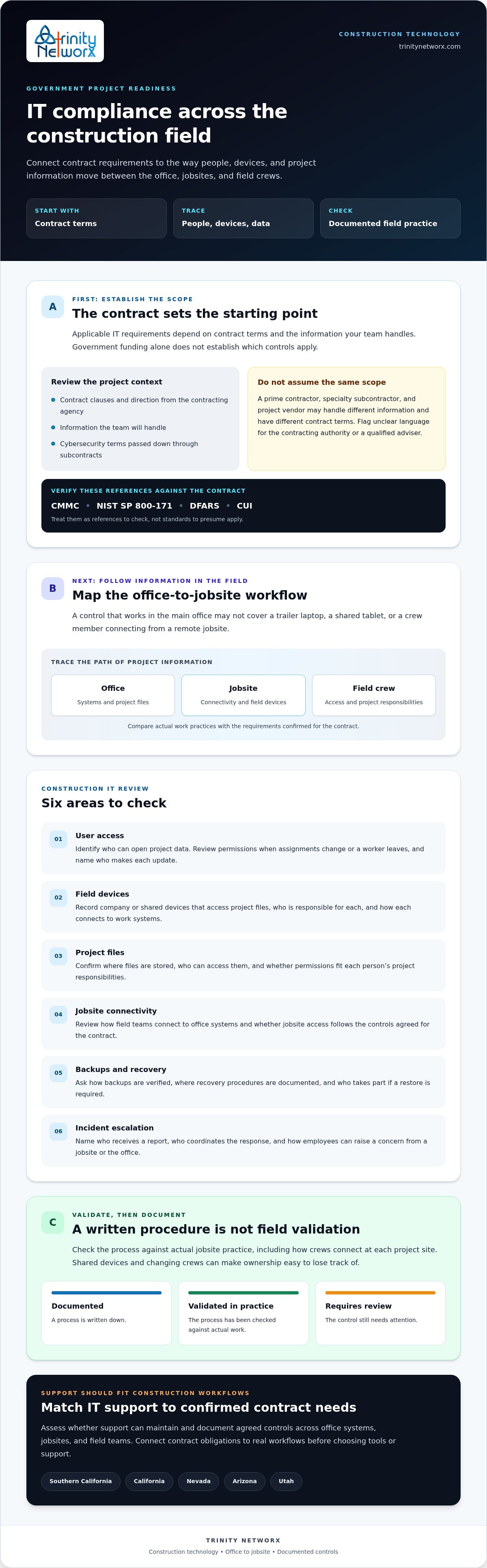
Start with the contract, confirm which requirements apply with a qualified adviser, then check whether controls work across project offices, jobsites, and field teams. Clear access records, current network documentation, reviewed recovery procedures, and assigned incident responsibilities give your team a practical basis for ongoing review.
IT compliance for government contractors in Southern California calls for support that understands construction workflows, not just office systems. Trinity Networx provides construction-focused IT planning and office-to-field connectivity, alongside managed IT, cybersecurity, backup, and recovery services. These services can help maintain systems and document agreed controls, but they don’t guarantee contract eligibility or certification.
Ready to review your setup? Talk with the team about construction IT support and take the next step with a clearer view of your technology needs.
No. CMMC requirements don’t automatically apply in the same way to every government contractor. Review the solicitation, contract terms, information your team will handle, and any requirements passed down through a subcontract. Ask the contracting authority or a qualified compliance adviser to confirm what applies before committing to an assessment or changing your construction IT systems.
Control access across people, devices, and locations. Limit project file access to team members who need it, use individual accounts instead of shared logins, and track which field devices connect to project data. Review jobsite connectivity, backup verification, and recovery procedures with your IT provider. Update access as crews change, and check these practices against confirmed contract requirements.
No. An IT provider can help maintain systems, document agreed controls, support backups and recovery, and organize technical records. It can’t promise contract eligibility or certification. Before work starts, clarify who interprets the contract requirements, who reviews evidence, and who communicates with contracting or assessment parties. Keep those responsibilities distinct from the provider’s technical support role.
Ask about construction experience, jobsite connectivity, technology changes, access records, written network documentation, backup testing, incident support, and business continuity. Also confirm who handles contract interpretation and evidence review. These questions help contractors assess IT compliance for government contractors in Southern California against real office-to-field operations. Talk with the team about your construction IT needs.

Article by
Lance Reichenberger, Ph.D.., J.D. (Candidate)
Dr. Lance Reichenberger is the founder of Trinity Networx, a Southern California technology firm specializing in managed IT services, cybersecurity, network infrastructure, and business technology strategy. With nearly four decades of experience in the IT industry, he works with businesses to improve operational efficiency, strengthen security, and align technology with long-term growth objectives.
Lance focuses on proactive IT management, enterprise wireless infrastructure, cybersecurity integration, and scalable technology solutions for growing organizations throughout Southern California.
The content published on this website is provided for general informational and educational purposes only. Articles may be created, edited, or enhanced with the assistance of artificial intelligence and automation tools under the direction and review of Trinity Networx. While every effort is made to ensure accuracy and relevance, the information provided should not be considered professional, legal, financial, cybersecurity, or technical advice specific to your organization. Businesses should consult directly with a qualified professional regarding their unique environment, compliance requirements, and operational needs. Trinity Networx makes no warranties regarding completeness, reliability, or applicability of the information contained within these articles.
Schedule a brief conversation with Trinity Networx to discuss your business technology needs.
Get a practical roadmap built around your business, your users, your systems, and the technology issues that need attention first.
Put the right technology, support, security, and infrastructure in place so your business can grow, adapt, and move forward with confidence.

