

3281 E. Guasti Rd, STE 700, Ontario, CA 91761
1712 9th Ave SW, Watertown, SD 57201

According to the 2026 Verizon Data Breach Investigations Report, the human element contributed to 62% of all data breaches. In commercial construction, that vulnerability starts when companies lack a structured IT onboarding checklist for new hires before deploying hardware to a jobsite trailer.
You already know the frustration of delayed starts. Field engineers wait days for working devices, sensitive project bids sit exposed on unmanaged phones, and busy crews bypass security rules simply to view daily blueprints. Idle crews quickly drain project margins.
Following a field-ready checklist guarantees your personnel have immediate jobsite access to construction management software, secured networks, and protected estimating files on their first morning. Below, we outline the exact technical steps required to build a dependable, repeatable deployment workflow across every regional trailer and main office.
• Stage ruggedized tablets, laptops, and cellular hotspots two weeks in advance to eliminate day-one jobsite downtime.
• Apply an IT onboarding checklist for new hires to enforce strict least-privilege access controls that protect sensitive bid documents and estimating databases.
• Mandate phishing-resistant multi-factor authentication across all field management platforms and mobile devices before remote crews log in.
• Validate network stability, jobsite trailer connections, and VPN performance during a focused first-morning technical activation.
Field machinery demands routine servicing before breaking ground. Your jobsite technology requires the exact same discipline. Generic onboarding plans fail because they assume employees sit in air-conditioned offices with stable Wi-Fi. Construction demands specialized planning. While human resources handles organizational socialization, technical teams must stage physical devices to withstand dust, vibration, and fluctuating cellular signals.
A reliable IT onboarding checklist for new hires starts two weeks prior to the employee start date. This timeline gives technical staff adequate room to procure, image, and test equipment before shipping it out. Commercial contractors partnering with Trinity Networx for commercial construction IT services avoid costly jobsite downtime by enforcing clear role-based hardware specifications:
Heavy-duty rugged tablets featuring sunlight-readable displays, drop protection, integrated cellular modems, and vehicle docking mounts.
High-performance laptops designed to handle complex CAD drawings, BIM models, and large estimating databases.
Standard business laptops paired with dual-monitor docking stations and VoIP communication tools.
Each unit must receive a physical asset tag with serial numbers logged directly inside your central inventory tracker. Unmonitored gear easily disappears during trailer relocations.
Never ship bare hardware straight to a job trailer. Technicians must apply full-disk encryption and install managed endpoint protection before deployment. Mobile device management profiles establish geofencing boundaries, enforce automated patching, and let your team wipe lost units instantly. Finally, bench-test every accessory. Verify plan table display connections, vehicle charging cradles, and local mobile hotspot speeds. This testing guarantees field personnel open their cases on day one and get straight to work.
Granting blanket administrative permissions creates immediate risk. When field personnel access folders outside their active jobsites, proprietary bid estimates, subcontractor fee structures, and profit margins get exposed. Your IT onboarding checklist for new hires must apply strict least-privilege access rules from day one. Federal standards regarding Contractor employee access highlight the legal and operational necessity of strictly limiting data permissions to confirmed job requirements.
According to the 2026 Verizon DBIR, vulnerability exploitation caused 31% of breaches, while stolen credentials accounted for 13%. Construction firms cannot rely on simple passwords or basic SMS text codes. You need phishing-resistant multi-factor authentication, such as FIDO2 hardware keys or biometric passkeys, across every mobile phone, rugged tablet, and cloud account. If your current permission structure feels unmanageable, you can speak with our technical team to lock down user profiles.
Every commercial build requires separate digital boundaries. Technical administrators must set up user identities through specific provisioning protocols:
Create restricted accounts inside Procore and PlanGrid that expose only the sheets, submittals, and RFIs tied to the user's assigned active project.
Block project managers and field foremen from seeing historical bidding sheets, executive compensation, and unrelated job financial audits.
Deploy hosted VoIP solutions on field laptops and company smartphones so superintendents communicate instantly with office engineers without publishing private personal numbers.
Deploying devices to a jobsite trailer solves only half the challenge. Equipment must function under realistic field conditions the moment work begins. A thorough IT onboarding checklist for new hires reserves the employee's first morning for live verification rather than assuming everything works out of the box. Technicians must conduct a mandatory 30-minute orientation to walk through strong password creation, secure access protocols, and threat detection. In 2026, malicious actors frequently rely on AI-assisted phishing to imitate subcontractors and project executives. Teaching personnel to spot fraudulent change orders or invoice redirect requests immediately protects your bottom line.
Following security training, run live technical validations directly inside the field office:
Test encrypted tunnels from the trailer network back to central file shares under peak shift bandwidth.
Open high-density blueprint sets on field tablets to ensure rendering speeds match operational needs.
Confirm direct wireless and hardwired links to wide-format plotters and local office multifunction printers.
Do not let field personnel waste hours troubleshooting connection errors alone. Add one-touch shortcuts to your in-house help desk right on every home screen. Test remote desktop stability across cellular modems to make sure off-site support agents can quickly resolve field snags. Ready to eliminate setup delays? Contact Trinity Networx today to establish reliable jobsite technology for your incoming crew.
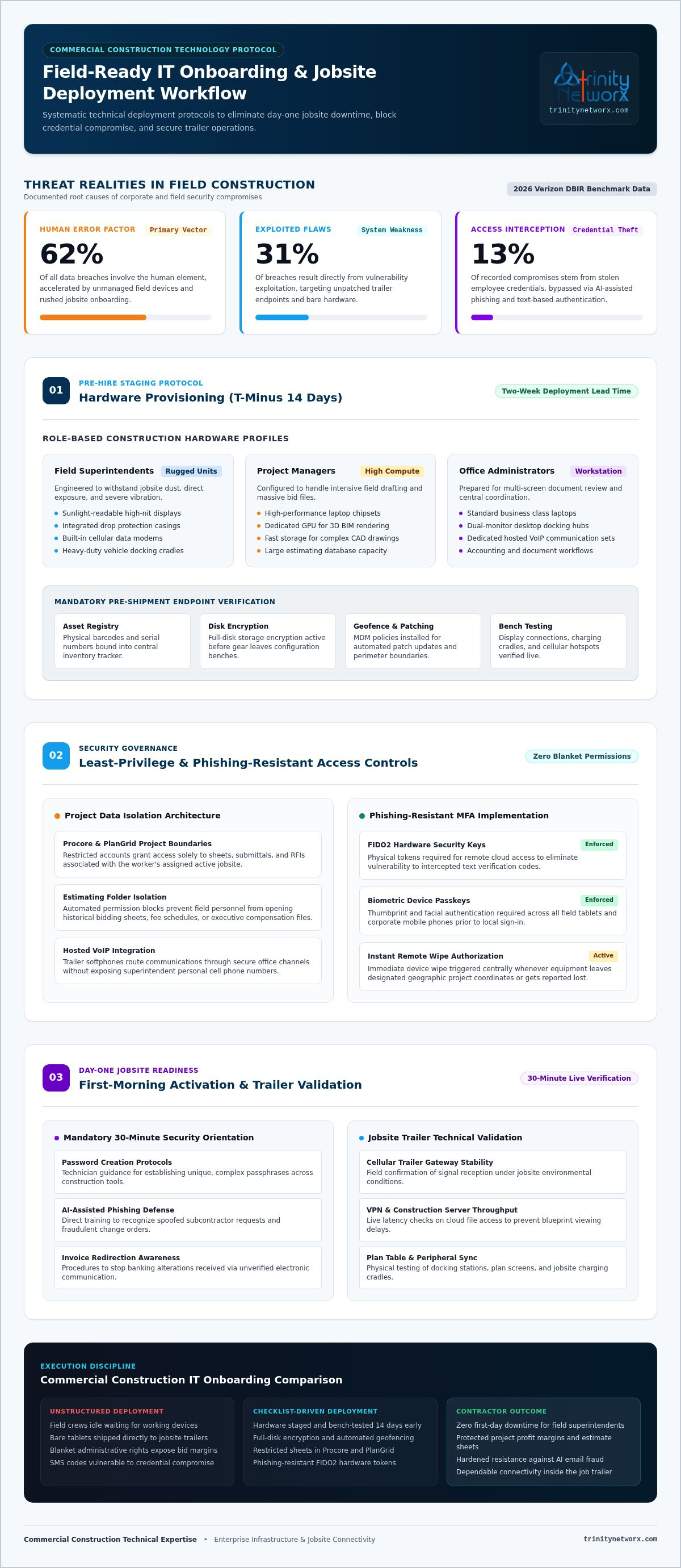
Staging rugged equipment early and restricting bid data through role-based access rules protects project margins from expensive downtime. Following a structured IT onboarding checklist for new hires turns erratic trailer setups into a repeatable, protected deployment across every regional jobsite.
Field productivity depends on dependable technology. Backed by over 30 years of collective IT expertise and named a CIO Review Top 20 IT Services Company, Trinity Networx protects your operations with a 100% in-house local IT staff and 24/7/365 network operations center monitoring. We understand the physical demands of construction environments.
Equip your personnel with tools that work immediately. Schedule an IT onboarding strategy session today to guarantee your next field hire hits the jobsite running.
You should start the process exactly two weeks before your new employee arrives on site. This lead time gives technical personnel enough runway to source specialized hardware, install operating system patches, and apply company security policies. Rushing this sequence forces field personnel to sit idle during their first critical morning.
Superintendents need IP65-rated rugged tablets with sunlight-readable screens, drop protection, and integrated cellular modems. Pair these tablets with protective vehicle mounts, heavy-duty styluses for markups, and portable battery packs. If their trailer lacks reliable line power, supply a dedicated mobile Wi-Fi unit configured for multiple regional carriers across California, Nevada, Arizona, and Utah.
Protect bid data by enforcing role-based permissions through your central directory. Never grant blanket administrator access to new hires. An IT onboarding checklist for new hires must assign field staff strictly to active project directories while keeping historical bid archives, company financial reports, and subcontractor rate negotiations fully locked behind phishing-resistant multi-factor authentication.
Field staff contact our US-based help desk directly using desktop shortcuts or phone integrations. Trinity Networx relies on a 100% in-house local technical team without overseas outsourcing, backed by 24/7/365 network operations center monitoring. Technicians connect through remote management tools to diagnose connectivity drops, clear printer queues, or resolve blueprint viewer crashes immediately.

Article by
Lance Reichenberger, Ph.D.., J.D. (Candidate)
Dr. Lance Reichenberger is the founder of Trinity Networx, a Southern California technology firm specializing in managed IT services, cybersecurity, network infrastructure, and business technology strategy. With nearly four decades of experience in the IT industry, he works with businesses to improve operational efficiency, strengthen security, and align technology with long-term growth objectives.
Lance focuses on proactive IT management, enterprise wireless infrastructure, cybersecurity integration, and scalable technology solutions for growing organizations throughout Southern California.
The content published on this website is provided for general informational and educational purposes only. Articles may be created, edited, or enhanced with the assistance of artificial intelligence and automation tools under the direction and review of Trinity Networx. While every effort is made to ensure accuracy and relevance, the information provided should not be considered professional, legal, financial, cybersecurity, or technical advice specific to your organization. Businesses should consult directly with a qualified professional regarding their unique environment, compliance requirements, and operational needs. Trinity Networx makes no warranties regarding completeness, reliability, or applicability of the information contained within these articles.
Schedule a brief conversation with Trinity Networx to discuss your business technology needs.
Get a practical roadmap built around your business, your users, your systems, and the technology issues that need attention first.
Put the right technology, support, security, and infrastructure in place so your business can grow, adapt, and move forward with confidence.

