3281 E. Guasti Rd, STE 700, Ontario, CA 91761
1712 9th Ave SW, Watertown, SD 57201
Lance Reichenberger, Ph.D.
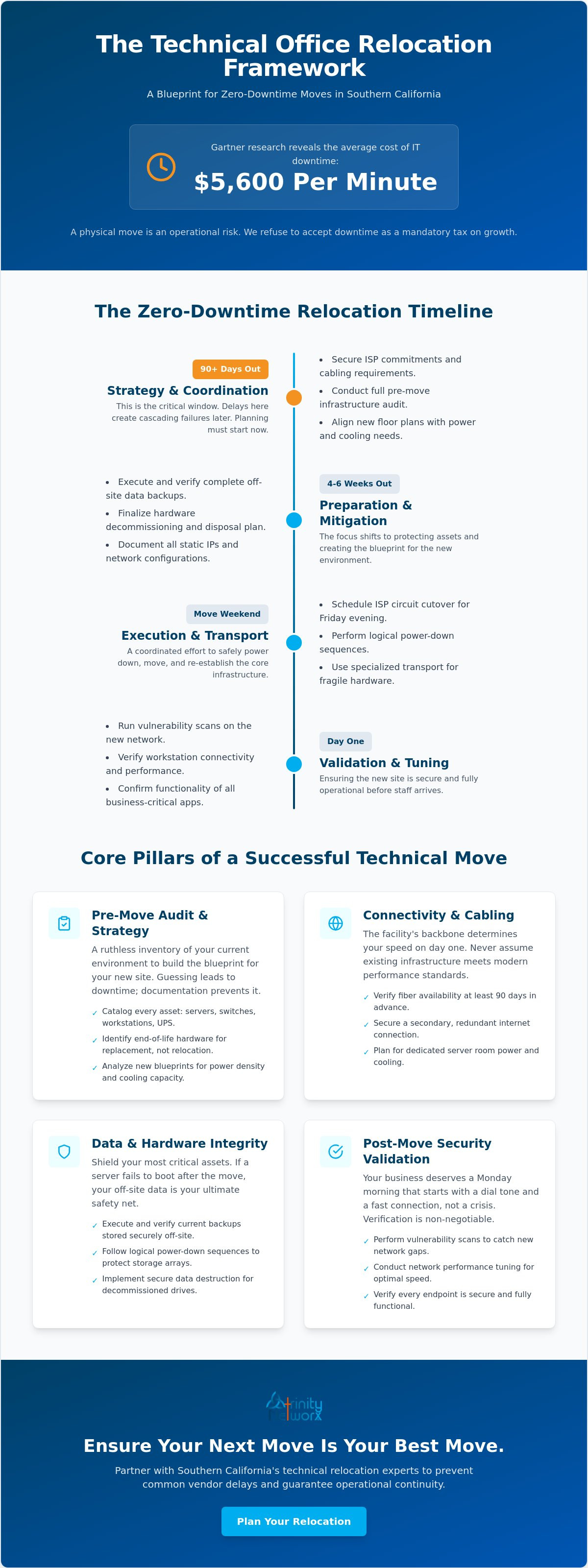
How much capital can your business afford to lose while your servers sit idle in the back of a moving truck? Gartner research indicates that IT downtime costs organizations an average of $5,600 per minute. When you handle IT project management for office relocations in Southern California, the margin for error disappears the moment the first cable is unplugged. You already know that a physical move is stressful. You likely worry that a missed internet service provider deadline or a dropped server will paralyze your operations on Monday morning. It's a valid fear. Most local moves fail at the network rack, not the loading dock.
We refuse to accept that downtime is a mandatory tax on growth. This guide provides a technical relocation framework built to keep your operations running without a pulse of interruption. You'll learn how to secure your hardware, verify your data integrity, and ensure your network is fully functional before your staff even arrives at the new site. We're moving past the chaos of reactive moving day fixes. We're shifting toward a strategy of total operational continuity. Your business deserves a Monday morning that starts with a dial tone and a fast connection, not a crisis.
• Audit your current hardware. Identify aging equipment that belongs in the recycling bin rather than the moving truck.
• Master IT project management for office relocations in Southern California by securing ISP commitments and cabling requirements at least 90 days before your move date.
• Shield your data. Execute verified backups and logical power-down sequences that keep your storage arrays safe from hardware failure.
• Verify your security perimeter post-move with vulnerability scans that catch new network gaps before they become active threats.
• Learn why local technical expertise prevents the common vendor delays that keep regional businesses offline during a transition.
A successful move starts months before the first box is taped. It begins with a ruthless inventory of your current environment. You need to know exactly what you own. We catalog every physical asset, including:
• High-density server racks and enclosures
• Network switches and firewalls
• Individual employee workstations and peripherals
• Uninterruptible Power Supplies (UPS) and battery backups
This isn't just about counting heads. It's about understanding the health of your infrastructure. We document every static IP assignment and network configuration detail. This documentation is the blueprint for your new site. Without it, you're guessing. Guessing leads to downtime. We ensure every data backup is current, verified, and stored securely off-site. If a server fails to boot after the move, your off-site data is your ultimate safety net. Professional IT project management for office relocations in Southern California relies on this level of granular detail to prevent day-one disasters.
Moving obsolete gear is a waste of capital. We identify end-of-life hardware that should be replaced rather than transported. Our technicians catalog serial numbers and warranty statuses for all mission-critical equipment. This ensures we know which items are under support if a hardware failure occurs during the transition. Some legacy systems are fragile. They require specialized climate-controlled transport to survive the trip across town. For hardware that has reached the end of its useful life, we implement a secure disposal plan. We follow strict data destruction protocols. Your proprietary information must never reside on a discarded drive. Effective IT project management treats decommissioning as a security priority, not an afterthought.
Your new office should be a catalyst for growth, not a bottleneck. A vCIO steps in to align the new floor plan with your future digital goals. We analyze the blueprints for power density and cooling capacity. We look for network infrastructure improvements that only a physical move provides. This is the time to review your current service contracts. Many vendors include relocation-triggered exit clauses or hidden fees. We find them. We coordinate with your internal stakeholders to build a realistic technical budget. IT project management for office relocations in Southern California requires balancing immediate moving costs with long term infrastructure stability. We ensure your budget covers the essentials without the bloat of reactive spending.
The new facility's backbone determines your speed on day one. It's a binary reality. Don't assume the existing structured cabling and fiber optic installations meet current performance needs. We audit the site to verify the integrity of the copper and fiber. We look for damaged jacks or non-compliant cable runs that will bottleneck your data. Proper IT project management for office relocations in Southern California demands a precise Wi-Fi heat map. We identify dead zones before the desks arrive. Your server room requires dedicated power circuits and independent cooling. Standard office HVAC often fails to handle the heat load of a modern server rack during a California heatwave. We analyze the physical layout to place access points where they won't be obstructed by metal filing cabinets or reinforced walls.
Lead times for fiber circuits in Los Angeles and Orange County are notorious. You must initiate coordination with providers like Frontier or Spectrum at least 90 days before your move. We verify fiber availability at your specific address immediately. Waiting until the final month is a recipe for disaster. We schedule the circuit cutover for the Friday evening preceding the move. This allows a 48 hour window for troubleshooting. We always secure a secondary internet connection. This redundancy prevents total isolation if the primary carrier hits a snag during the transition. If you're unsure about your new site's connectivity options, you can speak with our infrastructure team to review the blueprints.
Your cabling is a long term investment. We insist on Cat6A or higher for all new workstation drops. This standard supports 10Gbps speeds, which is essential for the heavy data loads expected by 2026. Every cable must be labeled at both ends. This prevents the troubleshooting nightmares that occur when a port goes dark. We test and certify every single port before the furniture installers enter the building. We don't just plug things in. We use specialized testers to confirm that every run meets the required decibel levels and speed ratings. This proactive approach ensures your team hits the ground running on Monday morning without the frustration of dead ports or intermittent connectivity.
Execution day is the ultimate test of your preparation. We start by executing a final, bit-for-bit data backup. We verify its integrity before a single server is touched. This is your insurance policy. Powering down is a surgical process. We follow a strict logical sequence; shutting down applications, then databases, and finally the physical hardware. This prevents file system corruption. We station an IT lead at both the origin and the destination simultaneously. This dual-presence strategy ensures that communication never breaks down as assets move across the city. Effective IT project management for office relocations in Southern California treats moving day as a high-stakes deployment, not just a logistics task.
Precision matters during transport. We use specialized IT carts with active anti-static protection. Moving sensitive hardware in standard cardboard boxes is a risk we don't take. We track every asset in real-time. If a truck is delayed on the 405, we know exactly which systems are affected. This transparency keeps the project on schedule and prevents the frantic guesswork that often plagues unmanaged moves.
Sensitive hardware requires more than just a box. We remove rail-mounted equipment to prevent the vibration damage that occurs when heavy racks are moved while fully loaded. Every component is wrapped in professional-grade anti-static materials. The server rack is always the first item loaded and the first item off. It must be positioned and powered at the new site before the first workstation arrives. This ensures the network core is ready to receive traffic immediately. Our goal is to have the heart of your network beating before the furniture movers even finish their first load.
Productivity depends on immediate connectivity. We connect every workstation according to the pre-approved floor plan we developed during the audit phase. This isn't just about plugging in monitors. We deploy business VoIP systems right away to restore external communication. Your clients shouldn't even know you've moved. Our team verifies peripheral connectivity for printers, scanners, and local storage at every desk. We don't leave until every employee has a dial tone and a functioning desktop. This level of detail in IT project management for office relocations in Southern California is what separates a smooth transition from a week of lost revenue.
Lance Reichenberger, Ph.D.
Hardware is active. Lights are on. But is the network safe? We don't guess. We verify. A physical move often exposes logical holes that were hidden by old configurations. We run a full vulnerability scan immediately. This ensures no new gaps appeared during the transition. Firewall rules need re-validation. VPN access points need testing to confirm remote staff can reach the new site without friction. This phase of IT project management for office relocations in Southern California focuses on hardening the new perimeter before the first full day of business.
Speed is as critical as security. We test network throughput at various points across the floor. This identifies potential bottlenecks in the structured cabling or hardware configuration. We don't just sit in the server room. We walk the floor. We talk to your users. We fix immediate technical friction, like a printer that won't map or a Wi-Fi dead zone, before it becomes an expensive support ticket. If you want a post-move environment that actually performs better than your old one, contact our network engineers to schedule a validation audit.
The move isn't over until your safety net is active again. We check that all local and cloud backups have resumed their normal schedules. It's common for automated tasks to fail after a change in IP or gateway. We confirm that business data backup systems are fully accessible. We verify that all shared drives and folder permissions remain intact. Your staff shouldn't struggle to find files on Monday morning. We cross-reference the pre-move audit to ensure every byte of data is where it belongs.
Southern California office buildings are crowded environments. Wi-Fi signals from neighboring suites bleed through the walls and cause interference. We adjust Wi-Fi channel assignments to find the cleanest spectrum. This is a vital part of IT project management for office relocations in Southern California that general movers miss. We verify that our IT performance metrics match or exceed your pre-move benchmarks. Finally, we update all internal documentation. This includes the new physical layout and logical site maps. Accurate documentation is the only way to ensure future troubleshooting is fast and efficient.
Lance Reichenberger, Ph.D.
General moving companies focus on the weight of a server. They don't understand its logical importance or the fragility of its data arrays. We provide the technical oversight required to prevent catastrophic data loss during transit. Partnering with a team that knows the local landscape ensures you aren't left waiting for an ISP technician who doesn't show up. We provide fixed-fee pricing to keep your project within the lines. Professional IT project management for office relocations in Southern California bridges the gap between basic logistics and total business continuity. We handle the handover to managed IT services so your team stays productive from the moment they sit down. We prioritize your operational health over simple box-moving.
Hardware in motion is a massive security risk. Most businesses ignore the physical vulnerability of servers sitting in a truck on the 405. We ensure full-disk encryption is active before any hardware leaves the rack. We track every asset in real-time to prevent lost equipment that contains sensitive client data. This proactive stance on hardware security is something a standard moving company cannot provide. We don't just move your gear; we protect your reputation. We treat every server as a mission-critical asset, not just another piece of heavy furniture.
Don't just move your old problems to a new suite. We use this transition to upgrade your technical posture. This is the ideal window to implement managed cybersecurity services that protect your new perimeter. We build for the next five years, not just the next five days. Your new facility should be a clean slate for efficiency and growth. We ensure your infrastructure is ready for the data demands of 2026 and beyond. We look for ways to reduce your physical footprint by moving secondary workloads to the cloud while keeping your core systems local and fast.
Your business can't afford a week of silence. Discuss your upcoming Southern California office relocation with us today to secure your timeline. We provide a comprehensive site audit to identify technical risks before they become expensive downtime. Secure a partner that values your uptime as much as you do. Reach out to the experts at Trinity Networx, LLC to start your technical relocation plan. We'll ensure your Monday morning starts with a dial tone and a connection that works.
Lance Reichenberger, Ph.D.
A relocation is far more than a simple change of address. It's a high-stakes infrastructure event. You've seen how a ruthless audit and securing carrier circuits months in advance prevent the most common disasters. We focus on the network rack because that's where your business operations truly live. By treating this transition as a technical deployment, you eliminate the risk of a dark Monday morning. Professional IT project management for office relocations in Southern California ensures that your hardware and data arrive ready for immediate production.
Our team, led by Lance Reichenberger, Ph.D., specializes in the unique technical demands of the local commercial market. We offer a 20-minute response time guarantee to address any friction before it impacts your bottom line. Don't leave your servers in the hands of general laborers who don't understand logical dependencies. You need a partner who views your uptime as the ultimate metric of success. Secure your move with the Trinity Networx, LLC relocation team today. Let's build a foundation at your new site that supports your growth for years to come.
Share this resource: [LinkedIn] [Facebook] [Twitter]
Lance Reichenberger, Ph.D.
Plan your technical transition at least 90 days before your move date. This window is necessary because internet service provider lead times in Los Angeles and Orange County often reach three months for fiber installations. Starting early allows you to secure cabling contractors and perform a full inventory before your current lease expires. Early action prevents the need for emergency cellular hotspots on your first day of business.
Zero downtime is the standard for a professionally managed move. We often schedule the physical transport over a weekend to ensure the network is functional by Monday morning. By using redundant internet connections and pre-configuring the new site's infrastructure, your staff can transition without losing a single hour of productivity. Anything more than a weekend window suggests a failure in technical coordination or proactive planning.
Replace your server only if the hardware is nearing its end-of-life or warranty expiration. Moving is the ideal time to decommission aging equipment rather than paying to transport it. If your server is less than three years old and under a valid support contract, it is usually safe to move. We evaluate your current hardware during the pre-move audit to determine if a replacement or a cloud transition makes more financial sense for your business.
The biggest mistake is treating the move as a logistics task instead of a technical project. Many companies wait until the last minute to notify their ISP or assume the new office's existing cabling is sufficient. This oversight leads to dark days where the staff has no connectivity. Effective IT project management for office relocations in Southern California requires coordinating technical vendors long before the moving trucks arrive at your door.
Yes, provided you use a Business VoIP system or port your numbers correctly. Modern cloud-based voice solutions allow you to keep your identity regardless of your physical address. If you rely on legacy copper lines, you must coordinate with the carrier months in advance to ensure the numbers transfer to the new central office. We recommend switching to cloud-based voice services before the move to make the transition invisible to your callers.
Encrypt all drives and verify your off-site backups before the hardware leaves the building. We ensure that a full, bit-for-bit backup resides in a secure cloud environment or a separate physical location. This acts as a recovery point if a server is damaged during transit. Using specialized IT carts with anti-static protection reduces the risk of hardware failure caused by vibration or static discharge during the drive across town.
Relocation is a perfect catalyst for cloud migration, but it requires a separate strategy. If your hardware is aging, moving to the cloud eliminates the need for a dedicated server room in the new suite. However, this shift must be finished and tested weeks before the physical move. Attempting a cloud migration and a physical relocation simultaneously increases complexity. We help you weigh the cost of new hardware versus monthly cloud hosting fees.
You need anti-static wrapping, rail-mount tools, and shock-absorbent transport for sensitive components. Standard moving blankets are not enough to protect high-density electronics. We use specialized IT carts designed to prevent electrostatic discharge and minimize vibration. Professional IT project management for office relocations in Southern California involves using high-density labels and cable organizers to ensure the re-racking process at the new site is fast and error-free.
Contact our team at contact us to discuss your relocation strategy. Share this guide: [LinkedIn] [Facebook] [Twitter]

Article by
Lance Reichenberger, Ph.D.., J.D. (Candidate)
Dr. Lance Reichenberger is the founder of Trinity Networx, a Southern California technology firm specializing in managed IT services, cybersecurity, network infrastructure, and business technology strategy. With nearly four decades of experience in the IT industry, he works with businesses to improve operational efficiency, strengthen security, and align technology with long-term growth objectives.
Lance focuses on proactive IT management, enterprise wireless infrastructure, cybersecurity integration, and scalable technology solutions for growing organizations throughout Southern California.
The content published on this website is provided for general informational and educational purposes only. Articles may be created, edited, or enhanced with the assistance of artificial intelligence and automation tools under the direction and review of Trinity Networx. While every effort is made to ensure accuracy and relevance, the information provided should not be considered professional, legal, financial, cybersecurity, or technical advice specific to your organization. Businesses should consult directly with a qualified professional regarding their unique environment, compliance requirements, and operational needs. Trinity Networx makes no warranties regarding completeness, reliability, or applicability of the information contained within these articles.
Schedule a brief conversation with Trinity Networx to discuss your business technology needs.
Get a practical roadmap built around your business, your users, your systems, and the technology issues that need attention first.
Put the right technology, support, security, and infrastructure in place so your business can grow, adapt, and move forward with confidence.