

3281 E. Guasti Rd, STE 700, Ontario, CA 91761
1712 9th Ave SW, Watertown, SD 57201

What good is a security update if installing it knocks a superintendent off a project platform during morning coordination? Construction firms need protected, current systems, but an update that interrupts field apps, BIM access, or office workflows can create its own operational problem. Managing software updates and patches across the company takes more than clicking “install.” It requires a clear view of office computers, jobsite devices, and the software crews depend on.
Updates get missed when devices are spread across offices and active sites. Poorly timed restarts can disrupt work, and field devices that connect intermittently may not receive updates when expected. A repeatable process helps protect systems without leaving teams guessing. This article covers how to inventory devices, prioritize and test patches, plan deployment around project activity, and follow up on anything still outstanding. Construction-focused IT support can help maintain visibility across office-to-field operations.
• Managing software updates and patches across the company starts with knowing which office and field devices need attention.
• Prioritize updates, test changes with a pilot group, and schedule deployment around project activity.
• Assign clear owners for approvals, exceptions, and completion checks. Review patch status to catch devices that remain offline or unpatched.
• Construction-focused managed IT support can help maintain update visibility across office and field operations. Contact Trinity Networx, LLC to discuss your company’s needs.
Patch management means identifying, testing, deploying, and tracking software fixes across company devices. A software patch can fix a security vulnerability or address a software issue. For a construction firm, managing software updates and patches across the company also means keeping the systems crews rely on available for project coordination.
Outdated software can leave security gaps or cause compatibility problems between applications and devices. A failed update at the wrong moment can interrupt access to project files or communication between the office and a jobsite. Patching without a shared process creates blind spots: office computers may be current while a shared field device is overlooked. A single, accountable process makes it easier to see what needs attention and who is responsible.
Start with company-managed computers, servers, business applications, and mobile or shared devices. Include field-connected systems when the company manages their software. For each item, record its owner, how it connects from the jobsite, and which project applications or workflows depend on it. Note key software dependencies so an update to one system does not catch a related application by surprise.
Timing matters. A shared device used for daily coordination should not restart during active work, and an application update may need testing alongside related project software. Keep offline, incompatible, or deferred devices on the list with a reason and a follow-up date, rather than letting them disappear from view. Construction IT planning can account for office-to-field connectivity, jobsite demands, and technology used during construction projects.
Set clear ownership for approvals, scheduling, and completion checks. For support building an update process around your construction operations, contact the Trinity Networx, LLC team.
A reliable rollout is planned, tested, and checked, not pushed to every device at once. CISA’s guidance on patches and software updates provides useful context for why updates need attention. For construction firms, managing software updates and patches across the company also means choosing an order and timing that protects active project work.
A staged rollout applies updates to a small pilot group first, then expands to other devices after checks show the changes are working. This gives the team an opportunity to catch compatibility issues before a wider release and limit disruption if something needs troubleshooting.
Record company computers, servers, applications, and field devices, along with their owners and connection status. Flag shared devices and systems used for active project work.
Set the order based on security exposure, operational importance, and software dependencies. Track what needs prompt attention separately from changes that can be scheduled for a planned window.
Apply the update to a pilot group using systems that reflect how office staff and crews work. Check access to key applications, project files, and common workflows before expanding deployment.
Set maintenance windows with project leads. Give affected teams notice, and avoid critical site activity or coordination periods.
Confirm that updates installed and the affected devices and applications work as expected. Record failures, offline devices, and exceptions, then assign someone to follow up.
Coordinate planned deployments with project leads who know when crews rely on shared devices, project files, or field-connected systems. If a device connects intermittently, mark it as pending instead of assuming it updated. When it reconnects, check its status and schedule any remaining work. For companies working across California, Nevada, Arizona, and Utah, the same process should account for devices and teams spread across multiple active job locations. Managed IT support can help monitor update status and follow up across office and jobsite technology.
For help aligning a patching process with construction schedules and office-to-field systems, talk with the Trinity Networx, LLC team.
A patching process needs named owners, not a shared assumption that someone else handled it. Assign responsibility for approving updates, setting deployment windows, recording exceptions, and confirming successful installation. If an update must wait because a device is incompatible or a crew needs it for active work, log the reason, the device owner, and the next review date.
Review patch status on a regular schedule. Flag devices that are offline, repeatedly missing updates, or waiting for a suitable window. A clear status report shows construction leaders which office systems are current and which field devices still need follow-up. It also gives IT staff a practical queue, rather than a vague sense that updates are probably complete.
Inconsistent records, recurring missed updates, and limited visibility across jobsite devices are signs that the process needs more ownership or capacity. Managed or co-managed IT can help coordinate approvals and follow-up across office and field operations. Trinity Networx, LLC provides construction IT planning, proactive monitoring, and office-to-field support to help teams maintain visibility while keeping project schedules in view.
Patch oversight also connects with broader security work. Cybersecurity services can support a wider view of company technology risks alongside update management, including attention to the systems used by office and field teams.
For help establishing clear patch ownership and reporting across construction operations, contact the Trinity Networx, LLC team.
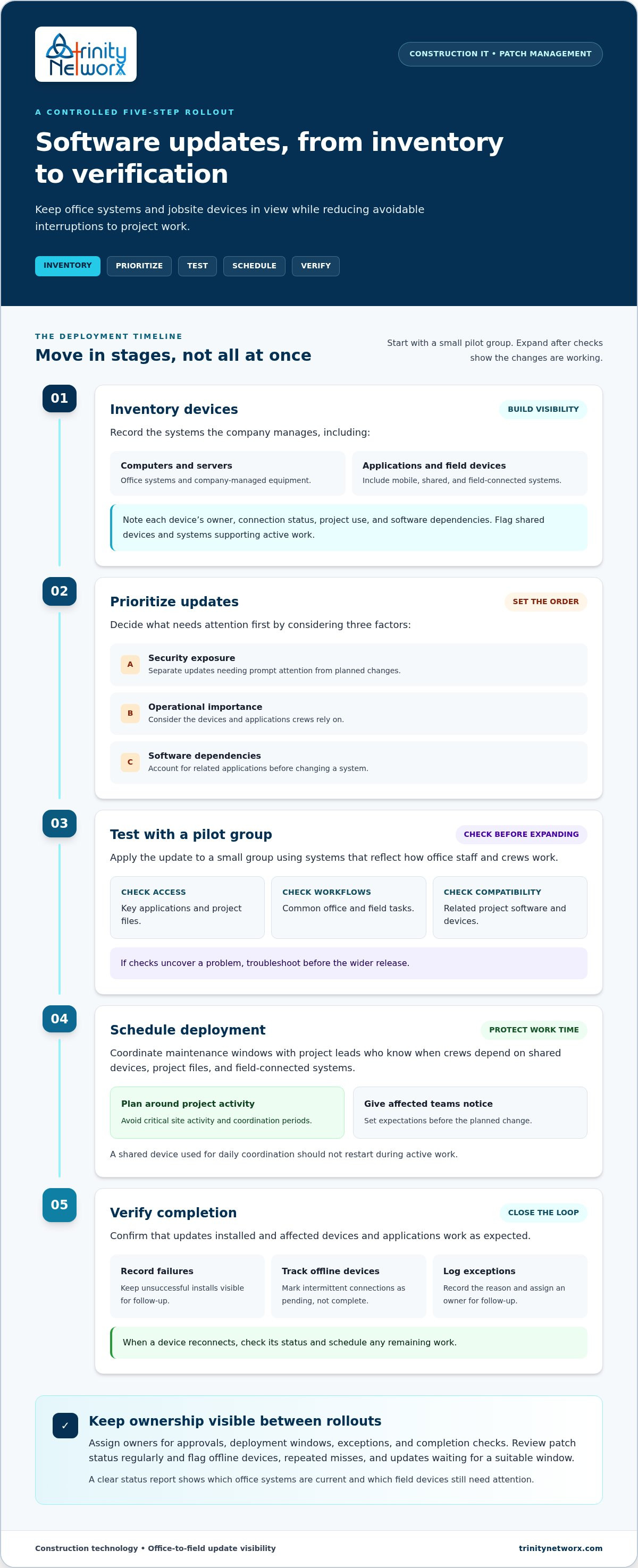
Managing software updates and patches across the company takes more than setting a deployment schedule. Construction firms need an accurate device inventory, priorities based on risk and operational importance, testing before broad release, and records showing which updates succeeded or still need attention. Clear ownership matters, as does timing that respects active jobsite work and field connectivity.
Construction IT planning can bring update work into the wider picture of office systems, field devices, and project schedules. Trinity Networx, LLC supports office-to-field connectivity and provides 24 x 7 x 365 remote network monitoring through its Southern California Network Operations Centre, along with an in-house US-based help desk. The company also provides construction-focused technology planning, including support for new construction environments and technology relocations. This expertise can help your team maintain visibility and follow up on update issues before they become recurring blind spots.
Ready to put a dependable process in place? Talk with the construction IT team about managing updates across your company. Clear ownership and consistent follow-through help keep project technology protected and focused on the work ahead.
Install updates according to their urgency, the systems they affect, and the construction schedule. Security fixes for exposed or important systems may need prompt attention, while other updates can be planned around testing and jobsite activity. Set a regular review schedule so updates do not sit unnoticed, and track any device that must wait for a suitable deployment window.
Updates can often be scheduled to reduce disruption, though no process can promise that every installation will be interruption-free. Coordinate maintenance windows with project leads, avoid critical site activity, and test changes with a pilot group before wider deployment. For field devices that connect intermittently, check their status when they reconnect and record anything still pending.
Include an inventory of company-managed computers, servers, business applications, and relevant mobile or shared devices. Define how updates are prioritized, tested, approved, and scheduled. Assign an owner to verify installation and document exceptions, including devices that are offline, incompatible, or waiting for a suitable window. This gives teams managing software updates and patches across the company a consistent record to review.
A designated IT lead should own the process, with project leads helping coordinate timing around field work. Managed or co-managed IT can add oversight for construction firms with limited internal capacity or poor visibility across jobsite devices. Trinity Networx, LLC supports construction IT planning, office-to-field connectivity, 24 x 7 x 365 remote network monitoring, and an in-house US-based help desk for businesses across California, Nevada, Arizona, and Utah. Talk with the construction IT team about your update process.

Article by
Lance Reichenberger, Ph.D.., J.D. (Candidate)
Dr. Lance Reichenberger is the founder of Trinity Networx, a Southern California technology firm specializing in managed IT services, cybersecurity, network infrastructure, and business technology strategy. With nearly four decades of experience in the IT industry, he works with businesses to improve operational efficiency, strengthen security, and align technology with long-term growth objectives.
Lance focuses on proactive IT management, enterprise wireless infrastructure, cybersecurity integration, and scalable technology solutions for growing organizations throughout Southern California.
The content published on this website is provided for general informational and educational purposes only. Articles may be created, edited, or enhanced with the assistance of artificial intelligence and automation tools under the direction and review of Trinity Networx. While every effort is made to ensure accuracy and relevance, the information provided should not be considered professional, legal, financial, cybersecurity, or technical advice specific to your organization. Businesses should consult directly with a qualified professional regarding their unique environment, compliance requirements, and operational needs. Trinity Networx makes no warranties regarding completeness, reliability, or applicability of the information contained within these articles.
Schedule a brief conversation with Trinity Networx to discuss your business technology needs.
Get a practical roadmap built around your business, your users, your systems, and the technology issues that need attention first.
Put the right technology, support, security, and infrastructure in place so your business can grow, adapt, and move forward with confidence.

