

3281 E. Guasti Rd, STE 700, Ontario, CA 91761
1712 9th Ave SW, Watertown, SD 57201

What good is a cloud migration if crews still can’t open the latest drawings at the job site? For construction firms, Microsoft 365 migration and management must account for field access, sensitive bids, and the work that can stall when project files aren’t available.
You need more than a move from one system to another. A field-first plan helps crews reach project files while protecting information used by office staff, project managers, and subcontractors. It also gives you a chance to organize records, set access rules, and plan for ongoing support.
This article explains how construction-focused IT support can guide the migration, plan for remote access, and keep Microsoft 365 aligned with daily project needs. You’ll learn what to review before moving files, how ongoing management supports field and office teams, and how proactive monitoring from Trinity Networx’s Southern California NOC supports operational continuity.
• A field-first Microsoft 365 migration and management plan starts with how crews access project files, not just how office systems move to the cloud.
• Review network capacity, organize project records, and confirm access permissions before migration so teams can find the files they need.
• Flat-fee managed IT services make support costs more predictable and give crews a clear path to help when email or file access issues arise.
• Discuss your project access and support needs with a construction-focused IT provider. Contact Trinity Networx, LLC.
Microsoft 365 migration is the planned move of construction data, such as project documents, bid files, and drawings, into a cloud environment. Moving files alone doesn’t secure information or ensure that crews can access it smoothly. Before the switch, review permissions, file organization, network capacity, and the way office and field teams work.
Construction teams work across offices, trailers, and job sites. An office-only migration plan can overlook network and access problems that slow field staff down. Large CAD files and drawing sets can also reveal weak points, such as slow connections, sync delays, or devices holding outdated copies. Check the network and the devices crews use, and identify which files need to be available at each stage of a project. For background on the platform’s services and applications, see this overview of Microsoft 365.
A project manager updates a blueprint in the office while a crew opens an older copy saved on a tablet. The field team may then work from a superseded plan. A managed cloud environment can give teams a shared location for project files, with access and synchronization configured around their workflow. That makes it easier to find the current bid or drawing instead of relying on email attachments and copies stored on individual devices.
Before migration, ask project leads to identify the approved location for each type of record and confirm who needs access. Test how crews will open and update files from their usual devices. Connectivity still matters, especially where job-site internet is limited. Include file sizes and connection constraints in the plan, and explain to users how to check they are working from the current version.
With Microsoft 365 migration and management, the goal is to plan for dependable access rather than troubleshoot avoidable problems after they disrupt work. Trinity Networx, LLC provides IT services for construction firms, including commercial construction IT services. Contact the team to discuss your firm’s project access and infrastructure needs.
For subcontractors, a migration plan should protect active project work while reducing clutter in the new environment. Legacy folders may combine current job records with duplicates and outdated material. Research on construction information management challenges describes the industry’s reliance on legacy systems and gaps in data infrastructure. A clear sequence helps teams assess what they have, decide what to move, and check the result.
Review available bandwidth, wireless coverage, and existing equipment. Use those findings to plan transfer timing around active project work, and flag job sites where connectivity may affect access.
Ask project leads to identify duplicate, obsolete, and business-critical records. Agree on what moves before migration begins, so users aren’t left sorting through unnecessary material in the new environment.
Map access to job responsibilities. Keep bid and payroll records restricted to authorized staff, and review permissions before users begin working in the new environment.
Plan the transfer around connection capacity and job-site activity. Afterward, check that the agreed files are present and that representative users can reach the folders they need.
Access should follow clear roles. A project team may need its drawings and schedules, while financial data should be limited to authorized personnel. Set those boundaries before migration, then ask the people responsible for each project to verify access. Trinity Networx, LLC offers Microsoft Office 365 support and migration for businesses, including construction firms.
Effective Microsoft 365 migration and management means deciding what moves, who can access it, and how the transfer fits active work. Make a list of the folders crews need in the field, the records that require tighter access, and the devices users rely on. Talk with the Trinity Networx, LLC team about planning a migration around your projects and job-site requirements.
A migration is only the start. On an active project, a stalled file sync can leave a superintendent without the latest schedule, while an email issue can delay a bid response. Ongoing management helps keep Microsoft 365 and the supporting IT environment aligned with field and office workflows. Include a clear process for reporting access issues, checking permissions, and helping users when a device or connection prevents them from reaching project files.
Trinity Networx provides flat-fee IT services for construction firms. Predictable pricing makes support costs easier to plan, rather than leaving teams uncertain about the cost of calling for help during a project issue. A proactive approach includes monitoring the IT environment and addressing warning signs before they become larger disruptions. Trinity Networx’s Southern California NOC provides 24/7/365 remote network monitoring to support continuity beyond migration day.
Construction executives need support that understands project pressures. Trinity Networx has 100 percent local staff, so your team can work with people based in the region. Its 60-minute response guarantee gives project leads a clear expectation for when a response to a support call should occur. It is a response standard, not a promise that every issue will be resolved within that time.
Security should remain part of the management conversation. Bids, payroll records, and project files require controlled access and ongoing attention, not just a one-time setup. Review who can access sensitive folders as staff, devices, and project needs change. Microsoft 365 migration and management should support those safeguards over time.
See how Trinity Networx approaches IT services for commercial construction. If email, file access, or unpredictable support costs are disrupting project work, contact the team to discuss your construction IT needs.
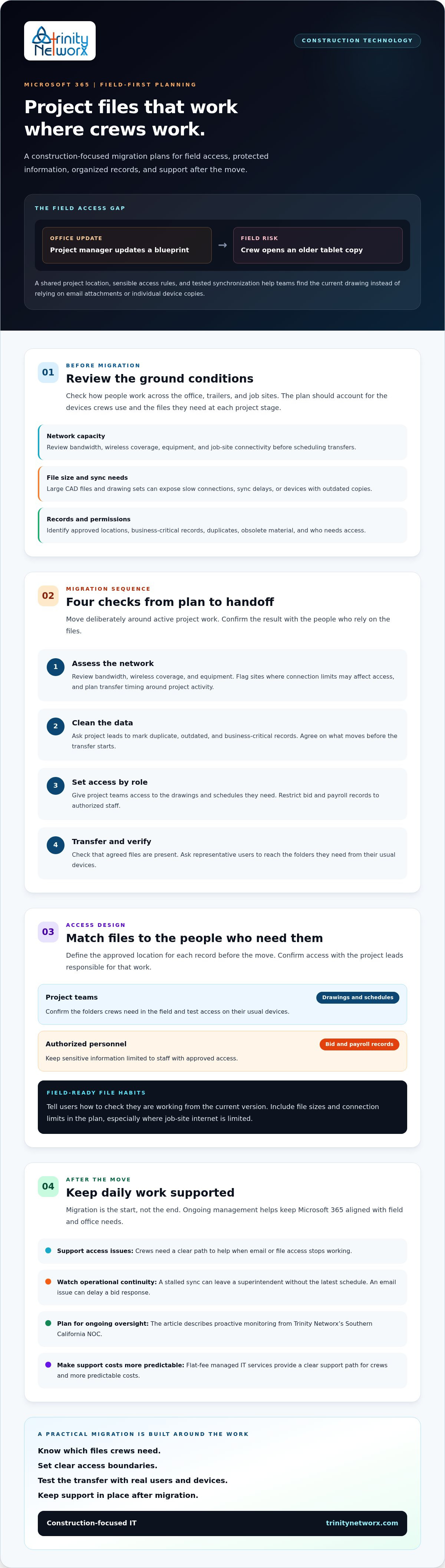
Construction teams need more than a cloud move. A well-planned Microsoft 365 migration and management approach accounts for field connectivity, organized project records, controlled access to bids and payroll, and support after launch. That combination helps crews reach the information they need while giving project leaders fewer technology distractions. Preparation also makes clear which records should move and who needs access.
Trinity Networx supports construction firms with flat-fee, all-inclusive pricing, 100 percent local Southern California staff, and a 60-minute response guarantee. These commitments set clear support expectations and make IT costs more predictable as project demands change.
For construction firms in California, Nevada, Arizona, and Utah, the next step is to review your current files, access needs, and job-site connectivity before choosing a migration plan. Contact Trinity Networx to discuss your Microsoft 365 migration and management needs.
There’s no fixed timeline. It depends on the amount and condition of your data, the size of drawing files, network capacity, and how users and permissions need to be set up. A Microsoft 365 migration and management plan should assess these factors first, then set a schedule for transferring files and checking access. Avoid committing to a date before reviewing the environment.
They don’t have to, but continuity requires planning. Schedule transfers around project activity, test access from representative field devices, and confirm that key drawings and folders are available before switching users to the new environment. Large files and limited job-site connectivity can affect timing, so identify those constraints early and tell crews about any planned access changes.
Microsoft 365 can support secure document handling, but the platform alone doesn’t guarantee that bids meet your contract’s security requirements. Review account protections, file permissions, and how sensitive information is stored and shared. Government contracts may specify additional controls. Ask an IT and cybersecurity provider to assess your requirements and configuration before placing controlled bid data in the environment.
Trinity Networx provides a US-based help desk with live answering from 8 a.m. to 5 p.m. and an emergency after-hours number. Confirm the escalation process with your team before crews head to a remote site, especially if they depend on cloud files for active work. Construction firms in California, Nevada, Arizona, and Utah can contact Trinity Networx to discuss support needs.

Article by
Lance Reichenberger, Ph.D.., J.D. (Candidate)
Dr. Lance Reichenberger is the founder of Trinity Networx, a Southern California technology firm specializing in managed IT services, cybersecurity, network infrastructure, and business technology strategy. With nearly four decades of experience in the IT industry, he works with businesses to improve operational efficiency, strengthen security, and align technology with long-term growth objectives.
Lance focuses on proactive IT management, enterprise wireless infrastructure, cybersecurity integration, and scalable technology solutions for growing organizations throughout Southern California.
The content published on this website is provided for general informational and educational purposes only. Articles may be created, edited, or enhanced with the assistance of artificial intelligence and automation tools under the direction and review of Trinity Networx. While every effort is made to ensure accuracy and relevance, the information provided should not be considered professional, legal, financial, cybersecurity, or technical advice specific to your organization. Businesses should consult directly with a qualified professional regarding their unique environment, compliance requirements, and operational needs. Trinity Networx makes no warranties regarding completeness, reliability, or applicability of the information contained within these articles.
Schedule a brief conversation with Trinity Networx to discuss your business technology needs.
Get a practical roadmap built around your business, your users, your systems, and the technology issues that need attention first.
Put the right technology, support, security, and infrastructure in place so your business can grow, adapt, and move forward with confidence.

