

3281 E. Guasti Rd, STE 700, Ontario, CA 91761
1712 9th Ave SW, Watertown, SD 57201

A phone that keeps a job moving can also give an outsider a route to project files. Construction supervisors need schedules, plans, photos, and field updates as they move between the office, vehicles, and active jobsites. A lost device, shared login, or overdue software update can put that access at risk. Securing mobile devices for construction supervisors means setting protections that fit field work, rather than adding steps that slow it down.
This guide covers practical rules for company-owned and personal devices, safer sign-in and update practices, and what to do if a device or account is compromised. For construction firms working across California, Nevada, Arizona, and Utah, consistent policies help protect project information across office-to-field operations. Construction-focused IT planning and cybersecurity support can help supervisors stay connected to the files and updates they need.
• Start securing mobile devices for construction supervisors by listing the phones and tablets that access plans, schedules, email, photos, and project files.
• Set clear ownership and access rules, then document which work apps supervisors may use on each device.
• Protect project information with individual accounts, strong sign-in practices, timely updates, and encryption where supported.
• Construction-focused IT support can help keep device policies consistent across projects while preserving practical field access.
A supervisor’s phone or tablet can connect an active jobsite to the office in seconds. It may store project information or provide access to plans, email, job photos, schedules, and shared files. Since crews rely on timely answers, device protections should not make essential information difficult to reach.
Mobile-device security covers the device, the accounts and services it can access, and the business information it stores or displays. The Mobile security overview describes the broader field. For construction teams, a useful test is whether safeguards work across offices, vehicles, and active sites, including projects spread across California, Nevada, Arizona, and Utah.
A supervisor may check a plan revision in the field, photograph completed work, respond to a project email, or relay a schedule change to a crew. These office-to-field workflows depend on reliable access and communication. Device rules should reflect how project teams share updates, not just how office staff use computers. Trinity Networx supports commercial construction firms with construction IT services for connecting office and field operations.
The risks vary by situation. If a tablet is lost, someone who finds it may access information on the device, particularly when its screen lock or account protections are weak. Account compromise is a separate problem: a stolen or shared login can expose information through connected services even if the supervisor still has their device. Shared accounts also make it harder to identify whose access needs to be restricted. An unsecured connection or delayed software update can create other openings. Each risk calls for a clear policy and response, rather than relying on a busy supervisor to notice a problem.
Set a device baseline before choosing controls. Make a list of the phones and tablets used on projects, note who owns each one, and identify which devices can access company information. Keep company-owned devices distinct from personal phones. Then document the approved work apps and accounts supervisors need in the field, along with any restrictions on storing or sharing project files. Clear rules prevent guesswork without blocking legitimate project access.
For every approved device, set expectations supervisors can follow between the trailer and the work area:
• Require a screen lock and an individual account for each user. Use strong sign-in protections, such as multifactor authentication where available.
• Keep operating systems and work apps up to date. Require device encryption where supported.
• Limit project access to approved apps and accounts. For personal devices, explain how business information will remain separate from personal use.
• Set a known reporting route and require supervisors to use it promptly if a device is lost or stolen.
Mobile-device management can help apply agreed settings to enrolled devices and remove business access from a missing device where appropriate. It can also help maintain consistent rules across company devices. Set controls around field workflows: supervisors should be able to reach current plans, schedules, and project communications without resorting to shared accounts or unapproved file storage. Trinity Networx provides cybersecurity and antivirus support for construction operations.
A response plan should name who reports a lost device and who restricts its access. Include compromised accounts in the same process: identify who can disable access and how supervisors should report suspicious sign-in activity. Make the steps easy to find, including for staff working away from the office. A link to contact the Trinity Networx team can be part of the company’s support information for construction technology needs.
Field access and security have to work together. If routine project files are difficult to reach, supervisors may take shortcuts, such as sharing accounts or saving documents in unapproved places. A practical approach to securing mobile devices for construction supervisors protects business access while keeping the plans, schedules, and communications needed on site within reach.
Managed IT and cybersecurity support can help apply consistent device policies across active projects. Training gives supervisors a clear way to recognize suspicious requests and report concerns, while monitoring helps the IT team watch for potential security issues. Construction-focused planning connects these safeguards to office-to-field workflows instead of treating a jobsite device like an office desktop. Learn how commercial construction IT services can support that connection.
Act promptly and follow a defined reporting route. The supervisor should report the loss to the company’s designated contact as soon as possible. The person responsible for device or account access can then restrict affected business access, including access through relevant work accounts. Do not wait to see whether the device turns up before reporting it.
Next, identify which accounts and project information the device could reach. Record the report, access restrictions, recovery steps, and any follow-up, such as reviewing unusual account activity or restoring field access on an approved device. Keeping a record helps the team spot gaps and apply the same response on future projects.
Construction firms can align device rules, training, and incident procedures with the realities of field work. Contact Trinity Networx, LLC to discuss mobile security and field technology across your projects.
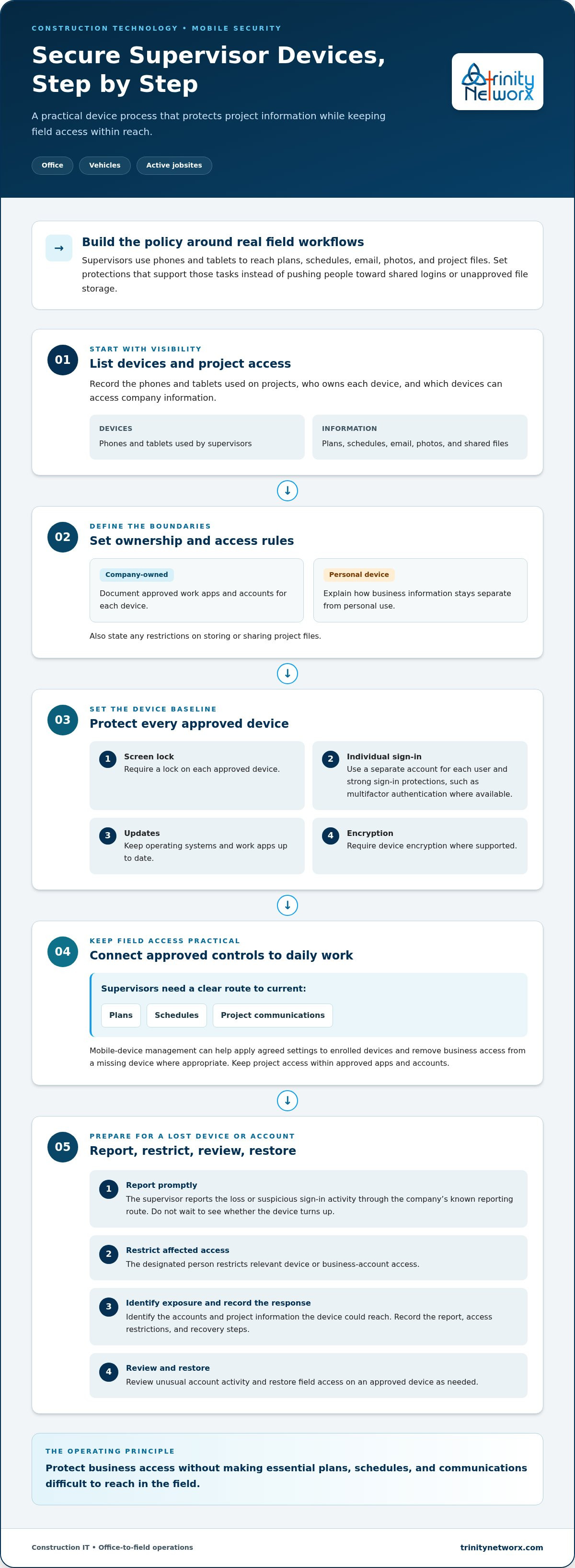
Securing mobile devices for construction supervisors means protecting project information without making field access a burden. Maintain an accurate device list, assign individual accounts, define approved apps and access rules, and give supervisors a clear way to report a missing device or suspicious account activity.
Construction-focused IT planning can match those controls to office-to-field connectivity and active project work. Trinity Networx provides 24/7 network monitoring and an in-house US-based help desk to support construction teams’ technology needs.
Set the rules before a device goes missing, and make sure supervisors know who to contact and what happens next. Contact the Trinity Networx team about construction technology to plan field access protections for your projects.
Yes, if company policy permits it and the phone meets the firm’s access rules. A policy for securing mobile devices for construction supervisors should require an individual work account, a screen lock, current software, and approved apps. Define how the company will restrict business access if the phone is lost, while keeping personal information separate where possible.
Have the supervisor report the loss promptly through the company’s designated contact. The person responsible for device or account access should restrict affected business access, then review which accounts and project information the phone could reach. Record the report, access restrictions, recovery steps, and follow-up actions, including checks for suspicious account activity.
Mobile-device management can help apply agreed settings and manage access to business information on enrolled devices. It can support consistent device rules, including removing business access from a missing phone. Configure the controls around the firm’s devices and field workflows so supervisors can still reach the project information they need.
Yes. Controlled access lets supervisors check current project files and coordinate field work without leaving business information broadly exposed. Use individual accounts, strong sign-in protections, approved work apps, timely updates, and device encryption where supported. Clear reporting steps also help the company respond if a device goes missing or an account appears compromised.

Article by
Lance Reichenberger, Ph.D.., J.D. (Candidate)
Dr. Lance Reichenberger is the founder of Trinity Networx, a Southern California technology firm specializing in managed IT services, cybersecurity, network infrastructure, and business technology strategy. With nearly four decades of experience in the IT industry, he works with businesses to improve operational efficiency, strengthen security, and align technology with long-term growth objectives.
Lance focuses on proactive IT management, enterprise wireless infrastructure, cybersecurity integration, and scalable technology solutions for growing organizations throughout Southern California.
The content published on this website is provided for general informational and educational purposes only. Articles may be created, edited, or enhanced with the assistance of artificial intelligence and automation tools under the direction and review of Trinity Networx. While every effort is made to ensure accuracy and relevance, the information provided should not be considered professional, legal, financial, cybersecurity, or technical advice specific to your organization. Businesses should consult directly with a qualified professional regarding their unique environment, compliance requirements, and operational needs. Trinity Networx makes no warranties regarding completeness, reliability, or applicability of the information contained within these articles.
Schedule a brief conversation with Trinity Networx to discuss your business technology needs.
Get a practical roadmap built around your business, your users, your systems, and the technology issues that need attention first.
Put the right technology, support, security, and infrastructure in place so your business can grow, adapt, and move forward with confidence.

