

3281 E. Guasti Rd, STE 700, Ontario, CA 91761
1712 9th Ave SW, Watertown, SD 57201

Your CMMC evidence can look complete at the office and still leave questions about what happens in the field. A project file shared from a jobsite device, unclear subcontractor access, or a procedure that doesn’t match daily practice can expose readiness gaps. Preparing for a CMMC audit means looking beyond policy folders to the construction technology and workflows that handle project information.
It’s understandable if ownership feels unclear. Information can move between office systems, jobsites, devices, and subcontractors, while records and technical evidence sit with different people. This checklist helps you assign evidence owners, review how information moves through real construction workflows, and identify gaps to address before an assessment. It also helps you decide whether your internal team has the time and expertise to lead preparation or could benefit from construction-aware IT support.
• Map how project information moves across offices, jobsites, devices, project systems, and subcontractors to clarify what needs review.
• Preparing for a CMMC audit starts with assigning owners to policies, access records, and system documentation.
• Compare written procedures with how crews and project teams actually use jobsite networks, devices, and platforms.
• Rank readiness gaps by evidence, operational exposure, and ownership. For construction-focused IT or CMMC support, contact Trinity Networx, LLC to discuss your needs.
On a construction project, sensitive information rarely stays in one place. It may move from an office workstation to a project platform, then to a superintendent’s tablet or a subcontractor. Preparing for a CMMC audit starts by tracing those routes, not by assuming a policy folder shows the full picture.
“CMMC audit” is common shorthand. Official terminology refers to assessments, including self-assessments and other assessment types, depending on the applicable CMMC level and contract. The Cybersecurity Maturity Model Certification (CMMC) overview provides background, but your contract and current program requirements determine what applies to your firm.
A documented control is the written rule, such as who may access project files. Evidence shows whether that control is operating, such as current access records or system settings. Review both: a policy alone doesn’t show how access works in practice.
Start with an inventory of the places project information is created, accessed, stored, or shared. Include project files and drawings, email and other communications, field devices, project systems, and external sharing paths. Trace how information enters the organization, moves between the office and jobsite, and reaches subcontractors. For each step, note the system involved, who manages it, and where access is granted.
Don’t classify information by guesswork. Confirm whether material is CUI and what handling applies by checking contract direction with the appropriate project or contracting contact. Not every drawing, schedule, or project message is automatically CUI.
Construction workflows bring together field connectivity, devices, and office systems. For sector-specific context, review construction IT services. If you need help relating your technology environment to CMMC readiness, contact Trinity Networx, LLC to discuss your requirements.
Build an evidence file around the systems and routines your crews actually use. A polished policy won’t resolve a mismatch between documented access rules and who can open project files from a jobsite tablet. Assign an owner to each item, note where the current evidence is stored, and flag material that is missing, outdated, or inconsistent with actual practice.
Gather current security policies and procedures. Check that each one reflects how office and field teams handle project information.
Name the person responsible for maintaining each policy, system record, and piece of evidence. Make sure that person can locate and update it.
Compare user access records with staff and subcontractor roles. Check whether access still matches current project work, including access to project platforms from field devices.
Reconcile device inventories and system documentation with the endpoints, jobsite networks, and project platforms in active use. Investigate devices or systems that appear in daily workflows but not in the records.
Locate the System Security Plan (SSP) and any Plan of Action and Milestones (POA&M) materials, where applicable. Verify current contract and CMMC requirements before treating either as required or complete.
Test the paperwork against a real workflow. If a procedure says project access is limited, check the relevant accounts and system settings. If crews connect through jobsite Wi-Fi or use shared devices, confirm the written process addresses that practice. Record the mismatch, the evidence source, and the accountable owner so the next action is clear.
For a source-backed evidence baseline, NIST SP 800-171A describes assessment methods that include examining evidence, interviewing personnel, and testing implemented requirements. Verify every cited standard, clause, and assessment reference against current authoritative CMMC and contract sources before relying on it.
Construction-focused cybersecurity support may help teams review technical records and identify gaps. If you need help assessing your environment, contact Trinity Networx, LLC to discuss your construction technology needs.
A findings list only helps if it leads to assigned work. For each item, record what evidence is missing or inconsistent, which system or construction workflow is affected, who owns the next step, and why the issue may matter to the applicable assessment. Confirm that relevance against current CMMC requirements and contract language. Don’t rank issues by guesswork or treat every finding as equal.
For example, if documented access doesn’t match who can reach project files from a jobsite device, identify the relevant account or system, assign an owner to review it, and record the corrective action and follow-up evidence. This gives project leadership and IT staff a shared view of progress, with security documentation tied to field operations.
Choose support based on the work your team can own and the expertise it lacks. Internal IT may coordinate records and routine system changes. A CMMC specialist can help interpret assessment requirements, if that scope is confirmed. Construction-aware IT support can address technical issues involving jobsite connectivity, field devices, office systems, and project data.
• How will your approach account for jobsite networks, project platforms, and subcontractor interactions?
• Which tasks are included, and which remain with our staff or other providers?
• Who owns each evidence item, remediation task, and status update?
• What assessment or advisory work do you perform, and can you define the scope in writing?
Before engaging anyone, get responsibilities and assessment-related claims in writing. For broader service-selection context, review CMMC compliance consultant considerations. If your team needs help connecting construction technology needs with CMMC readiness, contact Trinity Networx, LLC to discuss your requirements.
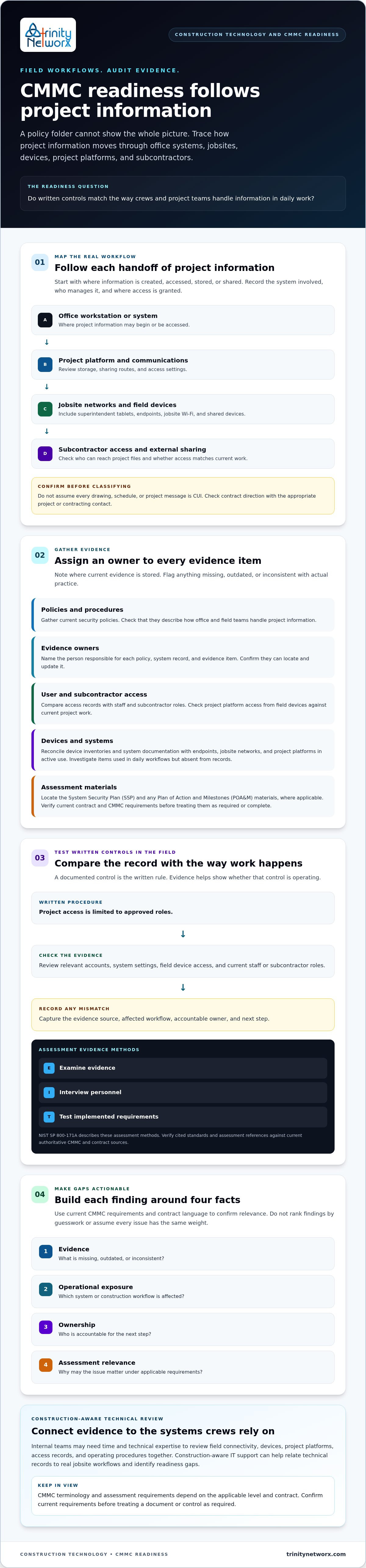
Preparing for a CMMC audit starts with knowing where project information travels, who can access it, and which systems support work between the office and jobsite. Keep evidence tied to real construction practices, not just written procedures. Then rank gaps by available evidence, operational exposure, accountable owner, and confirmed assessment relevance.
That gives your team a practical sequence: verify requirements, assign responsibility, and address technical issues in the workflows that handle project data. Trinity Networx offers construction-focused IT planning, office-to-field connectivity, managed IT, cybersecurity, and CMMC Compliance. Its services support businesses in California, Nevada, Arizona, and Utah. Confirm the specific support scope your firm needs.
Contact the team to discuss your construction IT and CMMC needs. With clear ownership and a plan grounded in how your crews work, your next readiness steps can be focused and achievable.
Start by confirming the applicable CMMC level and assessment expectations against your contract and current official guidance. Then map where project information moves between office systems, jobsites, devices, project platforms, and subcontractors. Assign an owner to each system and record what evidence exists, what’s missing, and which workflow needs review. Keep the assessment type clear, since “audit” is often used informally.
Gather current security policies and procedures, user access records, device inventories, and system documentation for the technology used in project work. Locate the System Security Plan and any Plan of Action and Milestones materials where applicable, then verify current requirements before treating them as required. Include evidence that shows procedures in practice, such as records that reflect access to project systems and field devices.
Yes, review jobsite devices and networks if they are part of the systems or workflows within your confirmed CMMC scope. Check how field staff connect, which devices access project platforms, and whether actual use matches documented procedures. Don’t assume every jobsite system or project file is in scope, or out of scope. Confirm CUI handling and contract-specific requirements with the appropriate project or contracting contact.
Outside help may make sense if your staff lacks time or technical experience to assess construction workflows, document gaps, or address system issues. Compare internal capacity, a CMMC specialist’s confirmed scope, and construction-aware IT support. Put responsibilities, evidence ownership, and any assessment claims in writing. Trinity Networx serves construction firms across California, Nevada, Arizona, and Utah. Contact the team to discuss your construction IT and CMMC needs.

Article by
Lance Reichenberger, Ph.D.., J.D. (Candidate)
Dr. Lance Reichenberger is the founder of Trinity Networx, a Southern California technology firm specializing in managed IT services, cybersecurity, network infrastructure, and business technology strategy. With nearly four decades of experience in the IT industry, he works with businesses to improve operational efficiency, strengthen security, and align technology with long-term growth objectives.
Lance focuses on proactive IT management, enterprise wireless infrastructure, cybersecurity integration, and scalable technology solutions for growing organizations throughout Southern California.
The content published on this website is provided for general informational and educational purposes only. Articles may be created, edited, or enhanced with the assistance of artificial intelligence and automation tools under the direction and review of Trinity Networx. While every effort is made to ensure accuracy and relevance, the information provided should not be considered professional, legal, financial, cybersecurity, or technical advice specific to your organization. Businesses should consult directly with a qualified professional regarding their unique environment, compliance requirements, and operational needs. Trinity Networx makes no warranties regarding completeness, reliability, or applicability of the information contained within these articles.
Schedule a brief conversation with Trinity Networx to discuss your business technology needs.
Get a practical roadmap built around your business, your users, your systems, and the technology issues that need attention first.
Put the right technology, support, security, and infrastructure in place so your business can grow, adapt, and move forward with confidence.

