

3281 E. Guasti Rd, STE 700, Ontario, CA 91761
1712 9th Ave SW, Watertown, SD 57201

What if a project file shared from a jobsite creates the same exposure as an unlocked office account? For construction firms, preventing data breaches in a small business means securing the connections between office systems and field operations. Employees, subcontractors, and mobile devices may all need access, but not to the same information. Project deadlines do not pause for security work, so practical controls need to protect data without getting in the way of coordination.
You can reduce risk by identifying which files and workflows need protection, reviewing access across office, cloud, and field systems, and planning how to respond to a security incident. Construction-focused IT planning, proactive monitoring, and verified backups can help support those efforts.
• Map how project documents, employee details, and business records move between the office, jobsites, and approved project collaborators.
• Start preventing data breaches in a small business by reviewing access and removing permissions that are no longer needed.
• Check how mobile devices and email are protected, and confirm backups can support recovery if project data becomes unavailable.
• Assign responsibility for reviewing alerts and coordinating recovery. Contact Trinity Networx, LLC about construction-focused cybersecurity and backup support.
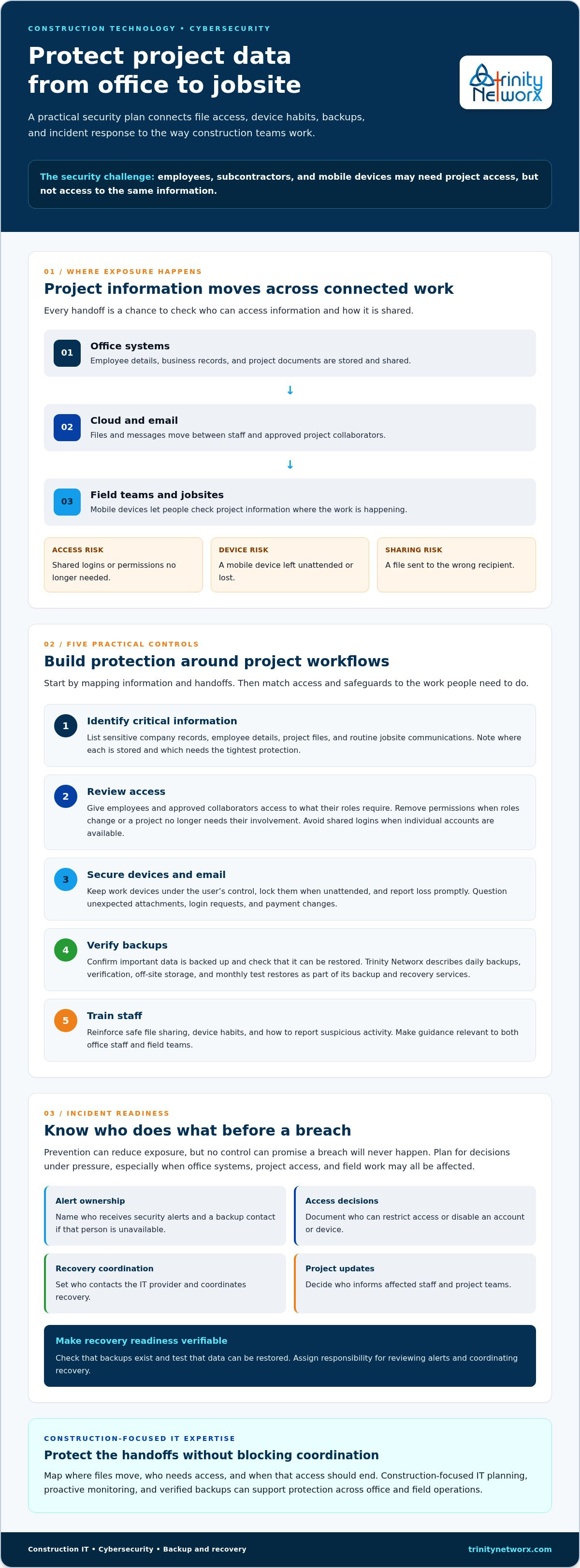
Project documents, employee details, and business records move between office staff, field teams, and outside project collaborators. Each handoff is a place to check who can access the information and how it is shared. A shared login, an unattended mobile device, or an email sent to the wrong recipient can expose information beyond the people who need it.
A data breach is the unauthorized access to, disclosure of, or loss of protected information. In construction, the risk follows the work: someone checking a document from a jobsite may need access to that project, but should not automatically have access to every company record.
Separate sensitive company records from project files and routine jobsite communications. Employee information and business records generally need tighter access than routine work updates. Project documents also need controls, especially when they are shared between office staff, field teams, and subcontractors. Give each person access to the information their role requires, then review permissions when responsibilities change or a project ends.
Map the workflow before choosing controls. Who sends files from the office? Who opens them in the field? Which outside collaborators need access, and when should that access end? Consider what would happen if a device were lost or an email account were compromised. Construction-focused IT planning can help align office-to-field access with project needs.
Preventing data breaches in a small business starts with mapping these handoffs, not adding friction to every task. Trinity Networx, LLC supports construction companies with IT planning, cybersecurity, and office-to-field connectivity. Contact the team to discuss where your workflows may need stronger protection.
Security should fit the way a construction team works, not slow every handoff. Use the steps below to protect project information while keeping office and field access purposeful. Together, they make preventing data breaches in a small business an ongoing practice rather than a one-time checklist.
List sensitive company records, employee details, project files, and routine jobsite communications. Note where each type of information is stored and which items need the tightest protection.
Check which employees and approved project collaborators need each file or system. Remove permissions when someone changes roles or a project no longer requires their involvement. Avoid shared logins where individual accounts can be used.
Keep work devices under the user’s control, lock them when unattended, and report loss promptly. Train staff to question unexpected attachments, login requests, or payment changes. The cyber risks in the construction industry can affect both information and project operations.
Confirm important data is backed up and check that it can be restored. Trinity Networx, LLC describes daily backups, verification, off-site storage, and monthly test restores as part of its backup and recovery services.
Reinforce safe file sharing, device habits, and how to report suspicious activity. Make the guidance relevant to both office staff and field teams.
Verified backups and periodic restore tests make recovery readiness something you can check rather than assume. Learn more about business data backup and recovery.
Construction-focused IT expertise can help connect these controls to actual project workflows. Talk with Trinity Networx, LLC about construction IT security and the steps that fit your business.
Prevention can reduce exposure, but no control can promise a breach will never happen. Construction firms need a clear plan for decisions under pressure, particularly if project access, office systems, and field work are affected at the same time. Decide in advance who reviews a security alert, who can restrict access, and who coordinates recovery and updates to affected staff.
Make the plan specific. Name the person who receives alerts and a backup contact in case they are unavailable. Document who can disable an account or device, who contacts your IT provider, and who informs project teams. Confirm what the provider’s monitoring and escalation cover rather than assuming an alert automatically leads to a particular action or response time.
Ask whether critical project and business data is backed up, whether backup verification is performed, and whether restore tests are documented. Trinity Networx, LLC describes daily backups, verification, off-site storage, and monthly test restores. Its Southern California Network Operations Centre provides 24/7/365 remote network monitoring. Confirm how that monitoring connects with your incident contacts and recovery responsibilities.
Construction-focused IT support should account for how crews and office staff regain appropriate access while recovery proceeds. Managed cybersecurity and backup and recovery services can support preparation, but response roles and communication steps should be clear to your team before an incident. Preventing data breaches in a small business also means preparing for disruption, not only reducing the likelihood of exposure.
Contact the Trinity Networx, LLC team about construction IT needs, including cybersecurity, monitoring, and backup and recovery.
Construction data moves with the work. Project files, business records, and field communications need clear access controls, and staff need practical guidance for handling devices and email. Preventing data breaches in a small business starts with knowing what needs protection and who should have access.
Preparation matters too. Confirm that critical data is backed up, that verification is in place, and that monthly test restores help check recovery readiness. Construction-focused IT planning can connect office systems with field operations, while 24/7/365 remote network monitoring helps keep watch for issues.
Security should support the pace of your projects, not pull your team away from the work. Contact Trinity Networx to discuss construction IT security and identify practical next steps for your business.
Start by identifying sensitive project files, employee details, and business records. Review who can access them, including employees and approved project collaborators, and remove permissions that are no longer needed. Secure work devices and email, and check that important data is backed up and backup verification is performed. For construction businesses operating across California, Nevada, Arizona, and Utah, these steps provide a practical starting point without suggesting any single control can prevent every incident.
Yes. If project information is exposed or unavailable, office staff and field teams may have trouble accessing the current details they need. The effect depends on which files or systems are affected. Review how your team shares project documents and jobsite communications, then identify who will help restore appropriate access and keep coordination moving.
There is no single interval that fits every construction business. Document restore tests so you can confirm whether critical project and business data can be recovered, and record any issues that need attention. Trinity Networx describes monthly test restores as part of its backup services. Ask your IT provider what the testing schedule covers and how results are recorded.
Promptly involve the person or team responsible for IT security, and follow your documented escalation process. Ask them to assess the alert and protect affected accounts, devices, or project access as appropriate. Record what was observed, when it occurred, and which systems or files may be involved. For help planning construction IT security and recovery, contact Trinity Networx.

Article by
Lance Reichenberger, Ph.D.., J.D. (Candidate)
Dr. Lance Reichenberger is the founder of Trinity Networx, a Southern California technology firm specializing in managed IT services, cybersecurity, network infrastructure, and business technology strategy. With nearly four decades of experience in the IT industry, he works with businesses to improve operational efficiency, strengthen security, and align technology with long-term growth objectives.
Lance focuses on proactive IT management, enterprise wireless infrastructure, cybersecurity integration, and scalable technology solutions for growing organizations throughout Southern California.
The content published on this website is provided for general informational and educational purposes only. Articles may be created, edited, or enhanced with the assistance of artificial intelligence and automation tools under the direction and review of Trinity Networx. While every effort is made to ensure accuracy and relevance, the information provided should not be considered professional, legal, financial, cybersecurity, or technical advice specific to your organization. Businesses should consult directly with a qualified professional regarding their unique environment, compliance requirements, and operational needs. Trinity Networx makes no warranties regarding completeness, reliability, or applicability of the information contained within these articles.
Schedule a brief conversation with Trinity Networx to discuss your business technology needs.
Get a practical roadmap built around your business, your users, your systems, and the technology issues that need attention first.
Put the right technology, support, security, and infrastructure in place so your business can grow, adapt, and move forward with confidence.

