3281 E. Guasti Rd, STE 700, Ontario, CA 91761
1712 9th Ave SW, Watertown, SD 57201

Lance Reichenberger, Ph.D.
Contact the team at contact us to secure your practice. Share this guide: [Social Media Share Options]
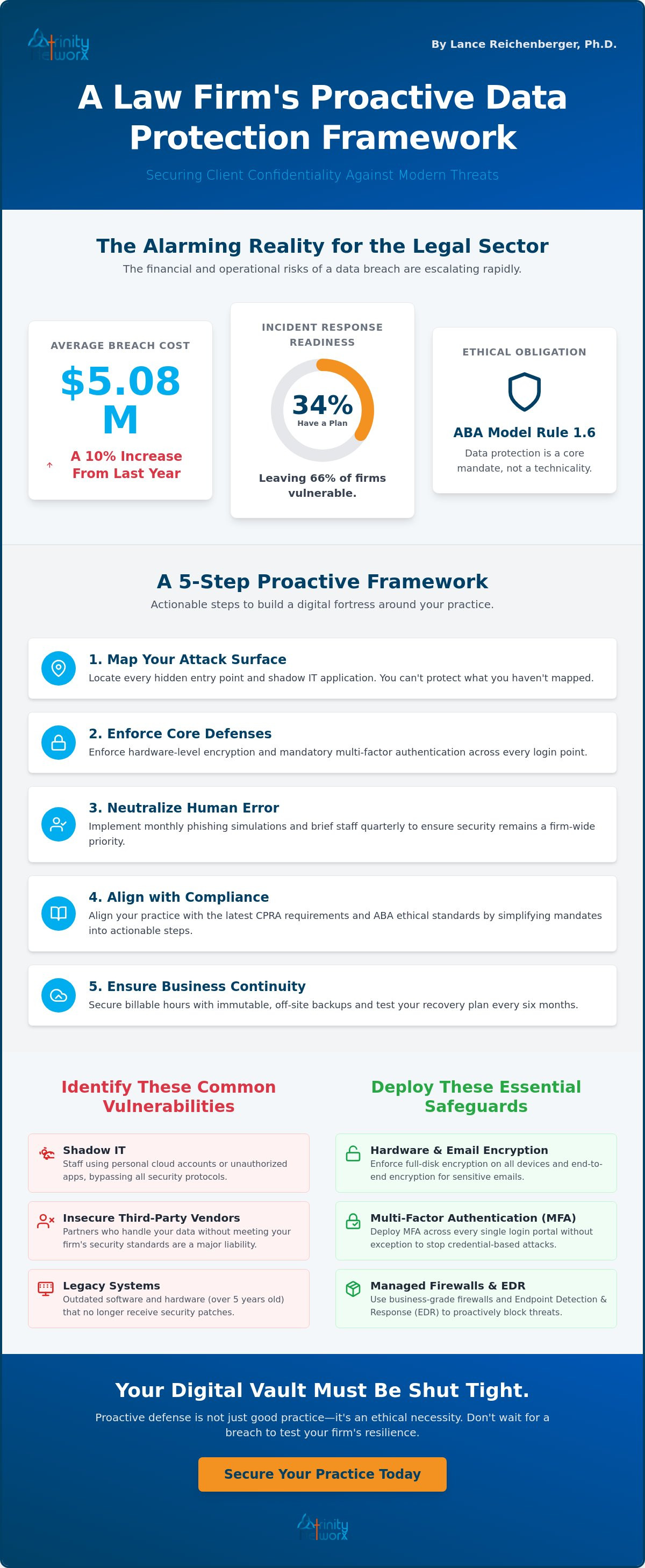
The average cost of a data breach in the legal sector has surged to $5.08 million. That is a staggering 10 percent increase from last year. You likely feel the weight of this reality every time you open a sensitive file. Protecting client data in a law firm is no longer a back-office technicality. It is a core mandate of your ethical duty under ABA Model Rule 1.6. With only 34 percent of firms maintaining a functional incident response plan, the industry is vulnerable. You deserve better than reactive panic.
We agree that the current maze of state privacy laws and FIPS 140-3 requirements is exhausting. You need clarity to focus on your cases. This article delivers a proactive data protection framework built specifically for the high-stakes environment of Southern California legal practices. We provide a clear roadmap to verify your compliance with the 2026 California Delete Act and NIST CSF 2.0. By the end of this checklist, you will have the peace of mind that your digital vault is shut tight against modern threats.
• Locate every hidden entry point and shadow IT application lurking in your network; you can't protect what you haven't mapped.
• Enforce hardware-level encryption and mandatory multi-factor authentication across every login as the twin pillars for protecting client data in a law firm.
• Neutralize human error by implementing monthly phishing simulations and briefing your staff quarterly to ensure security remains a firm-wide priority.
• Align your practice with the latest CPRA requirements and ABA ethical standards by simplifying complex confidentiality mandates into actionable steps.
• Secure your billable hours with immutable, off-site backups and test your recovery plan every six months to ensure you're never held hostage by a breach.
Lance Reichenberger, Ph.D.
Contact the team at contact us for a security assessment. Share this guide: [Social Media Share Options]
Protecting client data in a law firm starts with visibility. You cannot defend what you cannot see. Legal practices often suffer from data sprawl where files enter through email, web portals, and physical mail. Every entry point is a potential breach site. Audit these now. Your ethical duty to maintain attorney-client privilege depends on total control over these digital pathways.
Shadow IT is a silent threat. Staff often use personal cloud accounts or unauthorized messaging apps to move files quickly. This bypasses your security protocols. Locate these apps. Shut them down. Bring them under firm control immediately. Do not ignore your third party vendors either. Review how they handle your sensitive case files. If their standards don't match yours, they are a liability. Physical security also matters. Map the exact location of your servers and backup drives. If a thief can walk out with a drive, your encryption is your last line of defense.
Track every byte. Data moves from initial client intake through final archiving. Document which employees have access to specific case folders. If a paralegal doesn't need access to a partner's financial files, revoke it. Verify where your cloud providers store physical data. Data residency laws are strict. Managing IT infrastructure means knowing exactly where your bits and bytes reside.
Old software is a magnet for trouble. Check for end of life programs that no longer receive security patches. Hackers exploit these gaps. Assess the age of your current firewalls and routers. If your hardware is over five years old, it likely lacks the muscle for modern encryption. Identify any device that cannot support current protocols. Replace them before the breach happens. Protecting client data in a law firm requires hardware that can actually handle the fight.
Lance Reichenberger, Ph.D.
Contact the team at contact us to secure your practice. Share this guide: [Social Media Share Options]
Software is only half the battle. Many firms rely on cloud security while leaving their local office doors wide open. Protecting client data in a law firm requires a hard shell around your physical environment. Start with hardware-level encryption. Every laptop and mobile device must be encrypted at the drive level. If a device is stolen from a car, that data remains garbage to the thief. Password protection isn't enough. You need full disk encryption. Next, deploy multi-factor authentication (MFA) across every single login portal. No exceptions. This simple step stops the vast majority of credential-based attacks instantly.
Your office Wi-Fi is a potential entry point for disaster. You must separate guest Wi-Fi from the internal firm network. Allowing a client or visitor onto the same network as your case files is an unacceptable risk. It creates a bridge for lateral movement. Combine this with automated threat detection systems. These tools monitor your traffic 24/7. They catch anomalies that a human eye would miss. For those looking for professional oversight, IT infrastructure management ensures these layers work together without friction.
Consumer grade routers are for homes, not law offices. Replace them with managed business firewalls. These devices provide deep packet inspection and intrusion prevention systems to block malicious traffic before it reaches your workstations. You can find more practical steps in the FTC cybersecurity guidance for businesses. A real firewall acts as a digital bouncer. It scrutinizes every request. It rejects anything suspicious.
Workstations are the front lines. Use Advanced Endpoint Detection and Response (EDR) on all workstations. EDR is a proactive tool that stops ransomware before it encrypts files by identifying suspicious behavior in real time. It doesn't just wait for a known virus; it reacts to movement. Ensure all emails containing sensitive documents use end to end encryption. Sending unencrypted case files via standard email is like sending a postcard through the mail. Anyone can read it. Protecting client data in a law firm means ensuring only the intended recipient has the key. If you are unsure if your current setup meets these standards, speak with a security strategist today.
Lance Reichenberger, Ph.D.
Contact the team at contact us to educate your staff. Share this guide: [Social Media Share Options]
Your employees are either your strongest shield or your greatest liability. There is no middle ground. Recent data shows that 20 percent of U.S. law firms faced a cyberattack in the last year. Most of these attacks targeted the person behind the screen, not the firewall. Protecting client data in a law firm demands a culture of constant vigilance. Host quarterly security briefings for all legal and support staff. These sessions should cover the latest social engineering tactics used to bypass MFA. Establish clear, written protocols for handling suspicious email attachments. If it looks wrong, it is wrong. Your team needs a no-blame environment where they feel safe reporting a potential mistake immediately.
The home office is the new front line. Home routers often lack the security of your main branch network. Create a formal policy for remote work that prohibits the use of personal devices for client business. Require firm-managed devices and secure connections. A single weak home router can undo all your office-based protection. Staff must understand that security follows the data, not the desk.
Teach staff to spot subtle signs of social engineering. Look for urgent language, slightly altered domain names, or unexpected requests for sensitive data. Our guide on managed cybersecurity services offers the training frameworks necessary for a proactive defense. Implement a simple, one-click reporting process for suspicious messages. Speed is your best ally when a threat enters the inbox. Run monthly phishing simulations to keep these skills sharp and measurable.
Sticky notes are not a security plan. Mandate the use of enterprise grade password managers to ensure every account has a unique, complex key. Remove access immediately when an employee leaves the firm. Delays lead to disaster. Audit user permissions monthly to ensure the principle of least privilege. Only provide access to the files required for a specific role. This limits the blast radius of a compromised account. Protecting client data in a law firm requires restricting access to only those who absolutely need it.
Lance Reichenberger, Ph.D.
Contact the team at contact us for a compliance audit. Share this guide: [Social Media Share Options]
Compliance is the armor that protects your license. In Southern California, the regulatory environment is unforgiving. You must align firm policies with California Privacy Rights Act (CPRA) requirements immediately. These regulations aren't just for tech giants. If your firm handles significant volumes of resident data, you are in the crosshairs. Update your client engagement letters to reflect your current data security practices. This transparency builds trust and provides a legal baseline if a dispute arises. Protecting client data in a law firm is a legal obligation that demands precise execution.
Maintain detailed logs of data access for potential compliance audits. These logs are your first line of defense during a state bar inquiry. They prove who accessed sensitive files and when. If you can't show a clear trail, you can't prove you met your duty of care. Don't leave your reputation to chance. Accurate record-keeping is a non-negotiable part of modern legal practice.
The January 1, 2026, updates to the CCPA and CPRA expanded the definition of sensitive personal information. Does your firm meet the threshold? Even if you don't hit the revenue marks, handling data for 100,000 or more consumers triggers enforcement. You must implement the right to delete and the right to know. This means having a system to purge data upon request through the new DROP platform. Document your data minimization practices. Don't keep what you don't need. If you haven't reviewed your IT optimization strategy for compliance lately, you are flying blind.
ABA Model Rule 1.6 is clear. You have a duty to prevent the unauthorized disclosure of information. This pairs with Rule 1.1, which mandates technological competence. In 2026, competence means understanding the risks of generative AI. ABA Formal Opinion 512, issued in late 2024, warns that using AI without proper safeguards can violate confidentiality. Document every effort you make to secure data. This log is your proof of ethical compliance. The "reasonable efforts" standard now includes a high technical threshold. You must use encryption and secure portals to stay within ethical bounds.
Protecting client data in a law firm requires a bridge between legal duty and technical execution. Don't wait for a subpoena to realize your policies are outdated. Review your security framework against the NIST CSF 2.0 standards. If you need a partner to align your tech with these legal mandates, schedule a compliance review with our team today.
Lance Reichenberger, Ph.D.
Contact the team at contact us to build your response plan. Share this guide: [Social Media Share Options]
Every second of downtime is a lost billable hour. You cannot afford to wait for a disaster to happen before you decide how to fix it. Protecting client data in a law firm requires a plan for when the unthinkable occurs. Test your disaster recovery plan every six months. A plan that hasn't been tested is merely a suggestion. Verify that your backups are stored in an immutable, off-site location. If ransomware hits your primary network, immutable backups remain untouched and unchangeable. This is your ultimate safety net.
Partner with a provider that guarantees a 20-minute response time. Speed is the only metric that matters when your firm's operations grind to a halt. You also need a communication plan for your clients. Silence during an outage breeds suspicion. Prepare a clear protocol for notifying clients about technical issues before they hear it from a third party. Professionalism is maintained through transparency and swift action, not through hoping no one notices the downtime.
Identify the most critical applications needed to keep your practice running. If your case management software fails, can you still meet court deadlines? See our executive guide to business data backup for specific recovery strategies that fit the legal world. Set a maximum allowable downtime target. Knowing your limit ensures your recovery efforts are focused and fast. Protecting client data in a law firm means ensuring that data is available when you need it most.
Shift from reactive repairs to 24/7 proactive network monitoring. Waiting for something to break is an expensive and outdated way to operate. Use IT optimization to prevent bottlenecks before they occur. This keeps your network running at peak performance without surprise interruptions. Your IT partner must understand the unique pressures of the legal industry. We don't just fix computers; we drive your progress by ensuring your technical efficiency never wavers. Don't settle for a distant vendor when you need a strategic partner who values your time as much as you do.
Lance Reichenberger, Ph.D.
Contact the team at contact us to secure your practice. Share this guide: [Social Media Share Options]
The 2026 threat landscape moves fast. You've mapped your vulnerabilities and hardened your endpoints. Protecting client data in a law firm now demands a permanent shift to proactive defense. Your license and your legacy depend on these technical safeguards. Don't leave your reputation to chance. Trinity Networx, LLC stands ready to secure your digital perimeter with specialized legal expertise. We guarantee an under 20-minute response time to keep your billable hours protected. Our 24/7 helpdesk support ensures your team stays productive around the clock. Stop waiting for the next outage to act. Drive your practice forward with a partner that values your time. Contact the Trinity Networx, LLC team today for a proactive security assessment. You focus on the law; we'll ensure your practice remains impenetrable.
Lance Reichenberger, Ph.D.
Contact the team at contact us for a security audit. Share this guide: [Social Media Share Options]
Cloud storage is secure only when you maintain control over the encryption keys. Standard consumer cloud setups often lack the specific protections required for legal confidentiality. You must ensure your provider uses FIPS 140-3 validated modules to meet 2026 compliance standards. Verify that your data resides in jurisdictions that respect U.S. legal protections before uploading a single case file.
Ransomware remains the most frequent and damaging threat to legal practices. Attackers know that downtime destroys billable hours and legal reputations. Business email compromise is also surging as hackers use social engineering to mimic partners or clients. These attacks aim to divert settlement funds or steal credentials through sophisticated phishing tactics.
The CPRA applies if your firm handles the personal data of at least 100,000 California residents. Many small firms hit this threshold through large class action suits or extensive marketing databases. Even if you don't meet the volume requirement, meeting specific revenue marks triggers enforcement. You must implement the right to delete and the right to know to avoid state penalties.
Perform a full, independent security audit at least once every year. However, protecting client data in a law firm requires more than an annual checkup. You need continuous vulnerability scanning to identify new gaps in real time. Threats evolve daily; your defenses must move at the same pace to remain effective.
Isolate the affected systems at once to prevent the threat from spreading across your network. Do not power down the hardware as this can wipe critical forensic evidence needed for an investigation. Contact your IT partner and legal counsel immediately. You must follow your incident response plan to meet strict state and federal notification deadlines.
Liability is possible if your "standard" procedures fail to meet the current "reasonable efforts" threshold. Courts and state bars now expect a higher level of technical competence than in previous years. If you lack multi-factor authentication or encryption, you may be found negligent regardless of your intent. Technology competence is an ethical mandate under ABA Rule 1.1.
MFA ensures that only authorized staff can access privileged communications by requiring a second form of identity verification. It prevents a single stolen password from exposing sensitive case details. By blocking unauthorized entry, you fulfill your ethical duty to maintain the confidentiality of client information under ABA Model Rule 1.6.
Data backup is the act of making a copy of your files for safekeeping. Business continuity is the comprehensive strategy that allows your firm to keep working while those files are being restored. Protecting client data in a law firm involves both. Backup saves your files; continuity saves your practice from crippling downtime.

Article by
Lance Reichenberger, Ph.D.., J.D. (Candidate)
Dr. Lance Reichenberger is the founder of Trinity Networx, a Southern California technology firm specializing in managed IT services, cybersecurity, network infrastructure, and business technology strategy. With nearly four decades of experience in the IT industry, he works with businesses to improve operational efficiency, strengthen security, and align technology with long-term growth objectives.
Lance focuses on proactive IT management, enterprise wireless infrastructure, cybersecurity integration, and scalable technology solutions for growing organizations throughout Southern California.
The content published on this website is provided for general informational and educational purposes only. Articles may be created, edited, or enhanced with the assistance of artificial intelligence and automation tools under the direction and review of Trinity Networx. While every effort is made to ensure accuracy and relevance, the information provided should not be considered professional, legal, financial, cybersecurity, or technical advice specific to your organization. Businesses should consult directly with a qualified professional regarding their unique environment, compliance requirements, and operational needs. Trinity Networx makes no warranties regarding completeness, reliability, or applicability of the information contained within these articles.
Schedule a brief conversation with Trinity Networx to discuss your business technology needs.
Get a practical roadmap built around your business, your users, your systems, and the technology issues that need attention first.
Put the right technology, support, security, and infrastructure in place so your business can grow, adapt, and move forward with confidence.