

3281 E. Guasti Rd, STE 700, Ontario, CA 91761
1712 9th Ave SW, Watertown, SD 57201

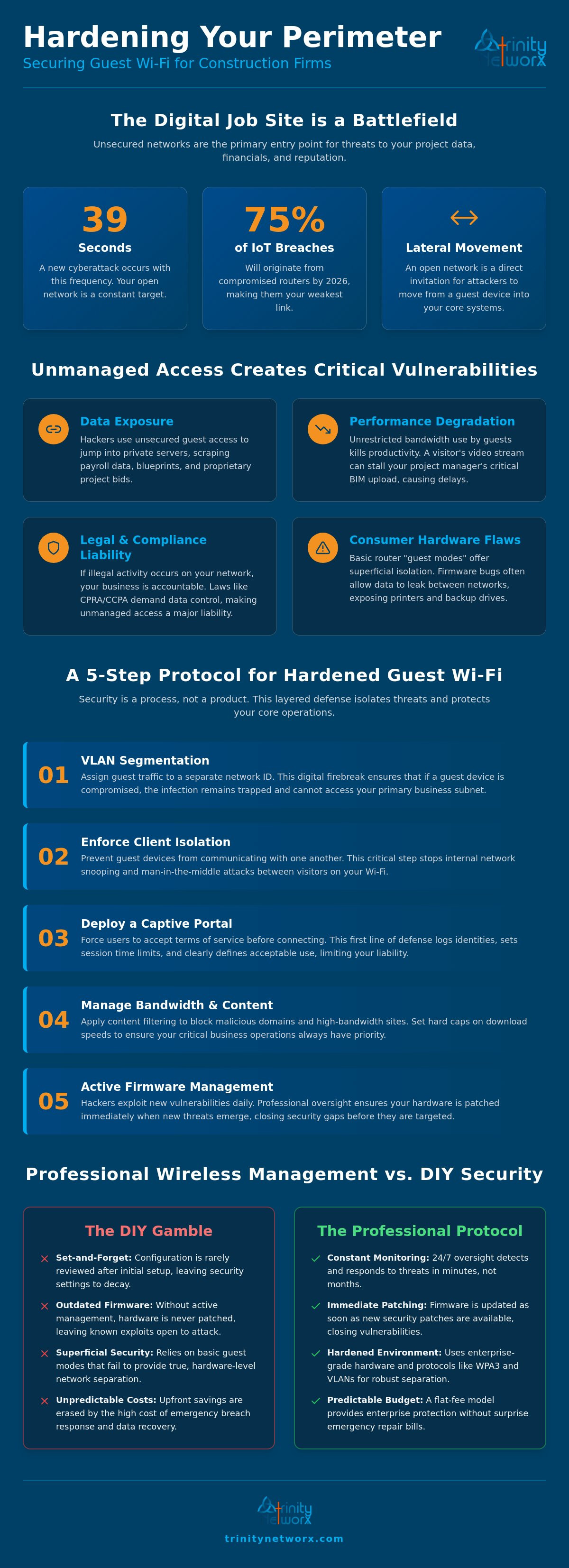
A cyberattack occurs every 39 seconds. Routers act as the main gateway for 75 percent of IoT-related breaches in 2026. For construction firms, securing guest Wi-Fi for business customers isn't just about hospitality. It's about survival. You provide internet access to subcontractors and clients to keep projects moving. But an open network is an invitation for lateral movement into your blueprints and financial records.
You likely feel the pressure of balancing connectivity with safety. It's frustrating when guest streaming slows down your internal operations or when setup feels too technical to handle alone. We'll show you how to build a hardened, isolated wireless environment that keeps your core data locked away. This guide covers the move to WPA3 security, the speed advantages of Wi-Fi 7, and the logical segmentation required to keep your business running at full speed.
• Prevent lateral movement by identifying how unsecured access points expose your project blueprints to external threats.
• Separate guest traffic from production networks using VLAN tagging to build a firm digital wall.
• Enforce client isolation when securing guest Wi-Fi for business customers so visitors cannot view or access other devices.
• Shift from vulnerable DIY configurations to managed environments that provide constant monitoring and immediate firmware patching.
Open networks are an invitation for trouble. Think about your job site. Subcontractors, architects, and vendors all need connectivity to keep the project moving. If you give them the same password your office staff uses, you've handed over the keys to the kingdom. Hackers use these unsecured points to jump from a guest phone into your private server. This lateral movement allows them to scrape sensitive payroll data or proprietary project bids. Proper Wireless security isn't optional. It's a requirement for operational continuity.
Beyond security, there is the performance hit. Unrestricted bandwidth kills productivity. If a visitor streams high-definition video, your project manager's BIM upload stalls. This creates delays. Securing guest Wi-Fi for business customers ensures your internal traffic always takes priority. You also face legal exposure. If an anonymous guest uses your connection for illegal activity, your business name is on the log. California’s CPRA and CCPA laws now demand clear notice and data control. Unmanaged access is a major liability.
Consumer hardware is built for homes, not high-stakes job sites. Most basic routers claim to have a guest mode, but the isolation is often superficial. Software bugs in cheap firmware frequently allow data to leak between SSIDs. This means a guest device could still see your networked printers or backup drives. Professional cybersecurity and antivirus protocols require hardware-level separation that consumer gear simply cannot provide.
Field offices are the weak link. Trailers in Ontario or remote job sites often lack the security rigor of a main headquarters. Attackers know this. They target these remote locations because they assume the perimeter is soft. Your field office needs the same protection as your downtown hub. Securing guest Wi-Fi for business customers means treating every trailer like a high-security data center. Proactive monitoring ensures that unauthorized access is caught in minutes, not months.
Security is a process. It is not a single checkbox. Don't just set a password and walk away. Securing guest Wi-Fi for business customers requires a layered defense that starts with technical separation. We build environments where visitors get the speed they need without touching your sensitive project data.
Assign guest traffic to a specific ID. This ID must never interact with your primary business subnet. It acts as a digital firebreak. If a guest device carries malware, the infection stays trapped in that segment. This setup links directly to managed cybersecurity services. Constant threat detection catches anomalies before they spread. You need a network that defends itself.
Enforce client isolation on every access point. This prevents guest devices from communicating with one another. It stops attacks where one visitor snoops on another's data. If you aren't sure if your hardware supports this, it's time for a professional network audit to find the gaps.
A captive portal is your first line of defense. It forces users to accept terms of service before they get a signal. Use this to log identities and set session limits. The Canadian Centre for Cyber Security suggests these portals as a standard for professional networks to track usage and limit liability. It keeps your network clean.
Apply content filtering. Block high-bandwidth sites like streaming services and known malicious domains. Set hard caps on download speeds. This keeps your business operations clear. Your project files must upload without lag. Don't let a visitor's video stream crash your bid submission. Control the flow to protect your bottom line while securing guest Wi-Fi for business customers.
DIY setups are a gamble. You might save on upfront costs, but you pay in vulnerability. Most business owners set up a router and never look at the settings again. This neglect invites disaster. Professional it-management ensures your firmware stays current. Hackers find new exploits every day. If your hardware isn't patched, it's open. Securing guest Wi-Fi for business customers is not a one-time task. It is a steady effort that requires professional oversight from Trinity Networx, LLC.
Flat-fee models provide enterprise-grade protection without the shock of emergency repair bills. You get a predictable budget and a hardened network. Following guest Wi-Fi security best practices requires more than just a separate password. It needs active management. We replace the "set it and forget it" mentality with assertive reliability. Your data is too valuable to leave to chance.
Our Network Operations Center (NOC) acts as your digital sentry. We track usage patterns to spot rogue access points or suspicious data spikes. If a guest device starts scanning your network, we kill the connection immediately. This proactive stance stops attacks before they reach your internal it-infrastructure. You don't have to watch the logs. Our team does that for you, 24/7/365.
Local accountability is our backbone. We don't use faceless vendors or offshore call centers. Our 100 percent in-house local staff understands the Inland Empire business landscape. When you have a wireless issue, Trinity Networx, LLC provides a 20-minute response guarantee. If hardware fails on a job site trailer, we can be there. We know how construction projects operate. Securing guest Wi-Fi for business customers means having a partner who is as fast and mobile as your field teams.
Unmanaged guest access is a liability your construction firm cannot afford. We've shown how logical isolation stops lateral movement. We've explained how captive portals keep your VoIP lines clear. Securing guest Wi-Fi for business customers isn't just about one-time technical settings. It requires active vigilance. Trinity Networx, LLC provides this through our local Southern California NOC. We track threats in real time. This ensures your field teams focus on the build instead of troubleshooting connections.
Our status as a CIO Review Top 20 IT Company reflects our commitment to professional excellence. We don't just fix problems. We prevent them. With our 20-minute response guarantee, you never have to worry about downtime or security gaps on your job site. Local technicians understand your specific needs in Ontario and the Inland Empire. Stop leaving your data to chance. You need a partner who treats your wireless security as a strategic driver of progress. Trinity Networx, LLC builds wireless environments that protect your data while empowering your growth.
Secure your business network today. Your firm deserves a proactive defense that moves as fast as your projects do.
A guest network is only safe if you enforce logical separation. If you don't, it acts as a bridge for lateral movement into your private files. Secure deployments ensure guests stay in a sandbox environment. This prevents them from seeing your servers or project bids. Without these controls, you're leaving a back door open to your most sensitive construction data.
Use Virtual Local Area Networks (VLANs) to tag and separate traffic at the packet level. This creates a digital wall that guest data cannot cross. Securing guest Wi-Fi for business customers also involves enabling client isolation. This setting stops a visitor's infected device from communicating with other guest phones. It keeps every connection in its own lane. This stops malware from jumping between devices on the same signal.
You don't need separate physical routers if you use enterprise-grade access points. Business hardware supports multiple SSIDs on a single device. It keeps these streams apart through hardware-level tagging. This is much more effective than the "guest mode" found on home routers. It allows you to maintain a clean setup in a job site trailer. You get safety without the clutter of extra gear.
A captive portal is a gateway page that forces users to accept terms of service before they connect. It limits your legal liability for any illegal activity a guest might perform on your network. It's a necessary part of securing guest Wi-Fi for business customers because it lets you set hard limits on bandwidth and session times. This prevents visitors from slowing down your primary business operations.

Article by
Lance Reichenberger, Ph.D.., J.D. (Candidate)
Dr. Lance Reichenberger is the founder of Trinity Networx, a Southern California technology firm specializing in managed IT services, cybersecurity, network infrastructure, and business technology strategy. With nearly four decades of experience in the IT industry, he works with businesses to improve operational efficiency, strengthen security, and align technology with long-term growth objectives.
Lance focuses on proactive IT management, enterprise wireless infrastructure, cybersecurity integration, and scalable technology solutions for growing organizations throughout Southern California.
The content published on this website is provided for general informational and educational purposes only. Articles may be created, edited, or enhanced with the assistance of artificial intelligence and automation tools under the direction and review of Trinity Networx. While every effort is made to ensure accuracy and relevance, the information provided should not be considered professional, legal, financial, cybersecurity, or technical advice specific to your organization. Businesses should consult directly with a qualified professional regarding their unique environment, compliance requirements, and operational needs. Trinity Networx makes no warranties regarding completeness, reliability, or applicability of the information contained within these articles.
Schedule a brief conversation with Trinity Networx to discuss your business technology needs.
Get a practical roadmap built around your business, your users, your systems, and the technology issues that need attention first.
Put the right technology, support, security, and infrastructure in place so your business can grow, adapt, and move forward with confidence.

