

3281 E. Guasti Rd, STE 700, Ontario, CA 91761
1712 9th Ave SW, Watertown, SD 57201

Your IT support may close tickets while a jobsite still waits for drawings, schedules, or access to project systems. The signs your current IT support is failing often show up in that gap: field crews lose access, office and site teams repeat troubleshooting, and the same problems return without a fix suited to construction operations. A ticket marked resolved does not always mean work can move.
Construction teams rely on technology to coordinate work across the office and changing jobsites. The key question is whether your provider plans for both environments, including connectivity, new-site setup, and technology moves. This article explains how to identify construction-specific support failures, assess your current provider against real workflows, and plan a practical next step for active projects in California, Nevada, Arizona, and Utah.
• Spot signs your current IT support is failing by tracking repeated field access problems, unresolved issues, and workarounds that disrupt coordination.
• For each recurring problem, record the affected crew, jobsite, system, operational impact, and whether the fix held.
• Check whether support planning covers field connectivity, new-site setup, technology moves, and communication between the office and jobsite.
• Before changing providers, document open issues, active projects, critical systems, access needs, and support responsibilities. Contact Trinity Networx, LLC to discuss construction-focused IT planning.
Repeated login or connection failures at a jobsite, the same problem returning after a ticket is closed, or a business system becoming unavailable during project work are clear warning signs. If crews have to wait for information or pass updates through improvised channels, technology is getting in the way of coordination between field staff and the office.
Construction IT support is failing when field teams lose access, office teams cannot identify the cause, and project work has to adapt around recurring technology problems.
Unreliable jobsite connectivity can prevent staff from reaching business systems and project information when they need it. The effect is not always a complete outage. An upload may stall, a crew may be unable to confirm current information, or office staff may spend time relaying updates that field teams should be able to access directly.
A ticket-by-ticket response can hide a recurring pattern. If similar access failures happen at different locations, closing each report without documenting the cause leaves the underlying issue unresolved. Review repeat tickets by location, system, affected team, and outcome. Note whether the fix lasted and whether the same issue appeared elsewhere. Technical support can involve different support tiers; for a construction firm, the important question is whether recurring problems reach someone who can investigate the cause, not just close the latest request.
Construction-focused planning connects office systems with changing jobsite needs, including connectivity and technology setup. Trinity Networx, LLC provides IT planning for commercial construction, including low-voltage cabling and support for technology relocations. To discuss the needs of your projects, contact the Trinity Networx, LLC team.
Move from individual complaints to a record of how support performs across projects. For each recurring issue, note the affected team, jobsite or office, business system, work disrupted, and what happened after the ticket was closed. Did the fix last? Was the cause documented? Did the same problem affect another location? These details can reveal a gap that a single ticket would not show.
A one-off outage is an incident; the same disruption returning without a lasting fix is a support gap.
Check whether the support plan reflects how construction work changes. Ask how field connectivity is planned, who prepares technology for a new site, and how equipment or network needs are handled when a project location changes. Confirm who owns issues that involve jobsite networks, user devices, and office systems. If responsibility passes between people, ask who tracks the issue through to resolution and keeps affected staff informed.
Ask whether network documentation reflects current locations and equipment, who can access it, and when it was last reviewed. Find out how issues are escalated and how updates reach field and office staff. A written service level agreement (SLA) can explain how support performance is measured. Assess those terms alongside the provider’s resolution follow-through and fit with project workflows.
Where site connectivity depends on physical infrastructure, confirm who plans and documents the cabling work. Review whether commercial network cabling is included in site network planning, rather than treated as unrelated to IT support. This is especially useful when preparing a new construction environment or relocating technology.
Use your findings to identify practical gaps before changing active project arrangements. A construction-focused review can connect support responsibilities with field connectivity, site setup, and technology moves. Discuss your construction IT support needs with Trinity Networx, LLC.
Recognizing the signs your current IT support is failing is useful only if you can act without creating new problems for active projects. Start with a handover record that lists open issues, the systems crews rely on, active project locations, user access needs, and who currently handles each support responsibility. Include recurring faults, previous troubleshooting, and fixes that did not hold. This gives your team a practical reference before responsibilities change.
Schedule the review around construction work, not only the office calendar. Gather available network documentation and support history, then list project priorities, upcoming site openings, technology relocations, and dates when teams depend on specific systems. Use that information to decide what needs attention first and how a transition should be staged. Keep ownership clear while any changes are underway.
Construction-focused IT planning should reflect how connectivity and equipment needs shift between the office, active jobsites, and new locations. A review can also help distinguish a temporary fault from a recurring issue that needs investigation. Ask whether proactive maintenance is part of the support approach, how recurring concerns are recorded, and how the provider checks whether a fix worked.
Before making a change, confirm which systems must remain accessible, who needs access, and how field and office teams will receive updates during the transition. Compare the proposed support plan with actual project requirements, including site setup and technology moves. A measured handover helps protect continuity while giving your firm a path toward construction-specific support.
Discuss your construction IT support needs with Trinity Networx, LLC.
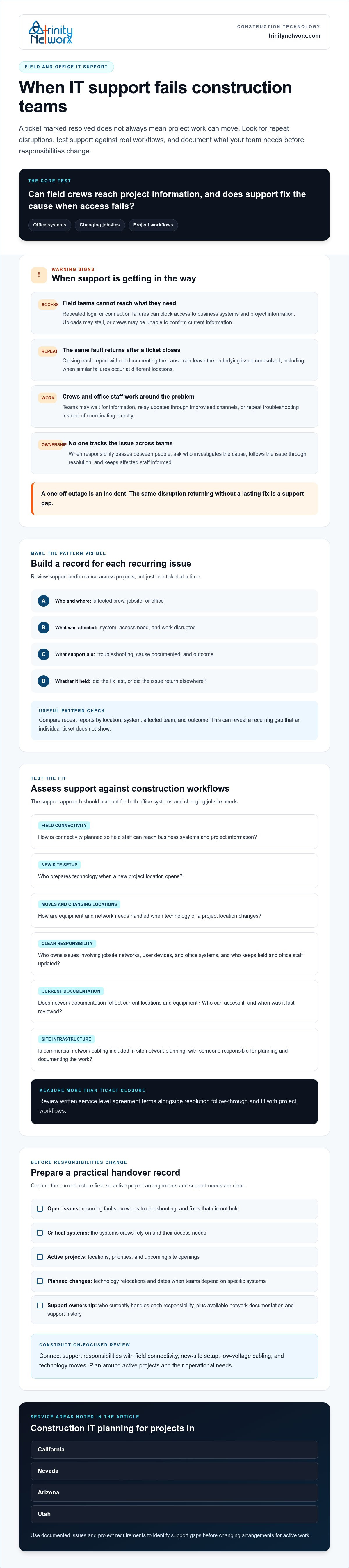
Recurring access failures, repeat tickets, and workarounds can signal a gap between IT support and the demands of active construction work. The signs your current IT support is failing become clear when field and office teams cannot rely on shared systems, or when support does not account for changing project locations and site needs.
Before making changes, document open issues, critical systems, access requirements, active projects, and current support responsibilities. Then assess whether the plan covers field-to-office connectivity, technology relocations, and new-construction setup. Trinity Networx provides construction-focused IT planning and low-voltage cabling, alongside support for project technology needs.
For help reviewing support responsibilities, field connectivity, and site setup, contact Trinity Networx, LLC to discuss your construction IT needs.
Yes. Unresolved connectivity or system access problems can interrupt coordination and keep teams from reaching work information when they need it. Not every IT issue delays a project, but recurring problems can create friction between field and office work. Record the affected team, location, system, and operational impact to identify patterns and support gaps across projects in California, Nevada, Arizona, and Utah.
Repeated trouble with jobsite connectivity, office-to-field access, technology moves, or new-site setup can point to a mismatch. A construction-aware provider should consider how field and office teams rely on shared systems and project information. Look for support that plans for changing site needs, not just isolated tickets. These details matter to commercial construction firms and subcontractors working across California, Nevada, Arizona, and Utah.
Review repeat tickets, whether fixes hold, affected locations, business systems, and how support handles active projects. These patterns can make signs your current IT support is failing clearer than a single incident. Ask who owns issues that involve jobsite and office technology, whether network documentation is current, and how staff receive updates. Track the evidence before deciding whether support fits your construction workflows.
Document critical systems, user access needs, unresolved issues, project schedules, and the current provider’s responsibilities. Plan handoffs around active work and confirm who will support field and office users. The transition plan will depend on your systems and project requirements, so do not assume every change follows the same steps. For construction-focused guidance in California, Nevada, Arizona, or Utah, discuss your construction IT support needs with Trinity Networx, LLC.

Article by
Lance Reichenberger, Ph.D.., J.D. (Candidate)
Dr. Lance Reichenberger is the founder of Trinity Networx, a Southern California technology firm specializing in managed IT services, cybersecurity, network infrastructure, and business technology strategy. With nearly four decades of experience in the IT industry, he works with businesses to improve operational efficiency, strengthen security, and align technology with long-term growth objectives.
Lance focuses on proactive IT management, enterprise wireless infrastructure, cybersecurity integration, and scalable technology solutions for growing organizations throughout Southern California.
The content published on this website is provided for general informational and educational purposes only. Articles may be created, edited, or enhanced with the assistance of artificial intelligence and automation tools under the direction and review of Trinity Networx. While every effort is made to ensure accuracy and relevance, the information provided should not be considered professional, legal, financial, cybersecurity, or technical advice specific to your organization. Businesses should consult directly with a qualified professional regarding their unique environment, compliance requirements, and operational needs. Trinity Networx makes no warranties regarding completeness, reliability, or applicability of the information contained within these articles.
Schedule a brief conversation with Trinity Networx to discuss your business technology needs.
Get a practical roadmap built around your business, your users, your systems, and the technology issues that need attention first.
Put the right technology, support, security, and infrastructure in place so your business can grow, adapt, and move forward with confidence.

