

3281 E. Guasti Rd, STE 700, Ontario, CA 91761
1712 9th Ave SW, Watertown, SD 57201

A field superintendent receives an email from a familiar supplier with new payment details. The office is waiting on an invoice, the crew needs materials, and the request sounds routine. Learning how to train employees to spot phishing emails means practicing with the messages construction teams actually handle, from project file alerts to urgent payment requests.
Office staff and field crews use different devices and follow different workflows. Training should account for both, and employees need to know they can report a message before they are certain it is malicious. The steps below show how to build practical recognition and reporting habits around construction work, then review whether the process is helping employees act with confidence.
• Build training around construction messages such as bid invitations, change orders, invoices, and project file links.
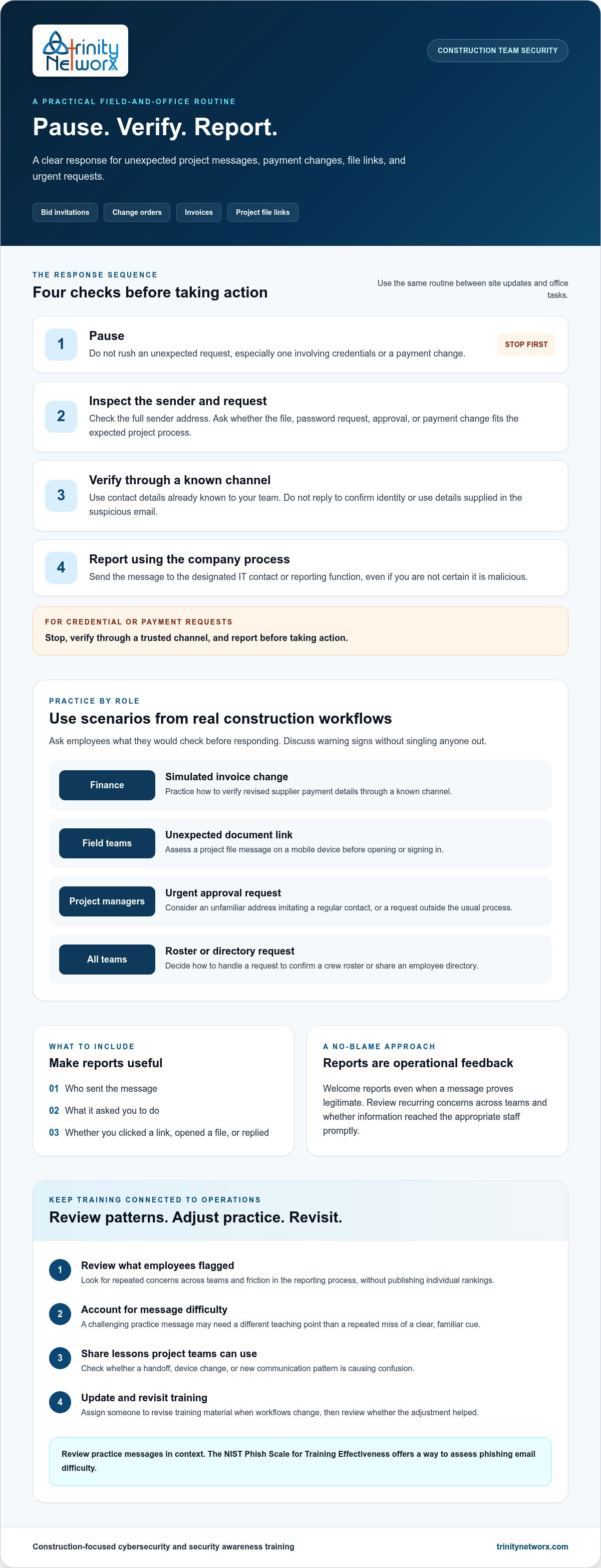
• Teach a repeatable response: pause, inspect the sender and request, verify through a known channel, then report.
• Adapt practice to office, field, finance, and project management workflows.
• Review reporting patterns and recurring knowledge gaps as project communications change.
Phishing is a deceptive message designed to trigger an unsafe action, such as sharing credentials, opening a harmful file, or sending money to the wrong account. A convincing message can expose a work account, project files, or business data. For example, a fake project-platform sign-in page may capture the credentials an employee uses to access shared documents. For a general overview of these methods, see What is Phishing?
Construction teams exchange bid invitations, change orders, invoices, schedules, and file links between the office and jobsite. Attackers can imitate these familiar communications. A message might appear to come from a supplier with revised payment details, a project manager requesting quick approval, or a file-sharing platform prompting someone to sign in. These are useful training scenarios, not proof that such messages are fraudulent.
Train employees to compare each message with the expected project process. Is the sender asking them to open a file they were not expecting, share a password, or change payment details? Does the full sender address match the contact they normally use? An unusual request from a subcontractor, supplier, executive, or project platform calls for a pause and verification through a known channel.
Make the practice specific to each role. Finance staff can review a simulated invoice change and identify how they would verify it. Field teams can assess an unexpected document link on a mobile device. Project managers can decide how to handle an urgent approval request that arrives outside the usual process. These exercises teach how to train employees to spot phishing emails without treating ordinary project correspondence as suspicious by default. Construction-focused IT services for commercial construction can connect employee awareness with the systems and office-to-field workflows the business relies on.
Give employees a routine they can use between site updates and office tasks: pause, inspect the sender and request, verify through a known channel, then report the message using the company’s designated process. Do not reply to confirm the sender’s identity or use contact details supplied in the suspicious email. CISA’s How to Spot and Report Phishing guidance offers additional practical reminders.
For an unexpected request involving credentials or payment changes, stop, verify through a trusted channel, and report it before taking action. Make that instruction easy to remember and include it in training for office and field workflows.
Use short scenarios that test different decisions. A project manager might receive a meeting invitation from an unfamiliar address that imitates a regular contact. A field employee might get an email asking them to confirm a crew roster. An executive could receive a request for an employee directory. Ask employees to explain what they would check before responding, then discuss the warning signs without singling anyone out.
Set one clear reporting route, such as a designated IT contact or reporting function, and tell employees what details to include: who sent the message, what it asked them to do, and whether they clicked a link, opened a file, or replied. Treat reports as useful even when a message proves legitimate. Construction-focused cybersecurity support can reinforce employee awareness with technical safeguards. Learn more about Trinity Networx, LLC’s cybersecurity and antivirus services.
Trinity Networx supports construction firms with cybersecurity and security awareness training. Its managed IT services can help connect employee reporting practices with the technical safeguards used across business systems.
Use reports as operational feedback, not a scoreboard. Review what employees flagged, whether similar concerns recur across teams, and whether the information reached the appropriate staff promptly. Compare patterns over time and across roles without publishing individual rankings. The goal is to identify friction in the work process, not assign blame.
When reviewing practice messages, account for how difficult each one was to recognize. The NIST Phish Scale for Training Effectiveness offers a way to assess phishing email difficulty. Consider that context before interpreting a missed warning sign. A challenging message may call for a different teaching point than a recurring mistake involving a clear, familiar cue.
Close the loop by sharing useful lessons with project leaders in a format teams can act on. A short review can show whether a project handoff, device change, or new communication pattern is causing confusion. Assign someone to update training material when the workflow changes, then revisit the issue later to see whether the adjustment helped.
This feedback cycle keeps how to train employees to spot phishing emails connected to construction operations. Trinity Networx supports commercial construction firms with construction-focused IT planning and security awareness training. Managed cybersecurity support can complement employee practice with technical security measures for businesses operating across California, Nevada, Arizona, and Utah.
Use an upcoming project kickoff or team onboarding session to put the training into practice. Build examples around the communication tools and handoffs employees will use on that job. Ask supervisors where the reporting process feels unclear, then make the route and next steps easy to find before the work gets busy.
Knowing how to train employees to spot phishing emails is not a one-time task. Make it part of how your construction business prepares people to use project technology safely. Keep the response process clear, welcome reports, and revise the training as workflows change.
Contact the Trinity Networx team to discuss construction-focused cybersecurity and employee training.
Yes. Attackers can imitate a real project contact or use a familiar-looking display name while sending from a different address. Check the full sender address and whether the message fits the project’s usual process. A familiar project name or email thread does not prove the request is genuine. For unusual instructions, confirm with the contact using details already on file.
Yes. Field employees may have less time to inspect messages during a shift than office staff. Training should fit field schedules and give crews a chance to discuss questions together. Keep the lesson focused on decisions employees may face while coordinating work across California, Nevada, Arizona, and Utah.
Yes. Set a clear learning goal for each simulation, such as noticing an unusual sender address, and review results at the team level. Use a simulated landing page that records whether the exercise link was opened without collecting real passwords. Afterward, discuss what made the message convincing and invite employees to suggest examples from their work. Keep the focus on improving the process, not naming individuals.
Stop interacting with the page and notify the designated IT or security contact promptly. Explain what happened, including whether you entered a password, downloaded a file, or approved a prompt. Do not forward the message to coworkers or try to remove files yourself. If you entered account details, tell IT which account was involved and follow its instructions for securing access.

Article by
Lance Reichenberger, Ph.D.., J.D. (Candidate)
Dr. Lance Reichenberger is the founder of Trinity Networx, a Southern California technology firm specializing in managed IT services, cybersecurity, network infrastructure, and business technology strategy. With nearly four decades of experience in the IT industry, he works with businesses to improve operational efficiency, strengthen security, and align technology with long-term growth objectives.
Lance focuses on proactive IT management, enterprise wireless infrastructure, cybersecurity integration, and scalable technology solutions for growing organizations throughout Southern California.
The content published on this website is provided for general informational and educational purposes only. Articles may be created, edited, or enhanced with the assistance of artificial intelligence and automation tools under the direction and review of Trinity Networx. While every effort is made to ensure accuracy and relevance, the information provided should not be considered professional, legal, financial, cybersecurity, or technical advice specific to your organization. Businesses should consult directly with a qualified professional regarding their unique environment, compliance requirements, and operational needs. Trinity Networx makes no warranties regarding completeness, reliability, or applicability of the information contained within these articles.
Schedule a brief conversation with Trinity Networx to discuss your business technology needs.
Get a practical roadmap built around your business, your users, your systems, and the technology issues that need attention first.
Put the right technology, support, security, and infrastructure in place so your business can grow, adapt, and move forward with confidence.

