

3281 E. Guasti Rd, STE 700, Ontario, CA 91761
1712 9th Ave SW, Watertown, SD 57201

A sluggish network isn't just a minor annoyance; it's a structural failure in your technology stack that bleeds project profits every single day. You've likely watched field teams stand idle while Buildertrend refuses to sync or felt the frustration of a dropped VoIP call. We know that in commercial construction, every second of latency translates to wasted labor and missed deadlines. Troubleshooting slow business internet connection issues requires more than just rebooting a router. It demands a proactive strategy to eliminate the technical friction that stalls your progress.
Reclaim your site's productivity by identifying exactly where the data flow stops. This guide provides a roadmap to resolve connectivity failures, ensuring CAD files upload instantly and field-to-office communication remains unbreakable. We will examine 5G wireless solutions, bonded connectivity for large crews, and the steps to stabilize your infrastructure. Stop letting lag dictate your project's pace.
• Identify why residential grade hardware fails under heavy construction site demands and why upgrading to commercial grade infrastructure is necessary.
• Master a systematic process for troubleshooting slow business internet connection issues by isolating local hardware faults from external provider service drops.
• Learn to run diagnostics directly at the modem to pinpoint exactly where your data flow is stalling.
• Transition to managed IT services to keep project management software synced and large CAD files moving without downtime.
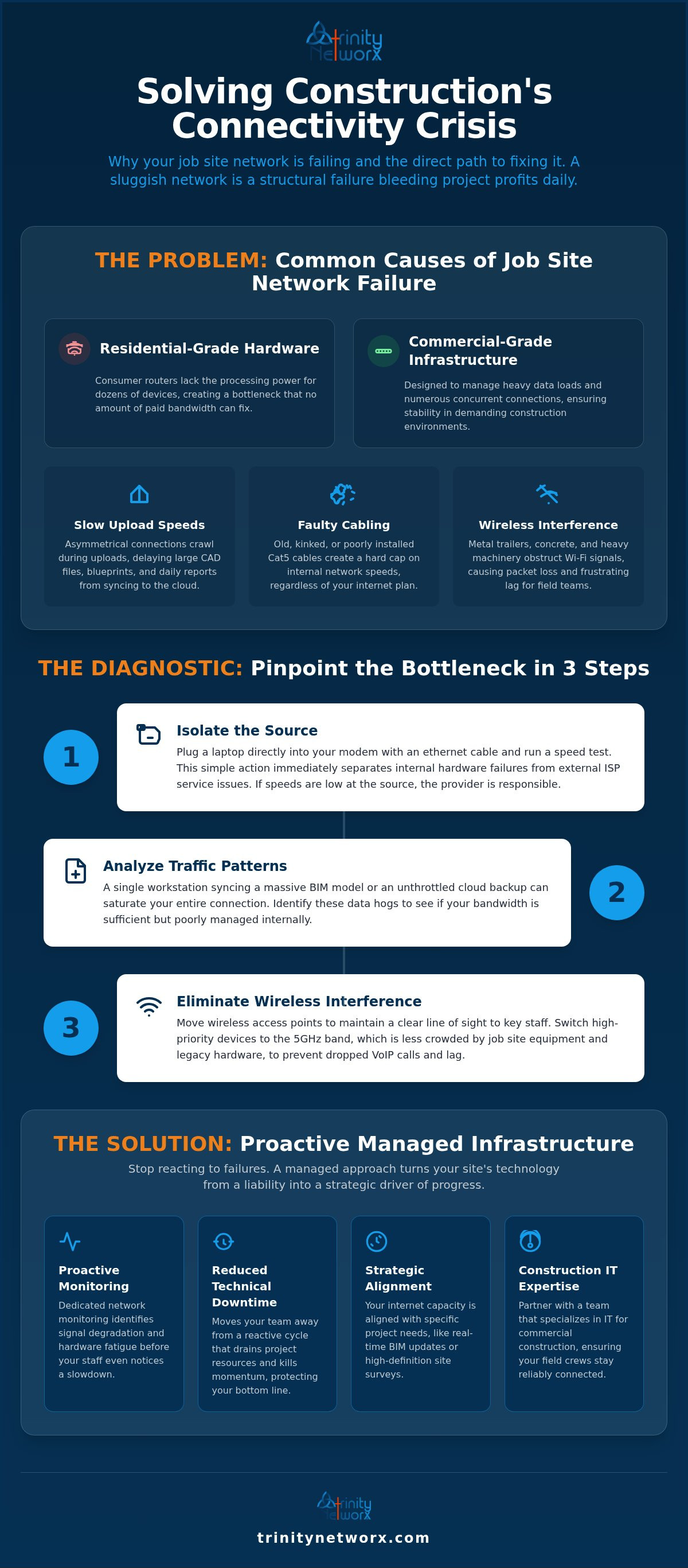
Slow internet on a job site isn't always about the provider. Most firms assume their ISP is throttling bandwidth when the real failure lies within their own walls. Troubleshooting slow business internet connection issues often reveals a massive gap between office expectations and field office hardware. Relying on residential grade routers for commercial workloads creates a bottleneck that no amount of paid bandwidth can fix. These consumer devices lack the processing power to manage dozens of concurrent connections from field tablets and office laptops. Network latency is the delay between a data request and its completion.
Construction data is heavy. Standard cable connections are asymmetrical, meaning they offer fast downloads but crawl during uploads. Large blueprints and CAD files require high upload speeds to sync with the cloud. When your field team waits ten minutes to upload a daily report, you're losing labor hours. This is a structural failure in your technology choices.
Software can't fix a physical break. Old or poorly installed infrastructure network cabling creates invisible barriers to speed. We often find ethernet runs kinked, crushed, or running parallel to high voltage lines. This positioning causes electromagnetic interference that drops packets and forces retransmissions. If your site still relies on outdated Cat5 cables, your internal network is capped at 100 Mbps. This creates a hard ceiling that ignores your high speed ISP plan. Effective diagnosis requires a systematic troubleshooting methodology to isolate these physical flaws before blaming the cloud.
Stop guessing. Troubleshooting slow business internet connection begins with physical isolation. Most managers run a speed test over Wi-Fi and blame the provider immediately. This is a mistake. Plug a laptop directly into your modem using a known good ethernet cable. Run the test there. If the results match your service level agreement, your internal hardware is the culprit. If the speed is low at the source, your provider has explaining to do. This simple step separates local hardware failure from external service delivery issues.
Analyze your traffic patterns. A single workstation syncing a massive BIM model or an unthrottled background cloud backup can saturate your entire connection. Many firms find that their bandwidth is sufficient, but their internal management is poor. To maximize internet quality and speed, you must identify these data hogs. Our team can perform a proactive maintenance check to root out hidden drains before they stall a deadline. If you're tired of the guesswork, speak with our field experts to stabilize your site.
Construction sites are hostile to Wi-Fi. Metal trailers, concrete pillars, and heavy machinery create physical obstructions that shatter signal strength and cause packet loss. Move your access points to maintain a clear line of sight to project managers and office staff. Switch your high priority devices to the 5GHz band immediately. The 2.4GHz spectrum is often crowded by job site equipment and legacy hardware, leading to dropped VoIP calls and frustrating lag. Clear the airwaves to keep your project moving at full speed.
Stop treating internet speed as an afterthought. It's a core project requirement, just like heavy machinery or skilled labor. When you stop reacting to failures and start managing your infrastructure, you protect your bottom line. Troubleshooting slow business internet connection issues becomes a thing of the past when you have a local partner. Working with a team specialized in IT services for commercial construction ensures your field teams stay connected regardless of site complexity. We use dedicated network monitoring to identify signal degradation before your staff even notices a slowdown. Proactive monitoring reduces technical downtime by spotting hardware fatigue early. This approach moves you away from the reactive cycle that drains project resources and kills momentum. It turns technology from a liability into a strategic driver of progress. Don't settle for reactive support that only answers when the site is already dark.
Your internet capacity must align with your specific project workflows and software requirements. If your team relies on real-time BIM updates or high-definition site surveys, a standard business plan won't cut it. Review your VoIP systems to ensure they have dedicated bandwidth priority over general web traffic. This prevents voice quality from dropping when a large file transfer starts. Implementing a flat fee managed service plan eliminates the cycle of calling support and waiting for a tech. You gain a strategic partner who values your uptime as much as you do. This isn't just about speed; it's about operational continuity. High-performing firms don't wait for a crash to fix their tech. They build it right the first time. Your connectivity should be as reliable as the concrete you pour. When the network stays stable, your project stays on schedule.
Reliability in construction extends from the ground up; just as you would trust Pro Torch Roofing for the structural integrity of a building, you must ensure your network infrastructure is built to last.
Stop letting technical friction dictate your project timelines. We've established that residential hardware and decaying cabling are the silent killers of site productivity. Troubleshooting slow business internet connection issues shouldn't be a daily ritual for your project managers. It's time to move toward a proactive model where bottlenecks are identified before they stall a single CAD upload. Our team provides the specialized expertise required to keep construction firms moving without the typical technical headaches.
You deserve a partner who understands the field. We offer a flat-fee pricing model to keep your costs predictable and a 20-minute response guarantee to keep your teams active. Our 100% in-house local staff ensures you never deal with overseas outsourcing. Stop the lag and secure your project uptime today. Your site's momentum is our priority.
Isolate the source by plugging a laptop directly into your modem with an ethernet cable. Run a speed test. If the results match your service plan, your router or internal network is the failure point. If the speed is low at the source, the problem lies with your ISP's delivery. This simple test stops the guesswork.
Hardware upgrades only help if your current router is the bottleneck. Many firms find that troubleshooting slow business internet connection issues points to residential routers that can't handle commercial traffic. These consumer devices lack the processing power to manage heavy data syncing and multiple concurrent users. Moving to business grade hardware is a strategic necessity for uptime.
The FCC defines high speed broadband as 100 Mbps download and 20 Mbps upload. Field offices syncing large CAD files or BIM models often require higher upload speeds than standard cable plans offer. For sites with 30 to 50 people, a bonded connection or 5G business internet ranging from 50 Mbps to 1 Gbps is often the minimum requirement for stability.
Physical cabling is the foundation of your network speed. Outdated Cat5 cables limit your internal throughput to 100 Mbps regardless of your ISP plan. Kinks, crushed runs, or interference from high voltage lines cause packet loss. This forces your hardware to retransmit data, which creates the lag you see during critical file transfers and VoIP calls.

Article by
Lance Reichenberger, Ph.D.., J.D. (Candidate)
Dr. Lance Reichenberger is the founder of Trinity Networx, a Southern California technology firm specializing in managed IT services, cybersecurity, network infrastructure, and business technology strategy. With nearly four decades of experience in the IT industry, he works with businesses to improve operational efficiency, strengthen security, and align technology with long-term growth objectives.
Lance focuses on proactive IT management, enterprise wireless infrastructure, cybersecurity integration, and scalable technology solutions for growing organizations throughout Southern California.
The content published on this website is provided for general informational and educational purposes only. Articles may be created, edited, or enhanced with the assistance of artificial intelligence and automation tools under the direction and review of Trinity Networx. While every effort is made to ensure accuracy and relevance, the information provided should not be considered professional, legal, financial, cybersecurity, or technical advice specific to your organization. Businesses should consult directly with a qualified professional regarding their unique environment, compliance requirements, and operational needs. Trinity Networx makes no warranties regarding completeness, reliability, or applicability of the information contained within these articles.
Schedule a brief conversation with Trinity Networx to discuss your business technology needs.
Get a practical roadmap built around your business, your users, your systems, and the technology issues that need attention first.
Put the right technology, support, security, and infrastructure in place so your business can grow, adapt, and move forward with confidence.

