

3281 E. Guasti Rd, STE 700, Ontario, CA 91761
1712 9th Ave SW, Watertown, SD 57201
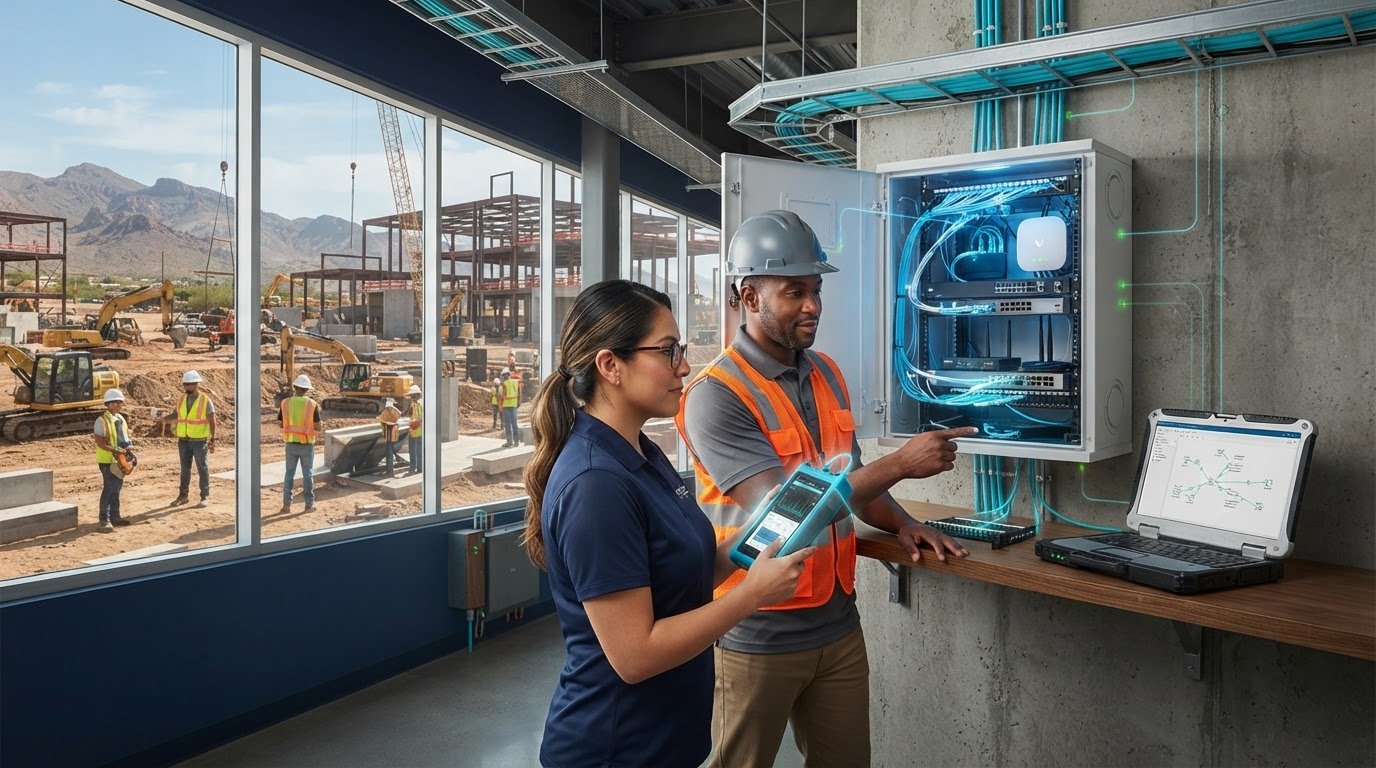
What if the slowest link in your construction network isn’t the internet connection? A fast provider connection can still leave project teams waiting when Wi-Fi, cabling, network equipment, or a jobsite setup is causing delays. When cloud applications lag or plans take too long to load, the question is immediate: why is my business internet so slow?
Find where performance drops before deciding what to change. This checklist walks you through comparing connection types, checking affected devices and applications, and accounting for jobsite conditions such as temporary setups and concrete or steel that can obstruct wireless signals. You’ll gather useful evidence and narrow down whether the issue calls for attention to Wi-Fi, cabling, equipment, or the wider network path. For construction firms in California, Nevada, Arizona, and Utah, this also means considering how office and field teams stay connected as project locations change.
• To answer “why is my business internet so slow,” trace the delay from the service connection through network equipment, Wi-Fi or cabling, devices, and cloud applications.
• Record which users, devices, locations, applications, and times are affected. This turns intermittent complaints into useful troubleshooting evidence.
• Compare the same task over a wired connection and Wi-Fi when possible. The results can help show whether wireless coverage or another network link needs attention.
• Construction-focused IT planning can connect office networks with field operations and account for changing project locations. Cabling and Wi-Fi infrastructure work can address problems identified during troubleshooting.
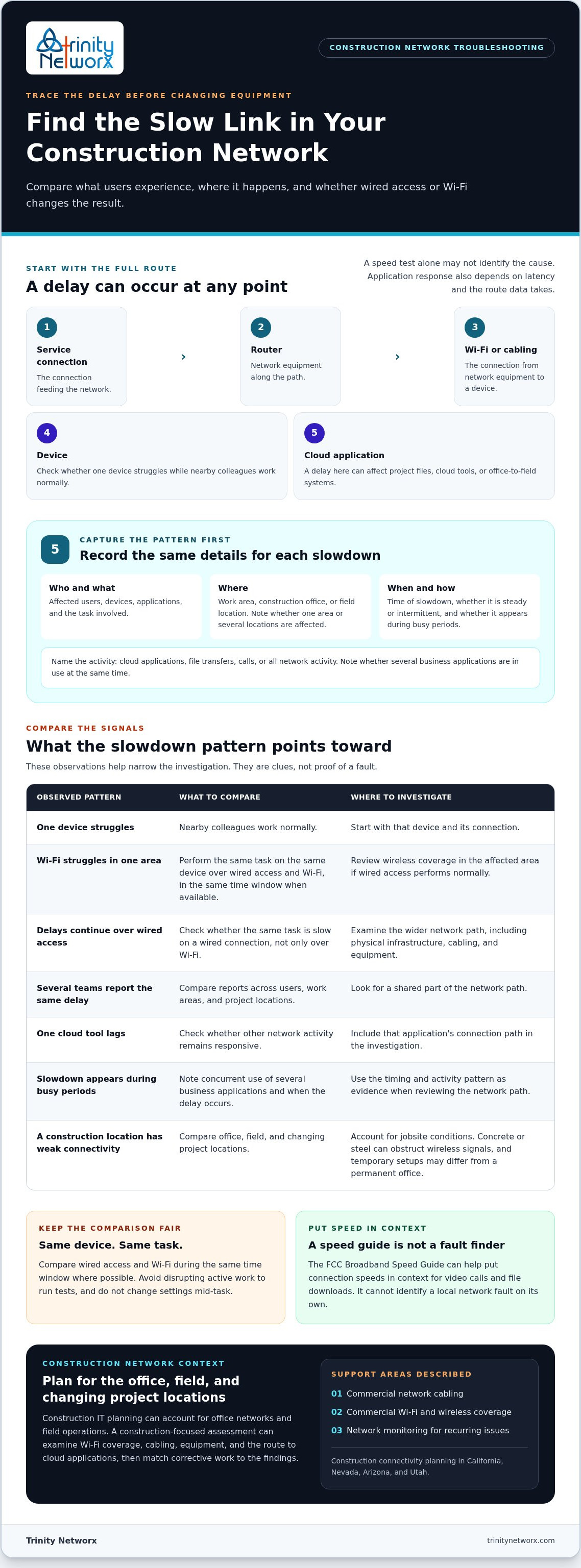
Slow business internet is any delay that interrupts construction work, whether a project file stalls, a cloud tool takes too long to respond, or an office-to-field system stops updating promptly. Connection speed is only one part of the experience. Bandwidth describes how much data a connection can carry. Application response also depends on latency and the route data takes. These network performance metrics help explain why a speed test alone may not identify the cause.
Trace the full path: the service connection feeds a router, then data travels over Wi-Fi or cabling to a device and on to the cloud application. A delay at any point can affect the task. The pattern matters, too. One device struggling while nearby colleagues work normally points to a different place to investigate than a slowdown reported across the construction office.
Get specific before drawing conclusions. Note whether the delay affects project file access, cloud tools, or office-to-field systems. Record who experiences it, where they’re working, and whether it affects one worker, one area, or multiple project locations. If one device struggles while nearby colleagues work normally, focus first on that device and its connection. If several teams report the same delay, look for a shared part of the network path.
This location-based picture gives construction IT specialists useful evidence for assessing office networks and field connectivity. Trinity Networx provides construction IT services for commercial projects, including planning for connectivity across project operations. For help tracing a slowdown from the construction office to the field, contact the Trinity Networx, LLC team.
To pinpoint why is my business internet so slow, capture a pattern before changing network settings or interrupting project work. A short record of what’s affected can help separate a local Wi-Fi or device problem from a broader connection issue.
Note affected users, devices, locations, applications, and the time each slowdown occurs.
Is the trouble limited to cloud applications, file transfers, or calls, or does all network activity feel slow?
Compare reports from one work area, the construction office, and field locations. A slowdown confined to one area calls for a different investigation than an issue affecting the entire site.
Where available, perform the same task over wired cabling and Wi-Fi during the same time window. Avoid disrupting active work to run tests.
Check whether the problem appears during busy periods or when teams are using several business applications at once.
Keep the comparison fair: use the same device and task, and note whether the delay is steady or intermittent. The FCC’s Broadband Speed Guide can help put connection speeds in context for activities such as video calls and file downloads. It won’t identify a local network fault on its own.
Start with ordinary work observations rather than disconnecting equipment or changing settings mid-task. If wired access performs normally while Wi-Fi struggles in one area, review wireless coverage there. If delays persist over a wired connection, examine the wider network path, including physical infrastructure. Trinity Networx provides commercial network cabling services for physical network needs and commercial Wi-Fi installation and wireless networking for coverage issues. If you need help interpreting the pattern, contact the construction IT team.
Use the evidence you’ve gathered to choose the next step. If problems appear only over Wi-Fi, review coverage in the affected office or jobsite area. If wired devices also slow down, examine the network layout, cabling, and equipment. When one cloud tool lags while other activity remains responsive, include the application’s connection path in the investigation. Focus on the link causing the delay rather than replacing equipment without a clear reason.
Construction IT planning must account for office teams, field operations, and project locations that change over time. A network that works in a permanent office may not meet a jobsite’s connectivity needs. Trinity Networx provides construction IT services for commercial projects, including planning for connectivity across these work environments in California, Nevada, Arizona, and Utah.
Bring in technical support when slowdowns recur across several users, locations, or critical project workflows, or when your troubleshooting notes point to shared infrastructure. A construction-focused assessment can examine Wi-Fi coverage, cabling, equipment, and the route to cloud applications, then match corrective work to the findings. Trinity Networx provides commercial Wi-Fi infrastructure services to address coverage gaps and 24 x 7 x 365 network monitoring to watch for recurring issues.
If the pattern still leaves you asking why is my business internet so slow, share what you’ve observed with a construction IT team. Talk with Trinity Networx, LLC about construction connectivity.
Slow internet doesn’t always start with the service connection. Network equipment, Wi-Fi, cabling, a device, a cloud application, or jobsite conditions can all affect performance. To answer why is my business internet so slow, record which users, locations, and work tasks are affected, then use those patterns to guide the next investigation.
Recurring problems call for a construction-focused view of the whole operation. Trinity Networx provides connectivity planning between office and field teams, commercial structured cabling, Wi-Fi infrastructure, and 24 x 7 x 365 network monitoring. The work supports project access as teams and locations change.
Ready to put your findings to work? Talk with Trinity Networx, LLC about construction connectivity. Share the affected locations, tasks, and connection types so the team can help identify the next step.
A sudden slowdown can come from a change anywhere along the connection path, including the service connection, network equipment, Wi-Fi, a device, or a cloud application. Start by noting which users, tasks, and locations are affected, and when the problem began. To determine why is my business internet so slow, compare those details before changing settings or restarting equipment.
Yes. Weak coverage, interference, or congestion can delay cloud tools and file access even when the incoming internet connection is performing normally. Compare the same task over Wi-Fi and a wired connection, if one is available. If wired access works well but wireless performance drops in a particular office or work area, review Wi-Fi coverage and infrastructure there.
A jobsite has different connectivity conditions from a permanent office. Temporary network setups, distance from wireless access points, and concrete or steel that obstructs signals can affect performance. Compare which devices and work areas are affected, then assess the site’s Wi-Fi coverage and connection path. Construction-focused IT planning can account for field operations and changing project locations across California, Nevada, Arizona, and Utah.
Keep a brief record of affected users, devices, locations, applications, and times. Note whether the slowdown affects cloud tools, file transfers, calls, or all network activity. If practical, compare the same task over wired and Wi-Fi connections during the same time window, without interrupting active project work. For recurring issues, contact Trinity Networx, LLC about construction connectivity.

Article by
Lance Reichenberger, Ph.D.., J.D. (Candidate)
Dr. Lance Reichenberger is the founder of Trinity Networx, a Southern California technology firm specializing in managed IT services, cybersecurity, network infrastructure, and business technology strategy. With nearly four decades of experience in the IT industry, he works with businesses to improve operational efficiency, strengthen security, and align technology with long-term growth objectives.
Lance focuses on proactive IT management, enterprise wireless infrastructure, cybersecurity integration, and scalable technology solutions for growing organizations throughout Southern California.
The content published on this website is provided for general informational and educational purposes only. Articles may be created, edited, or enhanced with the assistance of artificial intelligence and automation tools under the direction and review of Trinity Networx. While every effort is made to ensure accuracy and relevance, the information provided should not be considered professional, legal, financial, cybersecurity, or technical advice specific to your organization. Businesses should consult directly with a qualified professional regarding their unique environment, compliance requirements, and operational needs. Trinity Networx makes no warranties regarding completeness, reliability, or applicability of the information contained within these articles.
Schedule a brief conversation with Trinity Networx to discuss your business technology needs.
Get a practical roadmap built around your business, your users, your systems, and the technology issues that need attention first.
Put the right technology, support, security, and infrastructure in place so your business can grow, adapt, and move forward with confidence.

